

详细内容

Features Pricing User Guide Blog Affiliate
 简体中文 English Italiano Tiếng Việt Español Português (BR) 한국어 Deutsch 日本語 Français
Features Pricing User Guide Blog Affiliate

AI Text to Mind Map One Click to PowerPointMarkdownPDF&Word
AI-powered text to mind map conversion. Transform markdown, txt, freemind files into beautiful mind maps. Enjoy effortless exporting in PowerPoint, PDF, or Word formats.
Your browser does not support video playback.
Create Mind Maps Easily
Convert PDF, Word, Markdown, and more to mind maps with AI.
PDF to Mind Map
Convert PDF documents into structured mind maps with AI-powered content extraction and organization.
Text to Mind Map
Transform any text content into visual mind maps for better understanding and knowledge organization.
Markdown to Mind Map
Convert Markdown files into interactive mind maps while preserving document structure and hierarchy.
MS Word Document to Mind Map
Import Word documents and automatically generate mind maps from your written content and notes.
AI-Powered Mind Map Enhancement
Let AI help you refine, expand, and discover insights within your mind maps through intelligent suggestions and automated improvements.
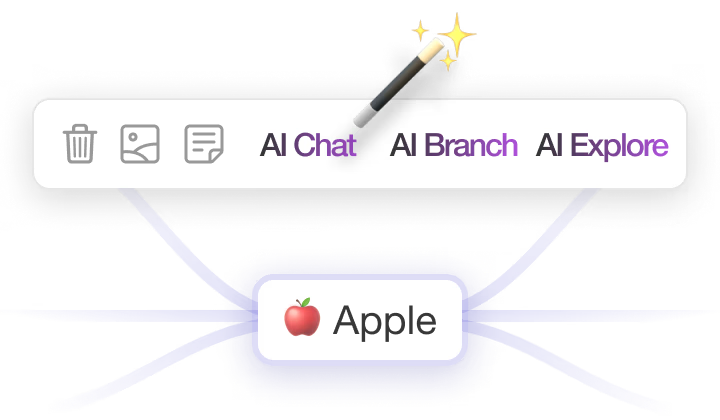
Ask AI
You can ask AI questions or discuss topics related to your mind map to get improvement suggestions for your mind map.
AI Branch
Generate new branches with AI. For example, if you select "Coffee", AI will generate branches like "Types of Coffee" and "Methods of Making Coffee".
AI Explore
Select a branch, and AI will provide detailed information. For example, if you select "Rome", AI will show Rome's history, transportation, and attractions.
AI-Powered Mind Maps
This app combines rich text notes, shortcuts, custom themes, and various icons to create a powerful mind map tool.
Node Notes
Insert rich text notes into nodes, easily apply bold, italic, highlight, and other styles, and insert images for convenient editing of large amounts of text.
Outline Mode
Display the mind map in a hierarchical text format, making text editing more intuitive and convenient.
Shortcuts
Supports shortcuts for common actions like copy, paste, and creating child nodes, allowing for quick and efficient mind map editing via keyboard.
Custom Themes
Provides multiple built-in themes and supports customization, allowing you to personalize your mind map appearance according to your preferences.
Export in Multiple Formats
Export mind maps in various formats including PPT, PDF, DOC, TXT, MD, PNG, meeting different editing and sharing needs and making mind map application more accessible.
Pitch Mode
Transform your mind maps into compelling presentations with one click. Perfect for business meetings, academic presentations, and project showcases.
Pricing
For friends with limited budget, welcome to use for free
If you need, consider upgrading membership plan
Free
For occasional users
$0
/Month
Current Plan
- Export png, pdf, doc...
- 5 AI-Actions per day
- 20 mind maps
- 50MB storage space
AmyMind Pro
For professional users who frequently create and organize various diagrams
$45
/Year
- Export png, pdf, doc...
- 500 AI-Actions per day
- Unlimited files
- 500MB storage space
- Folder management
- Remove watermark
Follow Us
AmyMind's growth cannot be separated from the support of friends
Welcome to communicate with us at any time to make AmyMind better!
🧭
Development Roadmap
AmyMind's development plan, you can always follow what features we are developing here
📧
Contact Us
You can email us at any time, our Gmail inbox recipient is ahshengchen
💁♀️
Authorized Resellers
Here shows AmyMind authorized genuine sales partners
AI Mind Map for Your Thinking
© AmyMind 2024
AI Tools
Text to Mind Map Markdown to Mind Map PDF to Mind Map Word to Mind Map
Resources
User Guide Affiliate Program AmyMind on X AI Tools
Legal