
详细内容
 Text Blaze
Add Text Blaze to Chrome – It's Free!
⭐⭐⭐⭐⭐
This saves me so much time! I love how easy it is to use.
 |
Donna W<br>Chrome Web Store |
⭐⭐⭐⭐⭐
Such a great app! Time saver and best of all works across devices.
 |
Jay K.<br>Chrome Web Store |
⭐⭐⭐⭐⭐
A freaking mazing !! Can't live without it, best thing ever.
 |
Mae S.<br>Chrome Web Store |
Text Blaze saves top users over 28 hours per month
That’s over $10,000 a year in savings because
of productivity
improvements

7 Billion
Characters are typed per month using Text Blaze
11X
Avg. productivity increase when a snippet is used
⭐⭐⭐⭐⭐
Rating on the Chrome Webstore
Based on actual user
results. Assumes a 200
characters per minute typing speed and a $30 value per hour saved. Top users are users who are in the top 10% of
Text Blaze usage.
How it works
1
Add to Desktop
Text Blaze works as a Chrome Extension, macOS app, or Windows app.
It only takes a few clicks to get started!
2
Save any text as a snippet and give it a shortcut.
Do you have a response you repeat often? Create a snippet for it! For example /ty for a thank you sentence.
3
Type the shortcut to insert your snippet wherever you are.
Text Blaze works on Gmail, Google Docs, LinkedIn, Salesforce and in all your favorite apps.
The most versatile way to speed up typing on Chrome
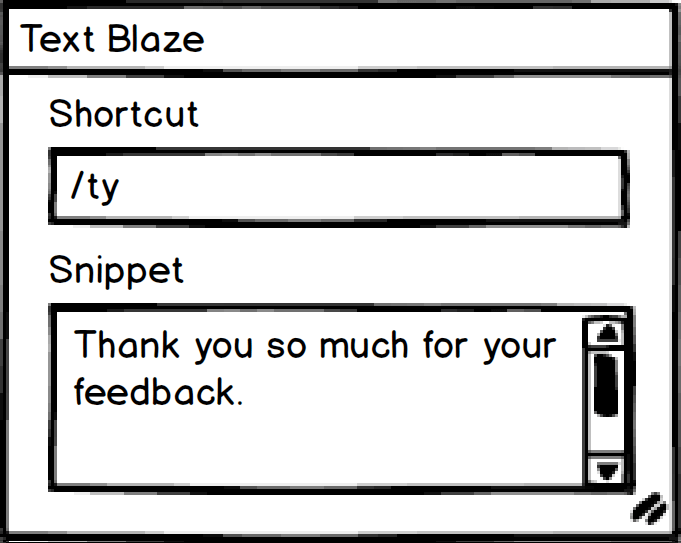
 1
Save any "snippet" of text in Text Blaze as a template
and give it a shortcut.
Use whatever feels natural for your shortcuts. You could try /ty for a thank you sentence.

 2
Type the shortcut and the snippet text will be
substituted for it wherever you are in Chrome.
Text Blaze works on Gmail, Google Docs, LinkedIn, Salesforce and wherever else you may be.
 3
Take advantage of sharing and collaboration features and the most
versatile dynamic templates in any app.

Dynamic Templates
Take advantage of Text Blaze's forms, dynamic formulas, and integrations with other sites to simplify
your day with Text Blaze. Reduce the number of tools you juggle and blaze through your work.


Sharing and Collaboration
Once you've created your snippets, share them with your colleagues. They'll immediately update with any
improvements you make and you can even edit them together.
Great for individuals...
Insert Snippets and Templates
Speed up your work and maximize your productivity by using templates and snippets. "Auto text", "text expander",
"snippets", "macros", "canned responses" – whatever you call it, the Text Blaze Chrome Extension is the best way
to do it.
Your Personal Assistant
Create forms with blank fields to easily fill in a name or other data each time you
use a snippet. Use dynamic formulas to calculate values like taxes on the fly.
Simulate clicks or key presses to automate parts of your workflow.
Create Consistent Processes Anywhere
Use forms, dynamic formulas and integrations with other websites to define your team's repeatable processes
using Text Blaze. You can even save form data and trigger follow up actions every time a snippet is used.
...and it completely crushes it in teams 
Collect and Share Your Most Effective Messages
If you work with a team, Text Blaze can be a central database of your most effective emails, chats and other
messages. Just create a shared folder and you can continually improve it together.
Works Everywhere You Work
Gmail, Google Docs, Office 365, Salesforce, Blackboard, Epic or any other site. Wherever you are in Chrome, the
Text Blaze Chrome Extension is there to help you. If you ever find a site where Text Blaze doesn't work, let us
know and we'll get it fixed ASAP.
A Better Way to Keep your Messages Consistent
Using a shared snippet folder, your team will always be hitting the exactly right notes in your messaging.
Everyone's snippets are updated automatically when changes are made, so everyone is always on the same page.
Trusted and loved ❤️ by users at


⭐⭐⭐⭐⭐
Wow! What an incredible time saver. I've been looking for something like this for the longest. So grateful for
Text Blaze!!!

Stephanie M
⭐⭐⭐⭐⭐
Excellent! I use Text Blaze every day and it's easily one of the best Chrome extensions in my collection. It
works everywhere, is very reliable, and very simple to use. Highly recommended.

Brian H
⭐⭐⭐⭐⭐
Extremely useful for speeding up note taking in my therapy practice... I've tried a number of autotext
extensions and this is hands down the best.

Tony L
