

详细内容

Features

Solutions
Products
Affiliates & partners
Ambassadors Affiliates Partners
Trustedby85,000+usersworldwide.
GenerateengagingshortclipswithAI
Turn any long-form video or podcast into engaging, scroll-stopping short clips. Choppity is an online video editor powered by AI.
Podcasters & creators
Marketers & advertisers
Sales, training & customer support
Trusted by 40,000+ companies worldwide


Advanced features:
Themostadvancedshortclipsgeneratoronthemarket
Choppity saves you time by automating tedious editing, whilst still giving you full control to edit everything. You can create a style matching your brand—captions, fonts, colours, logos, vfx and more—and Choppity will automatically edit your videos in that style. You can save and switch between multiple styles too.
Captions that increase watch time
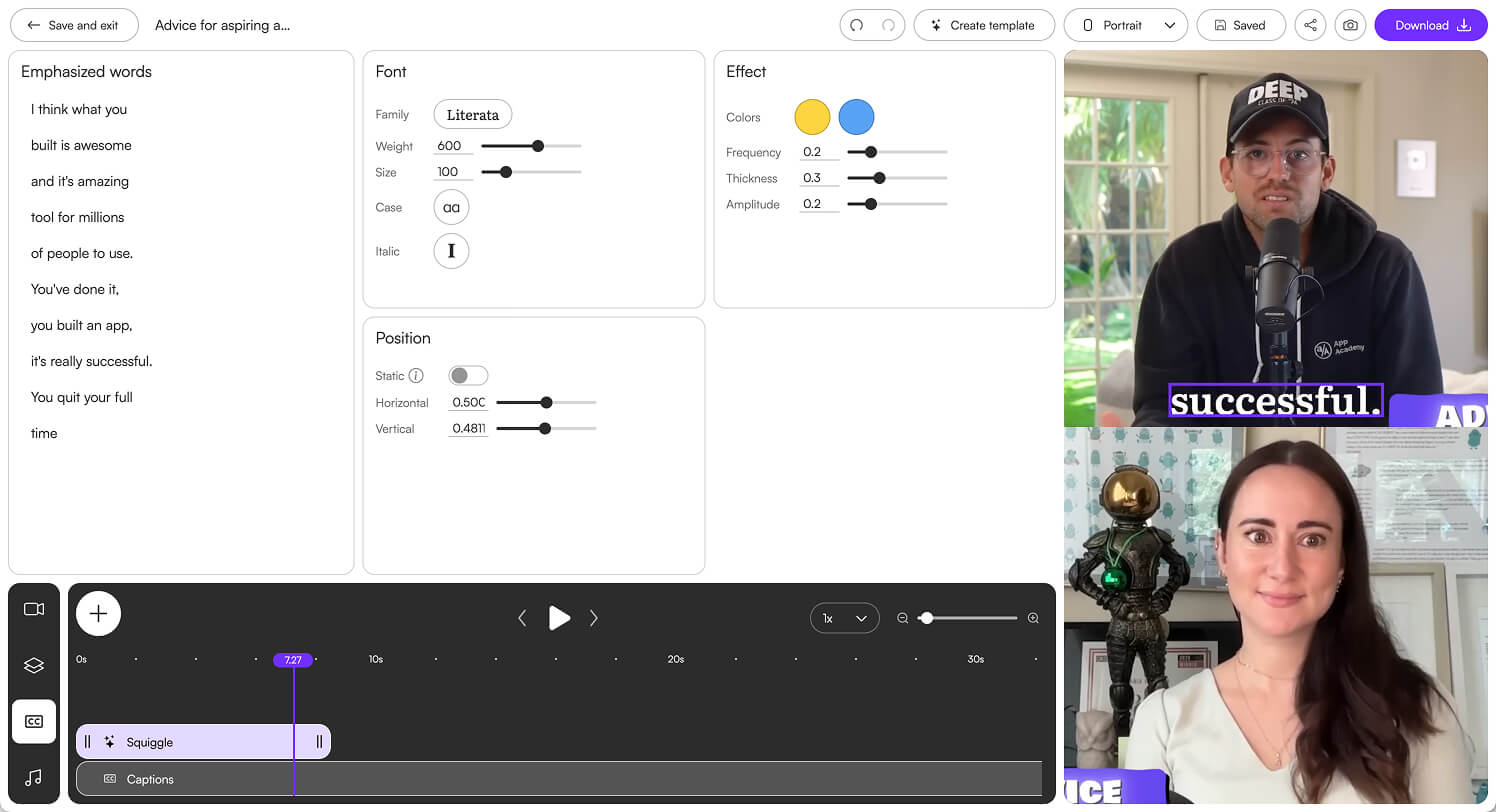
Add 98%+ accurate captions in 1 click. Customize the animation, colours and upload custom fonts to suit your style. Captions improve watch time by helping people understand your video, even on mute.

Magic clips™
Upload a long video and Choppity's AI will find the most engaging, viral-worthy clips, ready to be posted to social media. You can set a target duration for how long each clip should be.
Magic reframe™
Converting a landscape video into portrait format typically requires cropping and reframing after every cut. Choppity handles this automatically, instantly adjusting the frame to perfectly center each person’s face, saving you time.
Magic follow™
Choppity tracks and centers moving subjects, ensuring they stay perfectly in frame when converting a landscape video into a vertical short. This ensures a smooth and professional result, even with dynamic action.
Profanity censoring
Choppity automatically censors curse words to help you avoid issues with social media algorithms and brand compliance requirements, ensuring your content reaches a wider audience.
Transcript editing
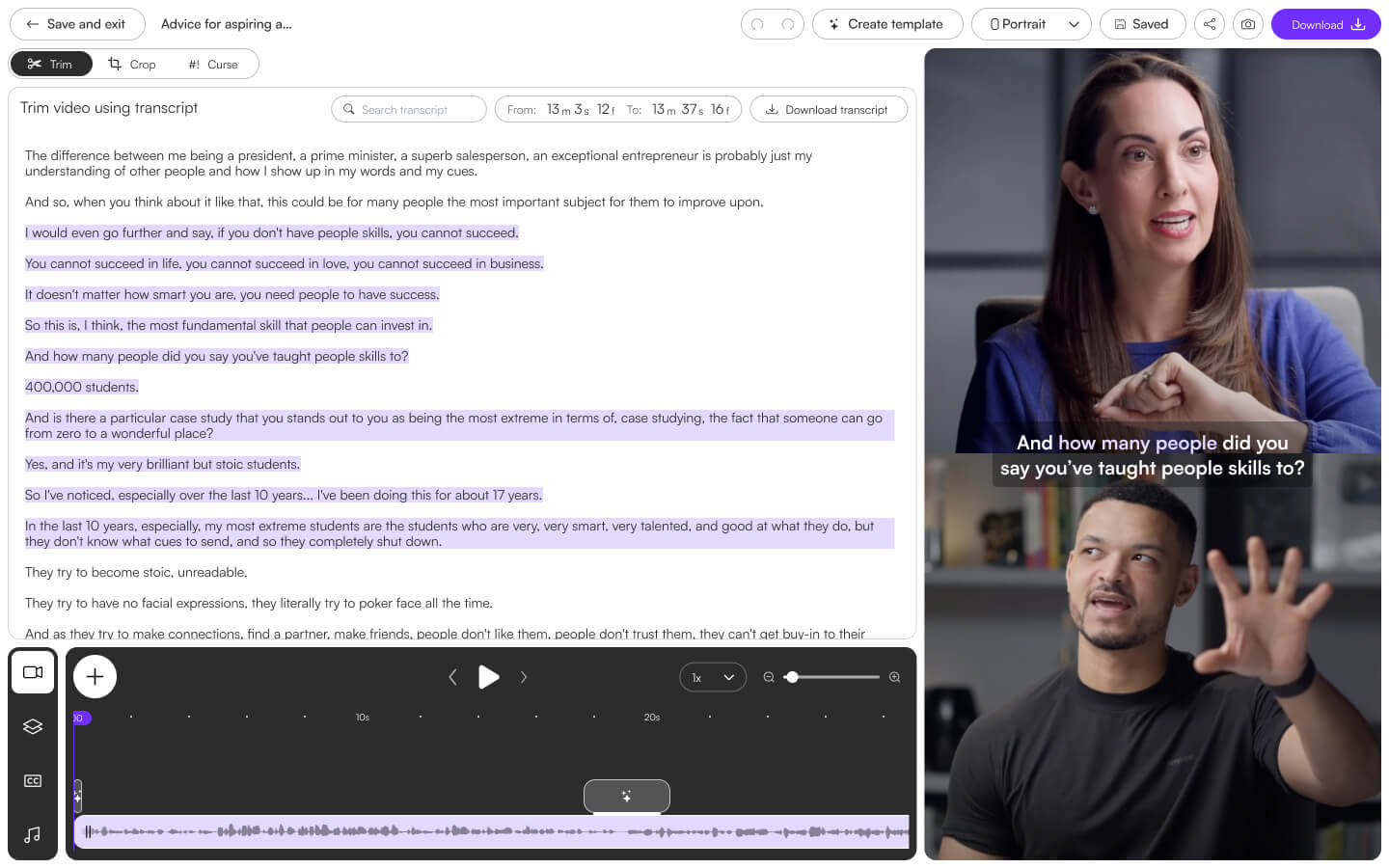
If you can edit a text document, you can edit videos in Choppity. Just highlight the transcript to trim and cut videos. It's much faster to make a cut by reading text than by listening to a video play. Try it for yourself and experience the efficiency.
Full creative control:
MaintainfullcreativecontroloftheAI generatedclips
Once your short clips are generated by AI, you will still have full control of the final output. You can edit the captions, video transitions, facial tracking, transcript and more.
Simple yet powerful editor.
EditvideoslikeaWorddocument.
With Choppity, you can edit videos using the transcript of the spoken words. The purple-highlighted section represents the part currently selected from your video.
You can drag one of the handles to trim. Highlight a section in the middle and cut it out. Or even highlight a part of the transcript and make an image or a b-roll video appear during that exact part.
Choppity is one of the simplest video editors to use. If you can use Canva, you can definitely use Choppity.

Workwithothers.

If you need a friend or a teammate to work with you, invite them to your team. You can work on the same videos together in a shared space.
For better organization and structure, you can create sub-teams (teams within teams). For example, set up a sub-team for each client in your marketing agency and invite them to their own dedicated team, where they can also make edits. No more endless requests like "Can you move that to the left a bit?"
Sharewithalink.

Forget the hassle of downloading an mp4, uploading it somewhere, and then sharing a link. With Choppity, you can simply send a link direct to a video project, and you’re done. No more waiting for videos to upload and process on YouTube.
For sales
Receive an email notification whenever someone watches your video to help you perfectly time a follow up (coming soon).
For agencies
Your clients can watch you make updates in real time and provide instant feedback saving time with realtime collaboration.

Sales and training.
Thescreenrecorderthateditsyoursalesandtrainingvideosforyou.
One of Choppity's tools is an automated screen recorder. Simply share your screen, hit record, and do your thing. After 60 seconds, you'll receive a polished, edited video complete with zooms, transitions and captions. Download the video as an mp4 or share it instantly via a link.
Here'sanexamplevideomadewithChoppity:
"...in the top left..." = zoom.
When you mention a specific area on the screen, Choppity automatically zooms in to highlight it, making it easier to understand.

Beautiful styles and backgrounds.
Choose from a variety of stunning styles and background images, upload your own, or select a solid color or gradient.

No more awkward silences.
Choppity automatically removes those awkward silent parts at the start and end of your video.

Not yet publicly available—we’re developing a new approach to automate video editing and analysis. You can write custom expressions and apply them to videos. To see examples of expressions, look below the "contact me" button.
Create a set of multiple expressions and run them simultaneously to tackle complex, multi-step tasks. Achieve any task—whether it's automated rough cuts, marketing automations, live broadcast event processing, content moderation, or review processes.
Create literally any expression you can imagine. Write once, use forever, save hours.
Checking your Browser…
Verifying...
Stuck here? Send Feedback
Success!
Error
Having trouble? Send Feedback
Expired. Refresh
Timed out. Refresh
Thank you! Your submission has been received!
Oops! Something went wrong while submitting the form.


By the way, this video was edited with Choppity.

"We'veseenamassiveincreaseinourviewsandsubscribers"
Callum Barker-Nicol
Product Lead at AutoTrader

Choppity. Trusted by companies of the FTSE 100. Created for everyone.
FTSE 100 - The 100 largest companies listed on the London Stock Exchange.
Videoforallusecases.

Sales
Increase conversions by upgrading your standard cold emails with personalized videos. Receive a notification when your video is watched.

Social media
Boost engagement and virality by switching up boring captions with captivating visuals and animations.

Customer support
Save time on customer support calls by filming a quick screen capture in Choppity.

Advertisement
Increase ROI by adding eye-catching visuals to your ads. Stand out from the sea of drab ads consumers are bombarded with.
Frequentlyaskedquestions.
How do I add animated subtitles to my videos?
Choppity automatically adds beautiful animated subtitles to your videos. You can customize the font, color, size and animations to align with your brand. Choppity adds special animations to keywords, editing videos like a human would.
Can I search for specific moments in my video?
Yes! With ClipAnything, you can search for moments using natural language prompts. For example, you can type "find the most exciting part" or "find the funniest moment" and the Ai will search through every aspect of your video - audio, visual, emotional cues and more.
What is Choppity?
Choppity is a video editor which edits social media, sales and training videos for you. Start from a finished video to make social clips, or record right in the Choppity recording studio.
Is Choppity free to use?
Yes! Choppity is free to use with limited usage, and with a discrete watermark. For more advanced features, watermark-free exports and more usage, paid plans start at $2 per month.

Home Pricing Affiliates Contact
© Copyright 2025 Mizko Media Pty Ltd t/a Choppity.
Create your first video