

详细内容
Turn YouTube, Reddit, and AI Stories into Viral TikToks, Reels, and Shorts
Edit videos with the power of AI automation, captions, and dynamic templates.
Powerful tools
Creating Clips, Made Simple.
ClipGoat gives you a full set of tools to turn YouTube videos, Reddit threads, and AI-generated stories into viral TikToks, Reels, and Shorts — fully customized and scheduled in minutes.
Generate up to 20 TikToks from a single YouTube video\
\
Choose from a wide selection of presets, animations or customise them exactly how you like them. \
\
 Write or paste a story, get a clip.\
\
Type or copy your own story, pick a voice and background, and ClipGoat will turn it into a video. \
\
 Free online video editor\
\
Edit captions, text, and sound in a few clicks. no experience needed, all in your browser. \
\
 Schedule Your Clips to Post Automatically\
\
Pick the time and date, and ClipGoat will post your videos to TikTok, Reels, and Shorts for you. \
\
 Make a clip from a Reddit Post\
\
Paste a Reddit link, and ClipGoat will create a full video with voice, captions, and background. \
\

ClipGOAT Features
Discover all the powerful features that make ClipGOAT the ultimate platform for content creators
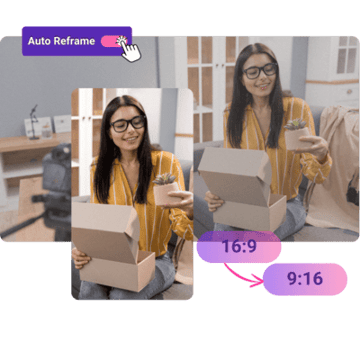
AI Auto Reframing
Never manually crop again, let ClipGOAT do the work for you
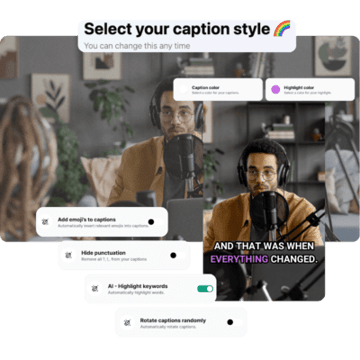
Auto Generated Captions
The best looking captions for your videos, generated automatically
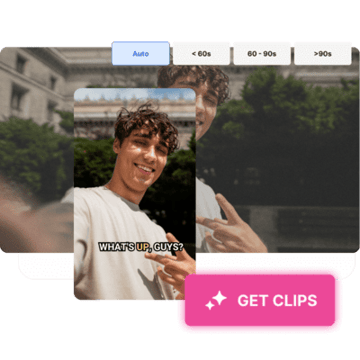
AI Clipping
Unlock Unlimited Creativity with ClipGOAT Processing Minutes

AI Generated Hashtags
Unlock Unlimited Creativity with ClipGOAT Processing Minutes

AI Generated Hook
Our AI will help you create the perfect hook for your video

AI Generated Title
Grab your viewers' attention with ClipGOAT's AI Generated Title

AI Virality Score
Get the viral potential of your videos with ClipGOAT's AI Virality Score

Export Resolution
Export your videos in the highest resolution

Processing Minutes
Don't spend too much, buy the amount of credits you need
Frequently Asked Questions
What makes ClipGOAT different from other video editing tools?
ClipGOAT combines advanced AI technology with user-friendly features, making it ideal for creating engaging short-form, vertical content. Our tool excels at turning long videos into captivating clips for social media. This AI video editor combines precision and creativity, ensuring your videos stand out.
What is ClipGOAT's AI Virality Score and how does it work?
ClipGOAT's AI Virality Score is a feature that analyzes various aspects of your video content, such as engagement potential, relevance, and trends, to provide a score indicating the likelihood of your video going viral on social media platforms. This score helps you optimize your content by identifying key elements that can enhance its chances of becoming popular, thereby maximizing its reach and impact.
How can I sign up for ClipGOAT?
Signing up for ClipGOAT is simple and free. On our homepage, click the Start now button, and create your account. You only need to provide your email address and create a password—no credit card is required to create an account. Once you've signed up, you can start using ClipGOAT's features immediately.
What features are included in ClipGOAT's Paid Plan?
The Pro Creator plan includes all the features available in the Starter plan, plus 600 minutes of video processing per month, 1080p exports, priority support, and additional AI-powered features to enhance your content creation workflow.
How can I get help if I encounter issues using ClipGOAT?
On the website there is a chat icon in the bottom right corner. Click on it to start a conversation with our support team.
How does ClipGOAT's AI video editing enhance social media content creation?
ClipGOAT uses AI to streamline the video editing process, ensuring your content is perfectly formatted for platforms like TikTok, YouTube Shorts, and Instagram Reels. Our AI enhances the creative process by saving time and boosting engagement with audience-centric editing. This results in higher-quality content that resonates with your viewers.
How does ClipGOAT's AI improve the video editing process?
ClipGOAT's AI technology intelligently analyzes your video content, identifying key moments and optimizing them for viewer engagement. Our AI video editor performs tasks such as auto-cropping, face tracking, and generating automated captions, in different languages, to improve the overall quality of your videos. This results in a smoother editing process and higher-quality final content.
What types of plans does ClipGOAT offer?
ClipGOAT offers two main plans: the Starter plan, which is free, and the Pro Creator plan, the paid version. Free users have 100 processing minutes, one-time, and export videos in 720p resolution. Paid users, on the other hand, have 600 minutes available per month and export videos in 1080p resolution. The AI features are available for both plans.
How do I upgrade to the Pro Creator plan?
Upgrading your plan is easy. Log in to your ClipGOAT account, click Get more credits, and select Upgrade now. Once the upgrade is complete, you will immediately have access to all the features of the paid plan.
How can I stay informed about new features and updates for ClipGOAT?
We encourage users to join our Discord for the latest news, feature updates, and announcements about ClipGOAT. By joining, you'll be among the first to know about new developments and enhancements. This keeps you up-to-date and allows you to take full advantage of our latest features.
Supported by Industry Leaders


Ready to try ClipGOAT?
Start using our tool today and see the difference it makes.