

详细内容

AI-Powered Video Editing & Screen Recording
DreamCut is a brand new AI video editor and screen recorder that works right from your browser. Edit videos effortlessly on any device with powerful AI in the cloud. Supercharge your content with AI voiceovers, a smart chat assistant, instant notes, and stunning image/video generation to wow your audience.
Become a supporter, get discounted early access + a private Slack where I share the designs, code and development process.
Join Waitlist

Keyboard Showcase(800 x 600)60 FPS

4:3
Screen Recording 11-30-25 at 09:47:56 AM.mp4
Video
Start TimeDuration
FilenameScreen Recording 11-30-25 at 09:47:56 AM.mp4Source00:15 (12.2 MB)
Speed 1.00xVol 100%
Trim StartTrim End
Zooms
1.0xPositionX: 0.5, Y: 0.5
Zoom to
1.8xPositionX: 0.5, Y: 0.5
Zoom to
1.0xPositionX: 0.5, Y: 0.5
Animation
DurationTimingLinearEase-InEase-OutEase-In-OutSpringSpring-SoftSpring-Strong
00:00
00:05
00:10
00:15
Screen Recording 24-09-18 at 9.57.16 AM.mp4 (12.2 MB) - Zoom 1x Ease-In-Out 0.5s
1.8x
1.6x
2x
1x
Using the Keyboard
An AI-First Video Editor currently in development.
0k
lines of code in 70 weeks and 1 days.
40,262 Claude AI Prompts in Cursor.
12,766 Git Commits by one person.
Meng To
@MengTo · designer and coder
I'm building my dream video editor with Claude AI
11k lines of code, 685 commits, 3 full weeks. Cursor, Tailwind, React, Firebase. Web-based, cloud saves, versions, can edit on mobile. This video was recorded using the tool.
Never in a million years I thought I was capable but here we are. AI is a multiplier.
8:13 PM · Aug 23, 2024 703.5K
289 550 5.3K 4.1K
Meng To
@MengTo · designer and coder
Generating notes directly from the video editor I'm building with Claude AI
I've always wanted the video editor to do 90% of the work for me: generate transitions, zooms, voices, captions, scripts, remove bg noise, and gen images/videos. I want to store everything online and I want to edit on any device, including my phone. I want to chat with my video.
7:26 PM · Sep 9, 2024 74.4K
63 68 864 630
Supported by creators at
Screen Rec
Capture your screen and windows with beautiful framing and zooms
Professional-grade screen recording at your fingertips
Whether you're creating tutorials, recording gameplay, or capturing important moments, our screen recorder offers the flexibility and quality you need. With customizable settings and multiple recording options, you can create perfect screen captures every time.
Screen Recording
Configure your recording settings and click 'Start Recording' to begin.
Recording Type
WindowScreenAudio Only
Sources
MicrophoneSystem AudioCamera
Start Recording
High-Quality Recording \
\
Capture your screen in high resolution with customizable settings Audio Capture \
\
Record system audio and microphone input simultaneously Flexible Recording Options \
\
Choose between full screen, window, or audio-only recording
The perfect animated background to blow your audience away
Stunning wallpapers, videos and gradients for your videos
DreamCut offers a wide range of background options to make your videos visually appealing. From static images to dynamic videos, create the perfect backdrop for your content.
Image Backgrounds
Choose from a variety of high-quality images or upload your own
Gradient Backgrounds
Create stunning gradient backgrounds with customizable colors and angles
Solid Color Backgrounds
Select from a curated palette or pick your own custom color
Video Backgrounds
Add dynamic video backgrounds to make your content stand out
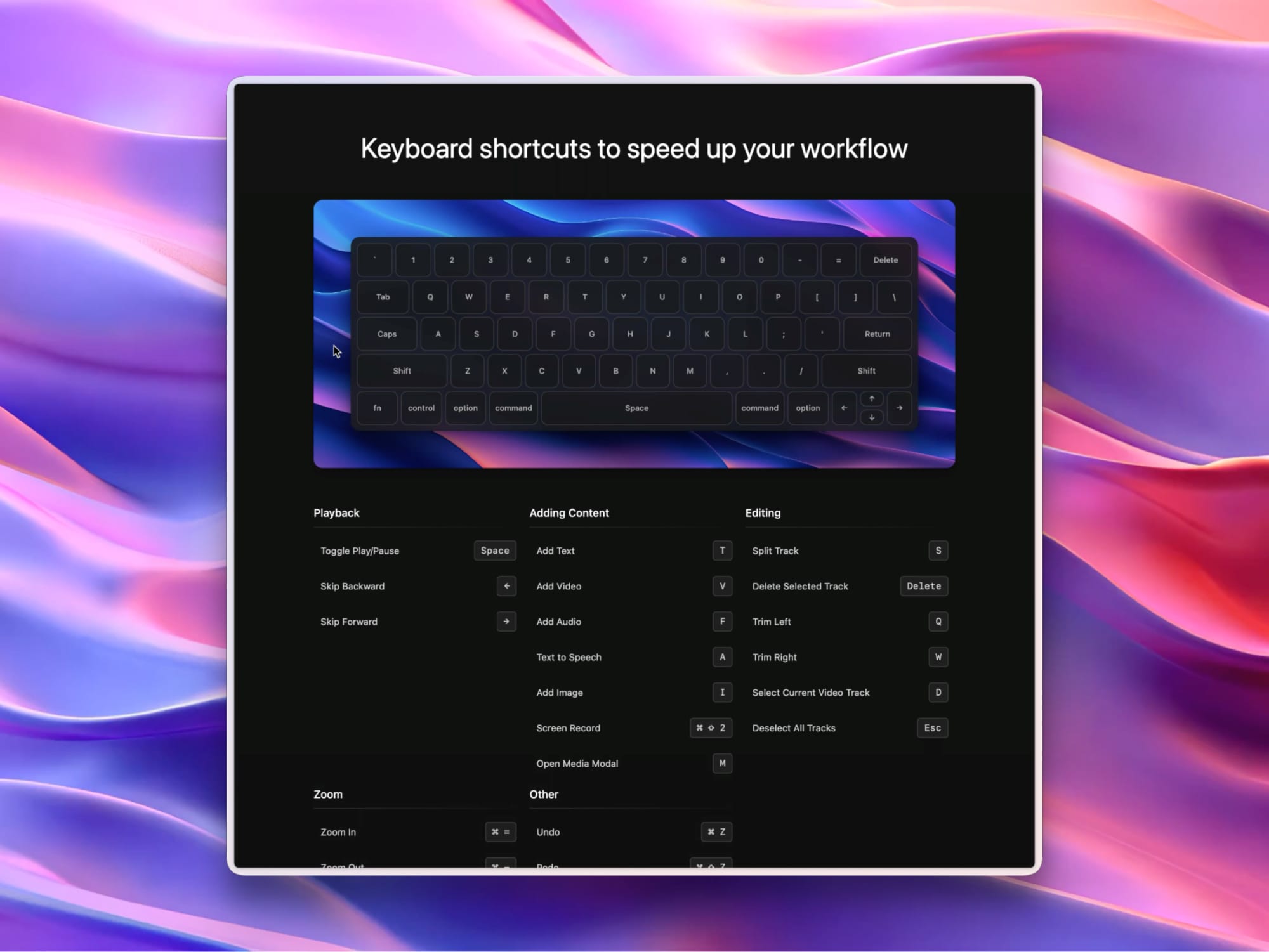
Keyboard shortcuts to speed up your workflow
`
1
2
3
4
5
6
7
8
9
0
=
Delete
Tab
Q
W
E
R
T
Y
U
I
O
P
[
]
\
Caps
A
S
D
F
G
H
J
K
L
;
'
Return
Shift
Z
X
C
V
B
N
M
,
.
/
Shift
fn
control
option
command
Space
command
option
←
↑
↓
→
Project
- Toggle Play/Pause
Space - Skip Backward
← - Skip Forward
→ - New Project
⌘ N - Open Project
⌘ O - Save
⌘ S - Open Chat
C
Insert
- Screen Record
⌘ ⇧ 2 - Text to Speech
A - Add Text
T - Add Video
V - Add Audio
⇧ A - Add Image
I - Generate Image
⇧ I - Open Media Modal
M
Editing
- Undo
⌘ Z - Redo
⌘ ⇧ Z - Split Track
S - Delete Selected Track
Delete - Trim Left
Q - Trim Right
W - Select Current Video Track
D - Deselect All Tracks
Esc
Zoom
- Zoom In
⌘ = - Zoom Out
⌘ - - Set Zoom (1.1x to 1.9x)
1-9 - Reset Zoom (1x)
0 - Set Zoom to 2x
0 0 - Add Zoom
Z - Zoom Position Selector
X
Video Editor
Transform your ideas into stunning videos with our Intuitive Canvas
Edit your video with a powerful and easy-to-use canvas
Our AI-powered canvas brings your creative vision to life. Drag and drop elements, apply effects, and see your changes in real-time. With intelligent suggestions and automated enhancements, creating stunning videos has never been easier.
Keyboard Showcase(800 x 600)60 FPS
4:3
Manage your video and audio files with search and filters
Access and organize your videos and audios anywhere
Our intuitive media library allows you to easily browse, search, and manage your video and audio files. Add media to your projects with just a click, and see what's used and unused in your project.
Video LibraryAudio Library
Date Name Size

Castor.mp4
1.81 MB • 11/5/2025
Procyon.mp4
1.38 MB • 10/28/2025

Rigel.mp4
1.64 MB • 10/28/2025

Fomalhaut.mp4
1.56 MB • 10/24/2025

Castor.mp4
1.16 MB • 10/14/2025

Spica.mp4
1.59 MB • 10/11/2025

Procyon.mp4
1.03 MB • 10/9/2025

Betelgeuse.mp4
1.52 MB • 10/4/2025

Regulus.mp4
1.48 MB • 10/4/2025

Procyon.mp4
1.48 MB • 9/24/2025

Betelgeuse.mp4
1.42 MB • 9/11/2025

Sirius.mp4
1.46 MB • 9/10/2025

Aldebaran.mp4
1009.62 KB • 8/29/2025

Arcturus.mp4
1.73 MB • 8/15/2025

Regulus.mp4
1.65 MB • 8/14/2025
Export your video at 4K, 60 fps for Twitter, TikTok, Instagram, and more
Fine-tune your export options for the perfect result
Our advanced export options allow you to customize your video's FPS, resolution, and quality. Choose the perfect balance between file size and video quality for your needs.
Export Video
ResolutionFormatLogs
Set Resolution
FPS:
243060
Resolution:
480p720p1080p4K
FPS: 60
Resolution: 4K
Quality: Perfect
Format: MP4
AI Voice
Voice shy or not fluent? Let AI speak for you, in many languages
Transform your text into lifelike speech with DreamCut
Elevate your video content with our cutting-edge text-to-speech feature. Create professional voiceovers, narrations, and dialogue with ease, choosing from a variety of natural-sounding AI voices or even cloning your own.
– I'm totally not just using Eleven Labs.
AI Voice Generator
Select Voice
PaolaMyraAlexJessicaChrisLilyWillSarahLauraCharlotteDaniel
Create a free account to try AI voices
Generate Voice
AI Voice Generation \
\
Create natural-sounding voiceovers with advanced AI technology BG Noise Removal \
\
Automatically remove unwanted background noise from your audio Custom Voice Cloning \
\
Clone your own voice or create unique voices for your projects
AI Image
Generate Images with AI directly in the video editor
Create professional-quality images with DreamCut's AI Image Generator
Elevate your video content with our cutting-edge AI image generation feature. Create custom visuals, backgrounds, and graphics tailored to your project's needs, all with simple text prompts.
AI Image Generator
Select Model
flux/schnell (315 tokens per image)flux-pro (5250 tokens per image)flux/dev (2625 tokens per image)flux-realism (3675 tokens per image)stable-diffusion-v3-medium (3675 tokens per image)
Image Count
1 Image2 Images4 Images
Create a free account to try image generation
Generate
AI Image Creation
Generate high-quality images from text descriptions using advanced AI
Powerful AI Models
Access state-of-the-art AI models to create stunning visuals for your projects
Explore Images
Explore community-generated images and experiment with prompts
Advanced AI Models
Cutting-edge AI models at your fingertips
Our platform integrates state-of-the-art AI models to enhance your content creation process. From natural language processing to image generation and speech recognition, these models provide powerful capabilities to bring your ideas to life. Explore the different AI models available and leverage their unique strengths in your projects.
AI Model Selection
FLUX.1 [schnell]
Fast Image Generation
Model Details
flux-schnell
The fastest model tailored for local development.
Capabilities:
- Rapid image generation
- Local development
- Open-source availability
- Integration with various platforms
These AI models power various features in our platform, enabling advanced content creation and editing capabilities.
Chat
Chat with your video. Let AI help you.
Enhance your video editing experience with our intelligent chat feature, providing real-time assistance and collaboration tools.
AI Video Editing
Automated video editing with AI-powered tools and suggestions
GPT-4o AI chat
Advanced AI-powered chat for intelligent assistance and collaboration
Content Generation
AI-assisted content creation for scripts, captions, and descriptions
Cloud
Stop losing your videos files – save them in the Cloud.
Access your work anytime, anywhere with DreamCut
Auto-save and version control ensure your work is continuously saved and prevent data loss. Easily review and revert to previous versions, giving you full control over your editing process.
5 - User Interface (32)
Aug 30, 5:40 PM
108.0MB - 09:50
Videos: 8, Audios: 7, Texts: 107
Aug 30, 5:05 PM
108.0MB - 09:50
Videos: 8, Audios: 7, Texts: 107
Aug 30, 5:00 PM
98.9MB - 09:50
Videos: 8, Audios: 7, Texts: 5
Load More
1
Cloud Storage. Access your projects from anywhere with our secure cloud storage solution. Collaborate seamlessly across devices.
2
Real-time Sync. Experience instant updates and synchronization across all your devices, ensuring your work is always up-to-date.
Notes
Generate quick notes from your videos. No extra subscription.
Intelligent note-taking powered by AI
Effortlessly convert your video captions into well-organized notes, blog posts, or social media content. Our AI-powered system analyzes your content and generates structured, coherent text that captures the essence of your ideas.
1
AI-Powered Notes. Transform your video captions into structured, coherent notes with the help of advanced AI technology.
2
Multiple Formats. Generate blog posts, social media content, or summaries from your video content with a single click.
Continuous Updates and New Features
Apr 8
Apr 1
Mar 25
Mar 18
Mar 11
Mar 4
Feb 25
Feb 18
Feb 11
Feb 4
Jan 28
Jan 21
Jan 14
Jan 7
Dec 31
Dec 24
Dec 17
Dec 10
Dec 3
Nov 26
Nov 19
Nov 12
Nov 5
Oct 29
Oct 22
Oct 15
Oct 8
Oct 1
Sep 24
Sep 17
Sep 10
Sep 3
Aug 27
Aug 20
Aug 13
Aug 6
Jul 30
Jul 29
\
\
Video Clip Cropping \
\
Easily crop your video clips to focus on specific areas or remove unwanted portions of the frame.\
\
Apr 8, 2025\
\
Learn more about video clip cropping → \
\
Custom and Cloned Voices \
\
Add custom and cloned voices using your own Eleven Labs API key for personalized voice-overs.\
\
Apr 7, 2025 Clip-Specific Export \
\
Export individual video clips instead of the entire video for more targeted output.\
\
Mar 19, 2025 Advanced Audio Enhancement \
\
Clean Audio feature with Studio Sound quality and Background Noise Removal capabilities.\
\
Mar 15, 2025 Multi-Track Editing \
\
Edit multiple video clips, audio layers, and captions simultaneously in a unified timeline.\
\
Mar 11, 2025 AI Chat Multi-Edit \
\
Enhanced AI Chat capabilities for managing edits across multiple tracks, clips, captions, and global settings.\
\
Mar 11, 2025 Quick Zoom Overlay \
\
Easily edit and add zooms by hovering the bottom right of the Preview, with default zooms automatically added after recording.\
\
Feb 19, 2025 \
\
Style Presets \
\
Presets for Captions, Camera and Canvas layouts to quickly apply popular styles.\
\
Feb 9, 2025\
\
Learn more about style presets → \
\
Global and Clip Settings \
\
Set global styles for the entire video while maintaining granular control over individual clips for Captions, Camera and Canvas.\
\
Feb 9, 2025 Word-Level Caption Animation \
\
Precise word-by-word caption animation with accurate timing and synchronization for more engaging video content.\
\
Feb 2, 2025 Enhanced Camera Layouts \
\
Choose camera presets and freely position the video canvas within layouts.\
\
Feb 2, 2025 Advanced Caption Controls \
\
Support for multiple captions with different styles and positions, plus word-by-word animation.\
\
Feb 2, 2025 Custom Font Styles in Inspector \
\
Font style customization now available in the Inspector panel.\
\
Feb 2, 2025 Automatic Transcription \
\
Detaching audio now automatically generates a transcription.\
\
Feb 2, 2025 \
\
Enhanced Font Controls \
\
Advanced font customization including size, weight, style, and spacing adjustments.\
\
Jan 8, 2025\
\
Learn more about enhanced font controls → \
\
Collapsible Tracks \
\
Added ability to collapse tracks for better workspace organization.\
\
Jan 8, 2025 WebM Preview Player \
\
Preview exported WebM files directly in the app with playback speed control and MP4 conversion.\
\
Nov 25, 2024 Split Video, Audio and Captions \
\
Split video, audio tracks and captions at the current playhead position for more precise editing control.\
\
Nov 13, 2024 Trim Video, Audio and Captions \
\
Trim the start and end points of video, audio tracks and captions to remove unwanted sections.\
\
Nov 9, 2024 Capture Canvas \
\
Take screenshots of the video canvas. Perfect for creating thumbnails, writing articles or sharing on social media.\
\
Nov 3, 2024
Show All Features
All-in-one video creation suite. Powered by AI.
Screen Recorder, Video Editor, AI Assistant, Voice Generator, Video and Image Generator - all in one powerful package.
MonthlyYearly Save 20%
Free
$0
Free for all users
- 3 Projects
- Record & Export
- 1080p, High quality, 30 FPS
- Up to 5 mins recordings
- 10 MB video/audio clips
- 500 MB storage
Join Waitlist
Pro (+30% off during early access)
$14 $20 / month / user
billed yearly
- Unlimited Projects
- Record & Export
- 4K, Perfect quality, 60 FPS
- Unlimited recordings
- 500 MB video/audio clips
- 50 GB storage
- AI Voices (120 mins per month)
- Image/Video Generation, Chat, Notes (1,000,000 tokens per month)
- Remove background noise
- Transcribe Audio/Video
- Premium backgrounds and videos
Become an Early Supporter
Pro+ (+30% off during early access)
$28 $40 / month / user
billed yearly
- Unlimited Projects
- Record & Export
- 4K, Perfect quality, 60 FPS
- Unlimited recordings
- 1 GB video/audio clips
- 100 GB storage
- AI Voices (240 mins per month)
- Image/Video Generation, Chat, Notes (2,000,000 tokens per month)
- Remove background noise
- Transcribe Audio/Video
- Premium backgrounds and videos
Become an Early Supporter
Supporters receive a 30% discount on early access, plus an extra 20% off the yearly plan. They also get behind-the-scenes access to the product, code, insights, and the opportunity to help shape its development.
Frequently Asked Questions
Do you offer refunds?
Yes, we offer a 30-day money-back guarantee for all new subscriptions. If you're not satisfied with DreamCut, you can request a full refund within the first 30 days of your subscription.
Refunds are subject to a 5% processing fee and usage fees. For example, if you've used 10% of your tokens/voice, you'll be refunded for 85% of your payment.
This is done because we're completely self-funded and bootstrapped, and there are significant costs to the APIs and bandwidth.
What does early access include?
Early access gives you a 30% discount + an extra 20% off (yearly plan only) priority access to new features before they're released to the general public.
You'll also be invited to view, use and get insights on some of the app UI components. Code is viewable on the site for visual components and features such as landing page elements, animations, video tools, AI tools, modals, etc. You can easily copy the code and ask Claude to rebuild for your product's codebase.
Additionally, you'll get access to a private Slack channel to ask questions, provide feedback and help shape the product roadmap in your specific use case. Your feature requests will be prioritized to ensure that we build the best product for you.
Can I use my own API keys?
Not at the moment, but we're thinking about it. We're waiting to see if there is significant demand for it. For now, we're using our own API keys at almost the same costs as if you use your own. Bundling everything together along with storage/bandwidth costs and a generous package for early supporters, we believe that this is the best experience for everyone.
What payment methods do you accept?
We accept all major credit cards (Visa, MasterCard, American Express, Discover) via Stripe. For yearly subscriptions for teams of 5+ users, we also offer wire transfer options for enterprise customers.
How can I get support?
We offer priority email support for all paid plans. Pro and Pro+ subscribers also get priority support and access to our dedicated Slack channel for faster response times.
Are there any discounts available?
We offer a 20% discount for yearly subscriptions. We also have special pricing for early access, which is the same as for educational institutions and non-profit organizations. Once the early access is expired, you can Contact us privately with your proof of status (student, non-profit, etc.) and we'll help you set up.
Do you offer pricing parity for different regions?
Yes, we offer regional pricing to ensure fair access to our tools across different economies. The exact pricing may vary based on your location. Contact us privately with your proof of location and we'll get you set up.
Can I switch between monthly and yearly billing?
Yes, you can switch between monthly and yearly billing at any time. If you switch to yearly billing, you'll immediately benefit from the 20% discount.
What happens if I exceed my plan's limits?
If you exceed your plan's limits for AI usage, you won't be able to use additional AI features until your next billing cycle or until you upgrade your plan. For storage limits, you can continue using the service, but you'll be notified to either upgrade your plan or reduce your storage usage by removing or optimizing large files.
Can I cancel my subscription at any time?
Yes, you can cancel your subscription at any time. Your access will continue until the end of your current billing period, and you won't be charged again.
Do you offer a free trial for paid plans?
We don't currently offer a free trial for paid plans, but we do have a free tier (available for waiting list users) that allows you to try out many of our core features. Additionally, our 30-day money-back guarantee allows you to try any paid plan risk-free.
StripeM-Inner