

详细内容
Professional GUI Client for DynamoDB
Accelerate your AWS DynamoDB workflow with faster data exploration, code generation, bookmarks, and more.
Download Now
Download Now Try Dynobase 2.5.0 Beta
7-day free trialNo credit card requiredAvailable for macOS (including Apple Silicon), Linux and Windows

See Dynobase in action - Click to Play Video
Trusted by engineers from successful companies


















10x Your DynamoDB Productivity
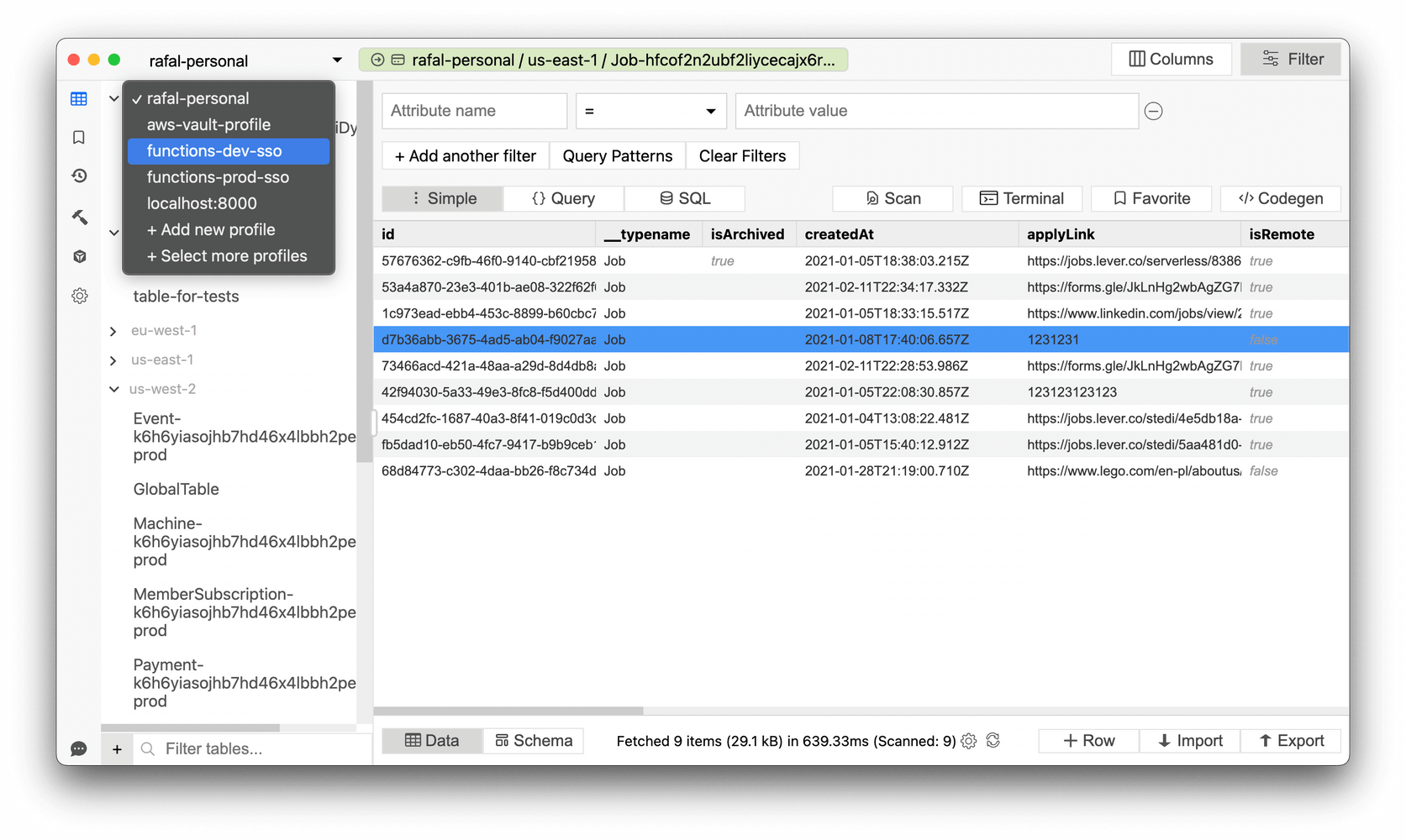
Jump between profiles and regions. Fast.
No more browser extensions, multiple windows, constant re-logging between roles and accounts.
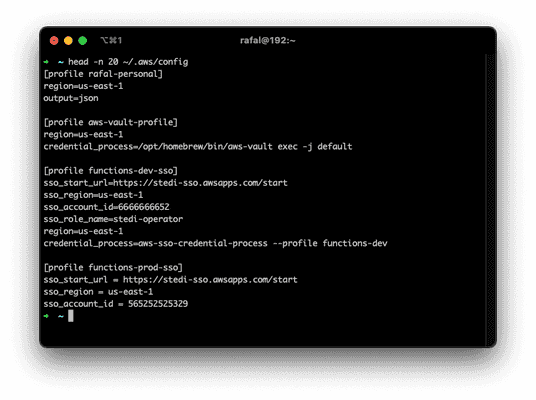
Use the same profiles as in CLI or SDK. Works with both short and long-lived credentials, MFA-protected profiles, AWS SSO-based identities and tools like aws-vault.



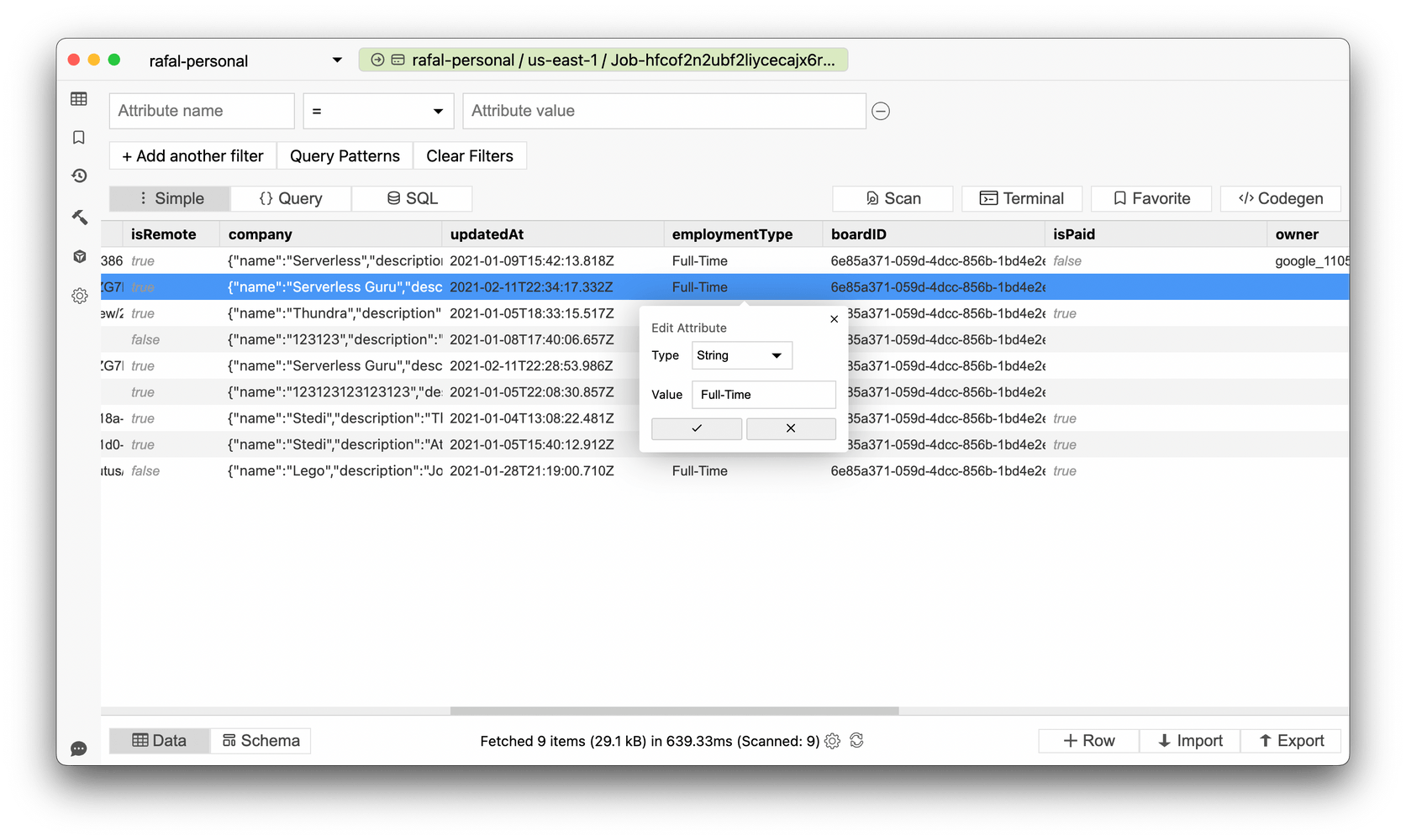
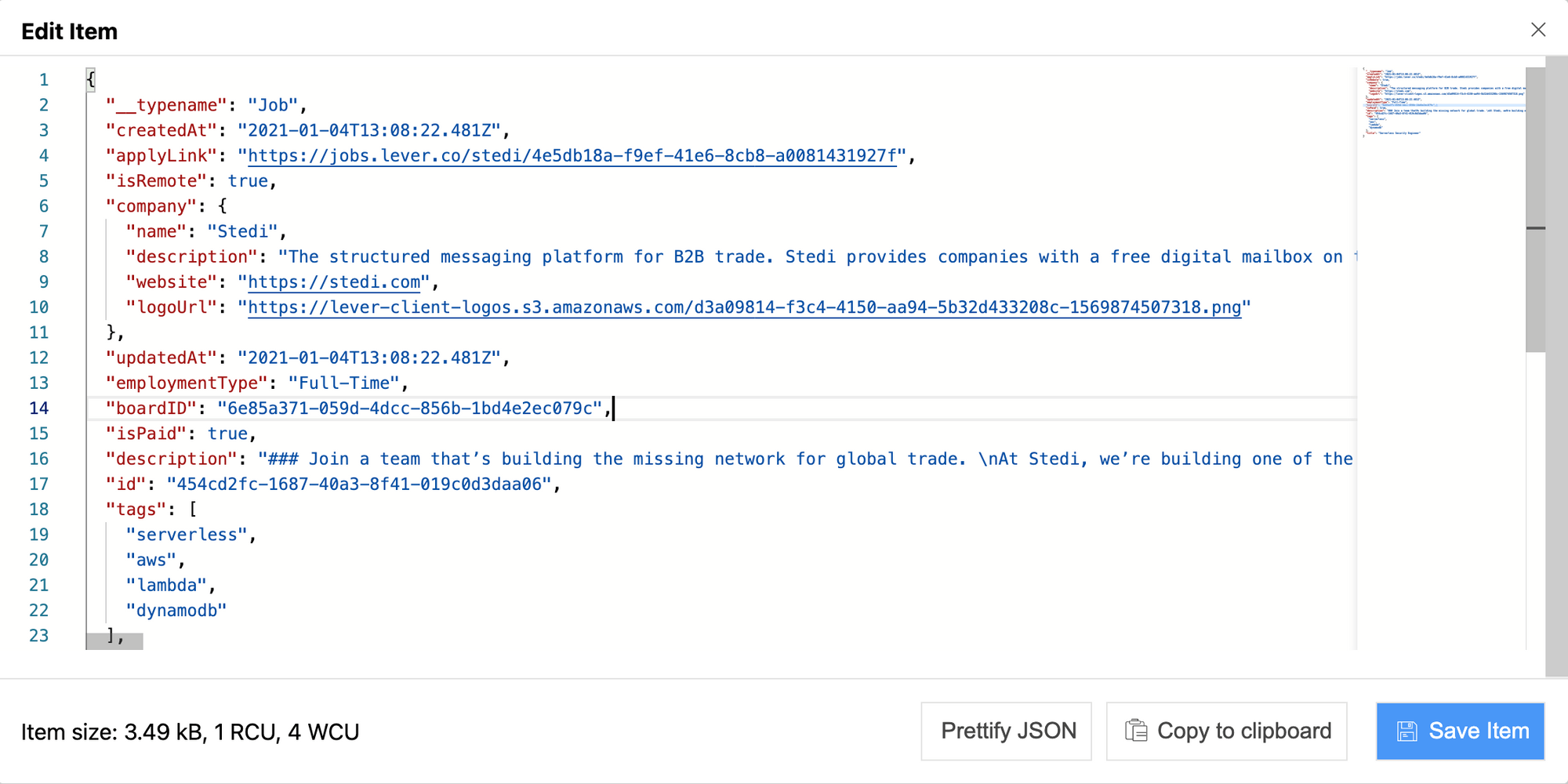
Edit data with ease.
Modify DynamoDB items just like you would modify JSON.



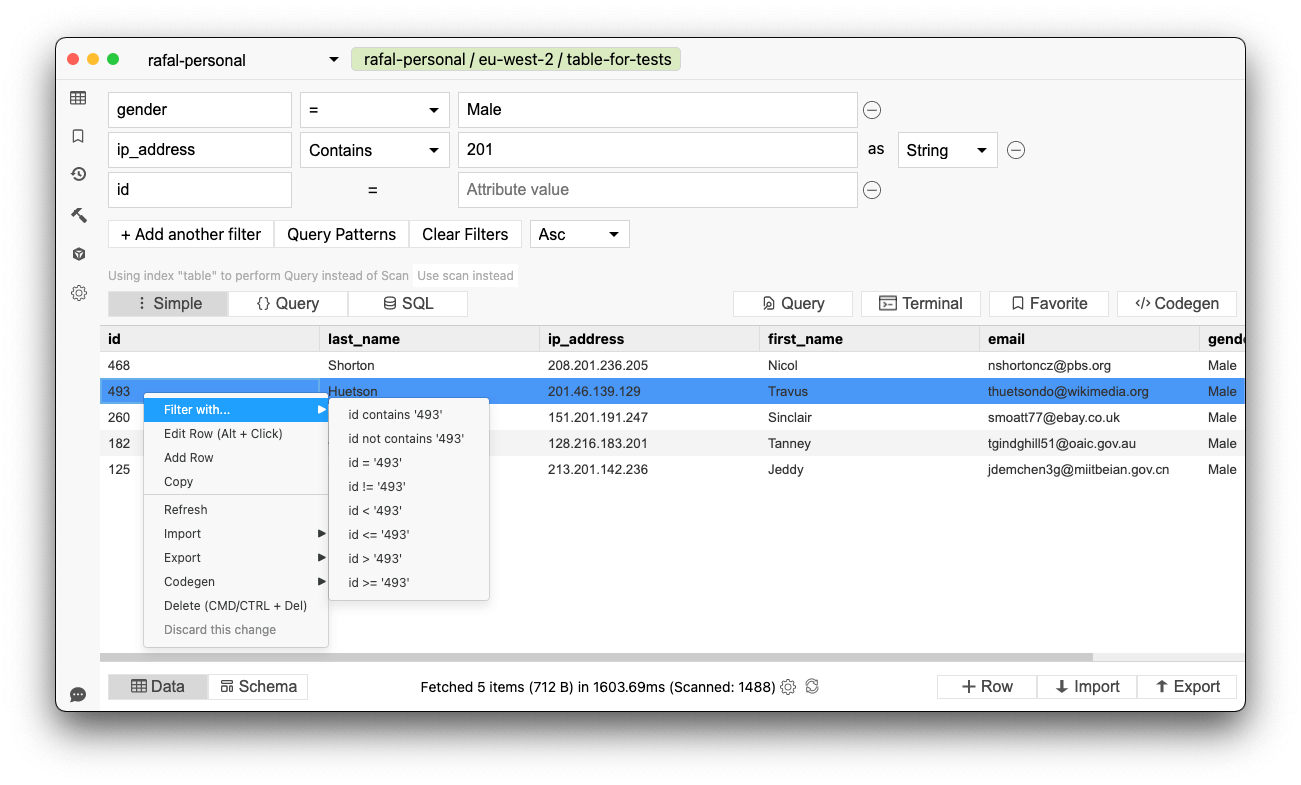
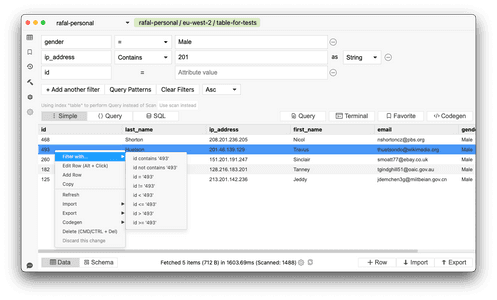
Create queries and find data easily.
Which index was that? What should this query look like? Was it Scan or Query?
It doesn't matter - Dynobase figures that out for you. It even works with SQL.
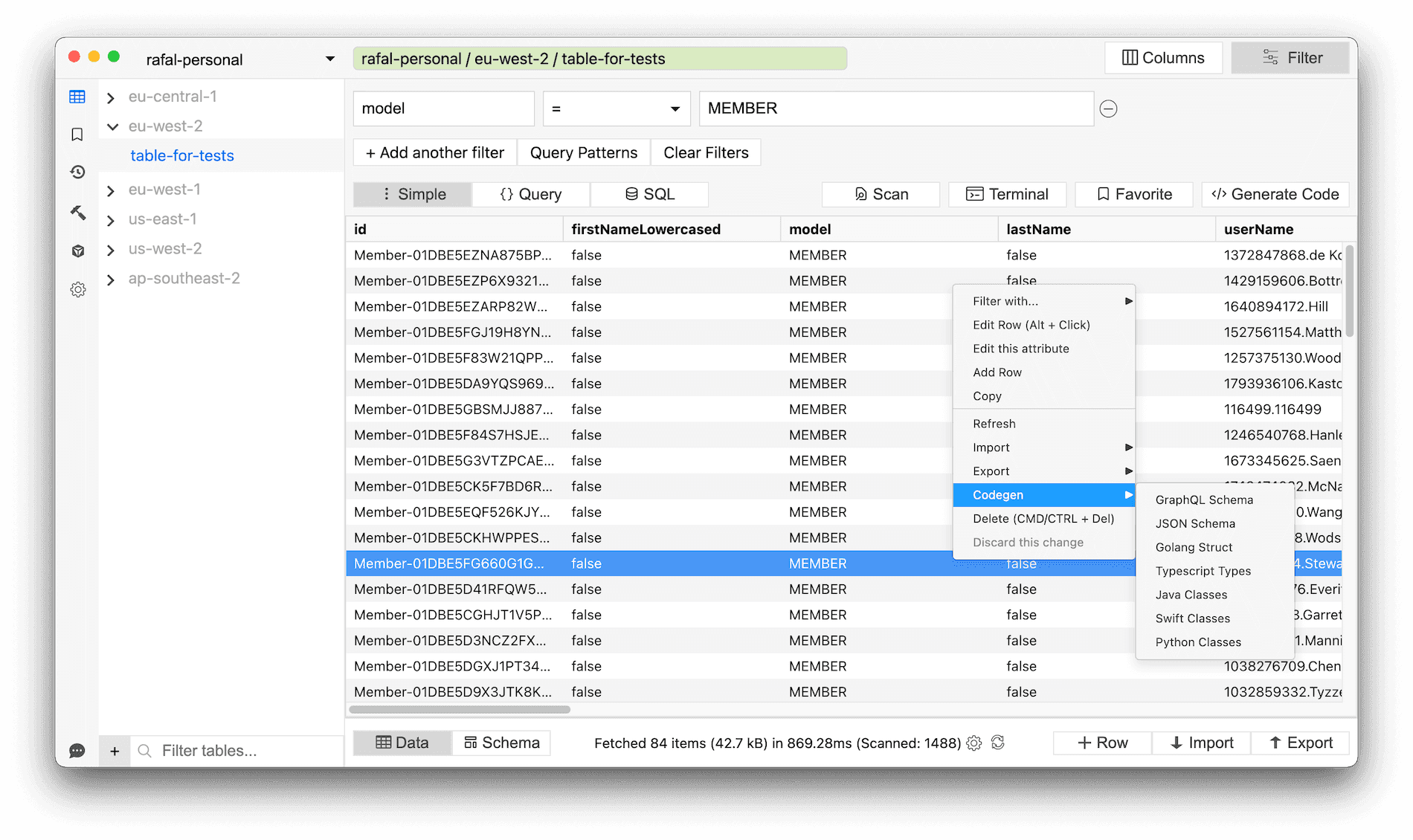
Plus, all your queries can be exported to code snippets, ready to be used in your project.


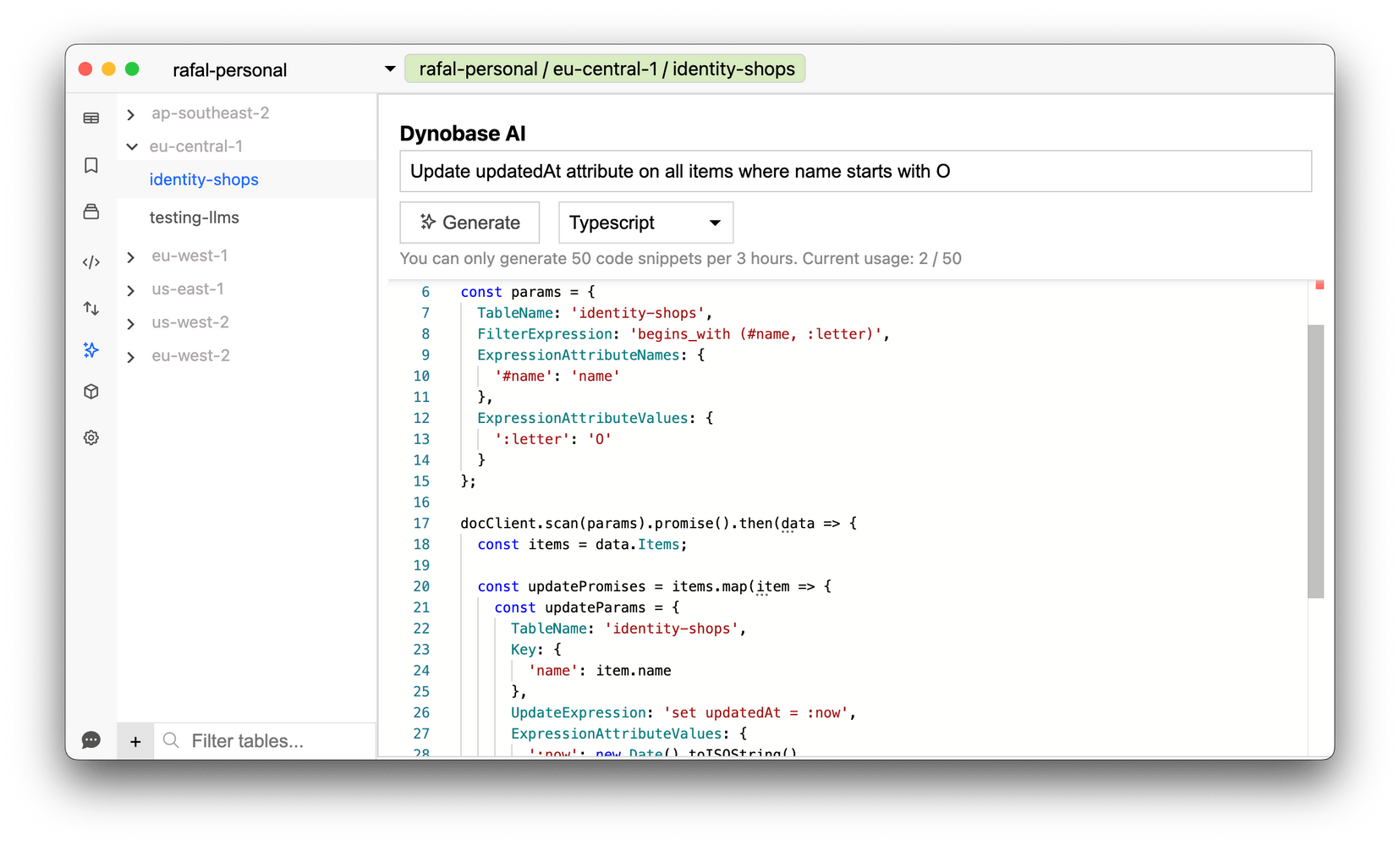
✨ Dynobase AI
Use the help of AI to generate DynamoDB code snippets for you. These snippets are available in JS/TS, Rust, Golang, and Python.
Simply explain your needs in natural language, and receive production-ready code in return.


Import & Export
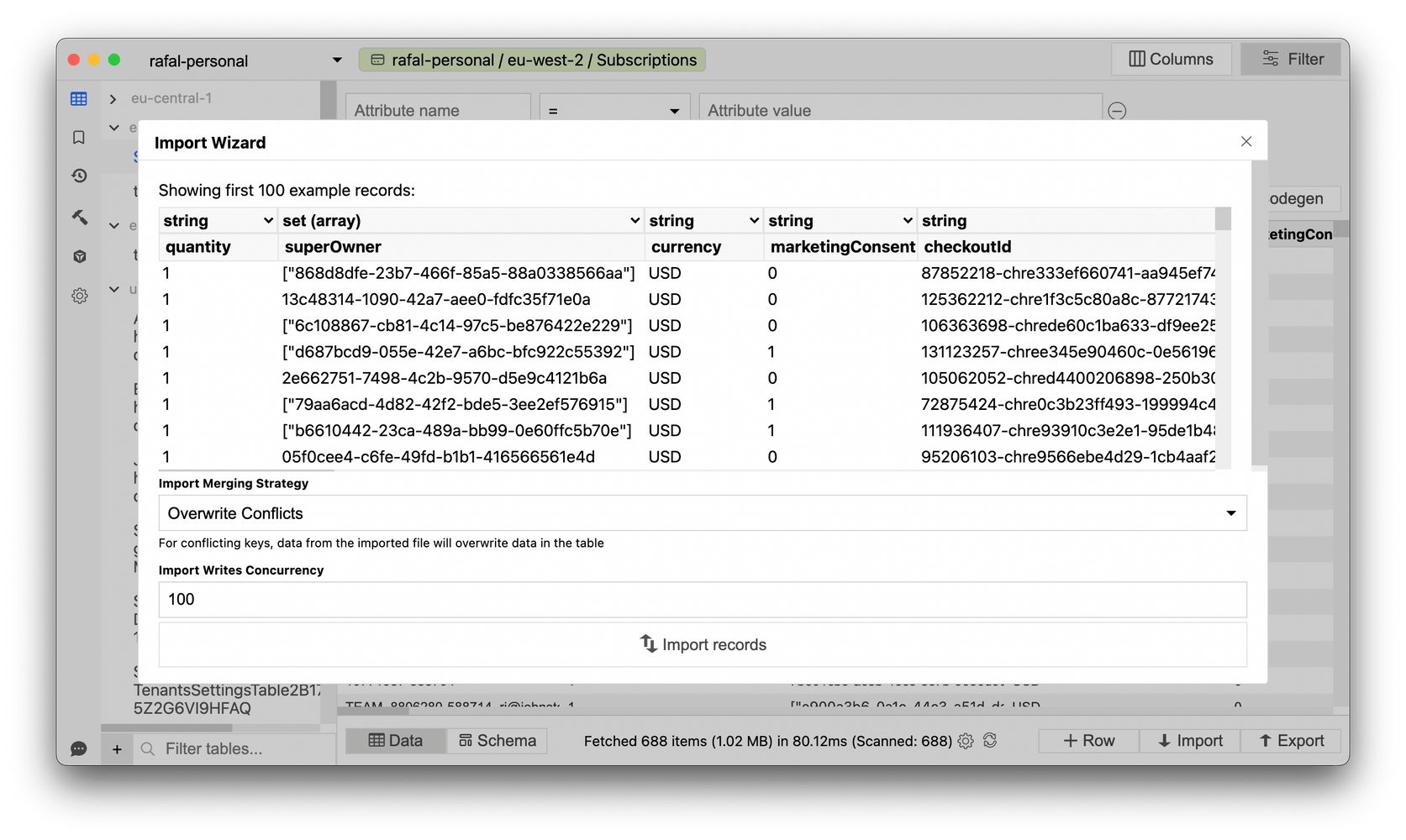
Doesn't matter whether you need to export or import data, if it's CSV or JSON. Dynobase can do it for you. Types conversion included.
Get rid of complex scripts. Migrate to DynamoDB in a few clicks.


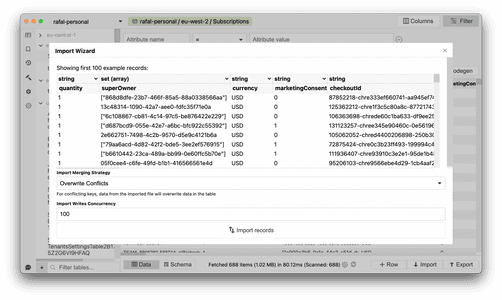
Unleash the full power of Amazon DynamoDB
Integrate With Your Workflow
Dynobase allows exporting of all operations into CLI and popular languages SDK formats. No more writing queries; just copy and paste straight into your favorite IDE.

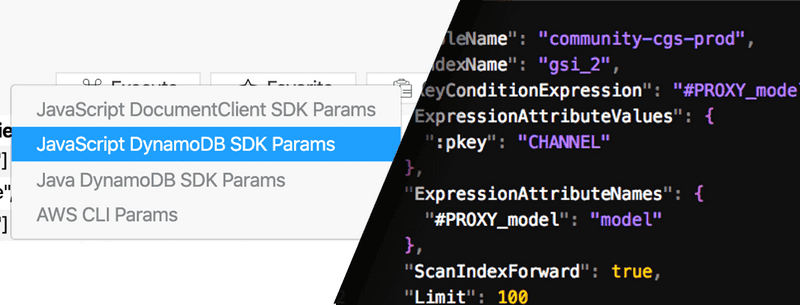
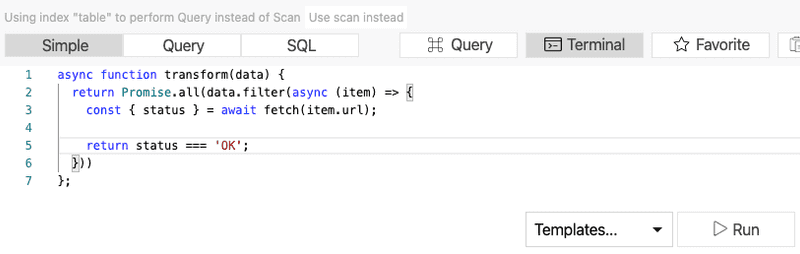
Terminal
Thanks to Terminal, you can blur the line between UI and Code. Slice and dice your data inside Dynobase to get results filtered and transformed beyond normal capabilities using Javascript.

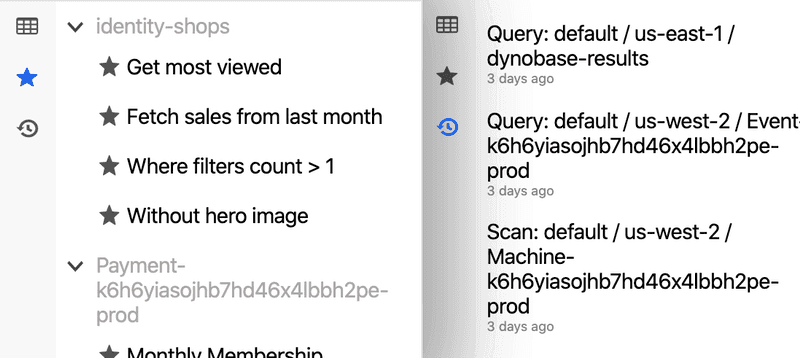
Bookmarks and History
Save and load frequently used queries and scans. Use the history of actions just like in your web browser.

Operation Builder
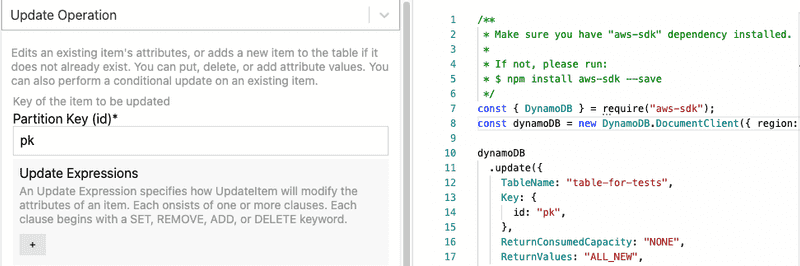
Creating DynamoDB operations, such as updating & deleting items or transactions, can be overwhelming. WYSIWYG Operation Builder will generate a production-grade code for you.

"Dynobase should absolutely be your go to tool for DynamoDB data modeling."
 Rick Houlihan
Inventor of Single-Table Design, Director Developer Relations @ MongoDB
Go ahead, play with the read-only version above.
And even more features...
Keyboard Shortcuts \
\
Navigate faster, quickly manipulate data and tabs
Multiple Tabs
Just like in your web browser, multitask easier
Query Optimizer
Dynobase automatically uses Queries instead of Scans where possible
Offline Support \
\
Works with DynamoDB Local and Localstack
Advanced Filtering
Use extended filtering and sorting capabilities
Fast speed
Scans and queries work much faster than in AWS Console
Automatic Code Generation \
\
Tired of writing queries or model classes? Dynobase does it for you
Secure
Interacts only with AWS APIs; no 3rd party connections involved
SQL Support \
\
Use PartiQL - a SQL-like syntax to query and manipulate data Truncate Table \
\
Purge table contents without removing AWS resource
Better UX/UI
Inline editing, dry runs, visual feedback, and no pagination
Multi-factor Auth
Even better security for AWS. Works with AWS SSO and aws-vault
Search Tables
Just type in the table name, and Dynobase will find it across all regions
Create Tables \
\
Create and delete DynamoDB tables straight from Dynobase Terminal / REPL \
\
Aggregate, mutate, map and filter results with built-in terminal using JS
Dark Mode
To make your eyes a little bit less tired when closing another sprint
Trusted by top DynamoDB experts
I love using Dynobase to explore my tables with a native app rather than going to the AWS console in my browser.
One of my favorite features is the ability to save common queries for simple use later. As you're implementing your data model, I recommend saving queries for each of your application's access patterns to make it easy to debug collections of items later on.
Dynobase is quickly becoming an essential part of working with DynamoDB.


Alex DeBrie, AWS Data Hero
Author of DynamoDBBook.com and DynamoDBGuide.com
Dynobase is by far the most intuitive UI tool I've used for DynamoDB, it's leaps and bounds better than the AWS console and makes it really easy to manage DynamoDB tables in a multi-region, multi-account environment.
It's made my life so much easier and allowed me to focus on the things that actually matter to my clients.


Yan Cui, AWS Serverless Hero
Author of Production-Ready Serverless, Developer Advocate at Lumigo
There are two amazing things about Dynobase.
The first is that it took so long for such a great DynamoDB client to finally arrive and the second is that it was so worth the wait.


Erik Peterson
Founder & CTO of CloudZero
Endorsed by AWS Community

This will be my default modeling tool from now on. Nice job Rafal.
5:14 am · 24 Sep 2021

I am FINALLY setting time aside to check out @dynobase!!
Awesome stuff so far: the capacity consumption feedback, and the configurable maximums around paginated reads and page sizes.
Strong work @rafalwilinski 💪

As a public service announcement, if you use DynamoDB and you haven't tried Dynobase ( https://dynobase.dev)... you should.
1:27 AM · Jan 15, 2020

"Well done! I use Dynobase everyday. Happy customer! 💪
3:23 PM · Apr 10, 2020

Two things every DynamoDB fan should have.
@alexdebrie's http://DynamoDBBook.com and @rafalwilinski @dynobase client

I was given a license for @dynobase a little while ago, and it's quickly crept into my dev workflow. So much easier to interact with DynamoDB, over the AWS console. I would say if you work with DynamoDB it's a must have tool.
1:55 PM · Jul 13, 2020

As a frontend developer, I used to be straight up _scared_ of databases 😱
Things changed when I started using AWS DynamoDB at work but as awesome as it is - the DynamoDB Web Console is not perfect
@dynobase makes DynamoDB *much* easier to work with 🥳

If you are interested in a great #DynamoDB client, this one is fantastic.
And no, I am not forsaking #NoSQL Workbench. I just really like the work that the Dynobase team does and they make a great product.
Get Started Now
Solo - Yearly
$9
/mo
$108 billed annually
- 1 License
- Mac, Windows, Linux
- All features
- All future updates
- PartiQL/SQL Support
- Email Support
Buy
MOST POPULAR
Solo - Lifetime
$249
$199
one-time payment
- 1 License
- Mac, Windows, Linux
- All features
- All future updates
- PartiQL/SQL Support
- Email Support
Buy
Team - Yearly
$79
/mo
billed annually
- 1020
Licenses - Mac, Windows, Linux
- All features
- All future updates
- PartiQL/SQL Support
- Email Support
Buy
Enterprise
Custom Pricing
- Unlimited Licenses
- Mac, Windows, Linux
- All features
- All future updates
- PartiQL/SQL Support
- Email Support
Haven't tried Dynobase yet?
Try it for 7 days, no strings attached.
Download Now
Download Now Try Dynobase 2.5.0 Beta
7-day free trialNo credit card requiredAvailable for macOS, Linux and Windows
Frequently Asked Questions
How does Dynobase connect to my DynamoDB tables?
Dynobase uses profiles stored in a folder named .aws in your home directory. It’s the same method that other various CLI and SDK tools are using. Dynobase is not modifying this file, neither is it storing them in any other place or sending them to 3rd party APIs. Dynobase also supports AWS SSO and external credential providers like aws-vault. This way, your AWS account, and identity are kept secure.
What is your cancellation policy?
If you no longer wish to use Dynobase, you may cancel at any time, and we will not bill you again. To do that, log in to your account at member.dynobase.dev and select Cancel.
How many devices can I activate with purchase or subscription?
You can register up to 3 devices per subscription or purchase. You can deactivate old devices that you’re not using anymore.
Can I use Dynobase to connect with DynamoDB Offline or LocalStack?
Yes, Dynobase works perfectly with DynamoDB Offline distributions, including the ones using Docker. Click here to learn more about offline support.
Have another question?
We're here to help. Use live chat or email support@dynobase.dev
Product Features
- Use SQL with DynamoDB
- Import CSV To DynamoDB
- Import JSON To DynamoDB
- Export DynamoDB To JSON
- Export DynamoDB To S3
- Export DynamoDB To CSV
- DynamoDB Update Item
- DynamoDB Delete All Items
- DynamoDB Delete Item
- DynamoDB Create Table
- DynamoDB Delete Table
- DynamoDB Conditional Update
DynamoDB Tools
- Chat With Cloud
- AWS Cost Monitoring
- DynamoDB Query Builder
- DynamoDB Boto3 Queries
- DynamoDB Golang Queries
- DynamoDB Code Examples
- DynamoDB Query Codegen
- DynamoDB Node.js Queries
- DynamoDB JSON Converter
- DynamoDB Local Admin GUI
- DynamoDB Pricing Calculator
- DynamoDB Single-Table Design
DynamoDB Info
- DynamoDB Streams
- DynamoDB vs Aurora
- DynamoDB Key Types
- DynamoDB Data Types
- DynamoDB Local Setup
- DynamoDB Transactions
- DynamoDB Java Queries
- DynamoDB Data Modeling
- DynamoDB with AWS SAM
- DynamoDB Common Errors
- DynamoDB Capacity Modes
- DynamoDB Query Examples
DynamoDB Guides
- DynamoDB Book
- DynamoDB Intro
- DynamoDB FAQ
- DynamoDB Tools
- DynamoDB GSI
- DynamoDB TTL
- DynamoDB PartiQL
- DynamoDB Indexes
- DynamoDB Triggers
- DynamoDB vs MongoDB
- DynamoDB Global Tables
- DynamoDB Best Practices
/
/
/
/
/
© 2025 Dynobase