

详细内容
Backed by 
Grading Assistant for Labs
Teachers should spend their time teaching, not getting buried under endless stacks
of paper to grade.
Students
deserve
detailed feedback that doesn't take weeks. Join us on our mission to modernize education.


3x
Faster Grading
30,000+
Submissions Graded
99%
Grading Accuracy
with Advanced Vision
100%
Improve student learning
For Homework
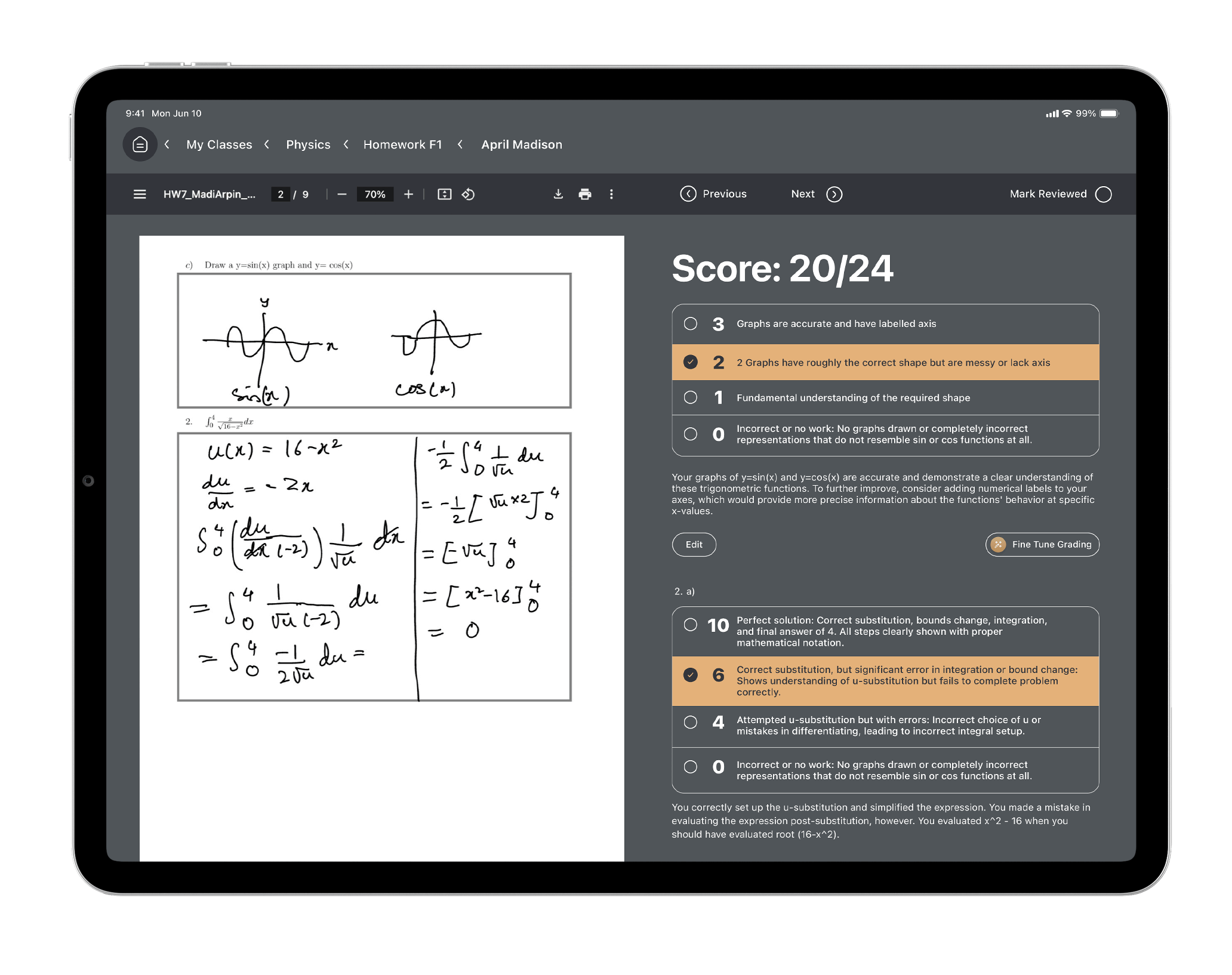
Grade in just a few clicks

Upload Student Work
GradeWiz applies computer vision
techniques to segment the work into individual questions and match submissions to students.


AI-Powered Grading, Feedback
GradeWiz uses our Symphony Model to complete the grading rubric and generate
detailed,
individualized feedback. We focus on explaining where the student went wrong, while emphasizing what
they did
well.

Instructor Review
After review by the instructor, feedback and grades can be released to students
with a
single click. GradeWiz also provides in-depth analysis on student performance such as common
mistakes.
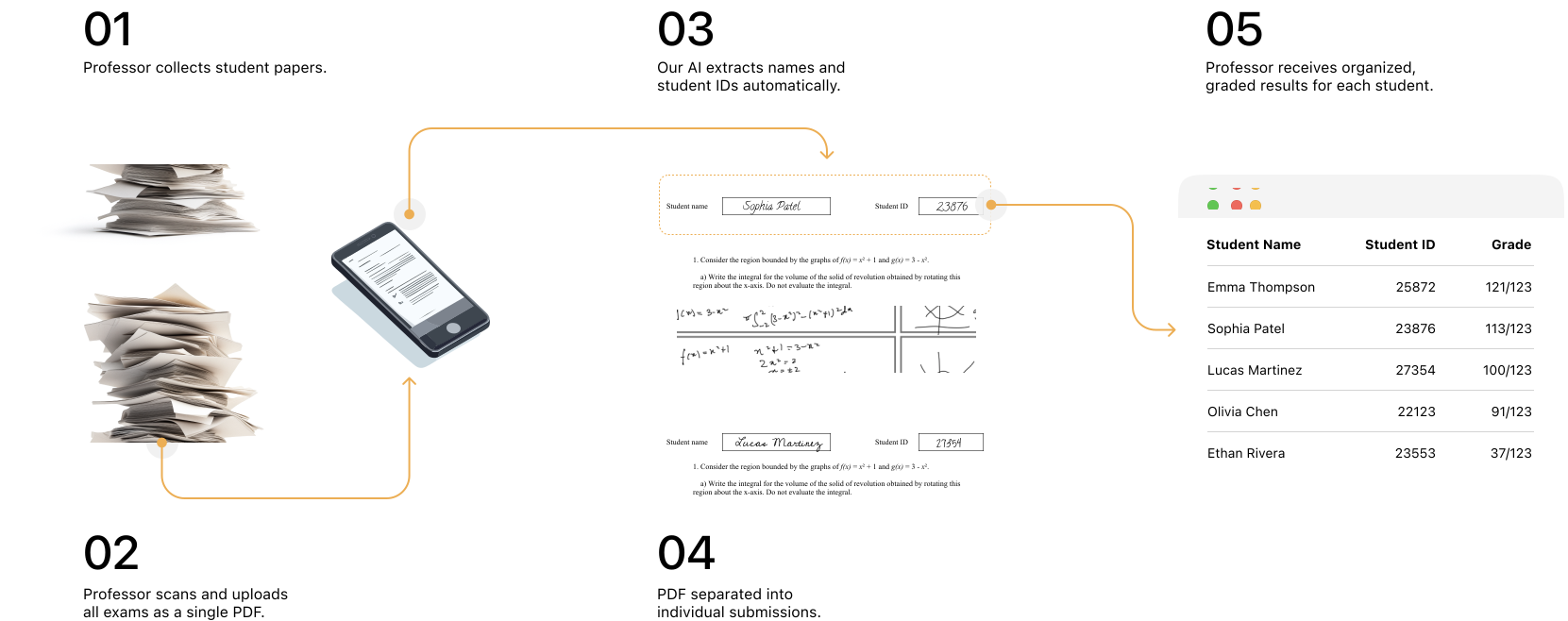
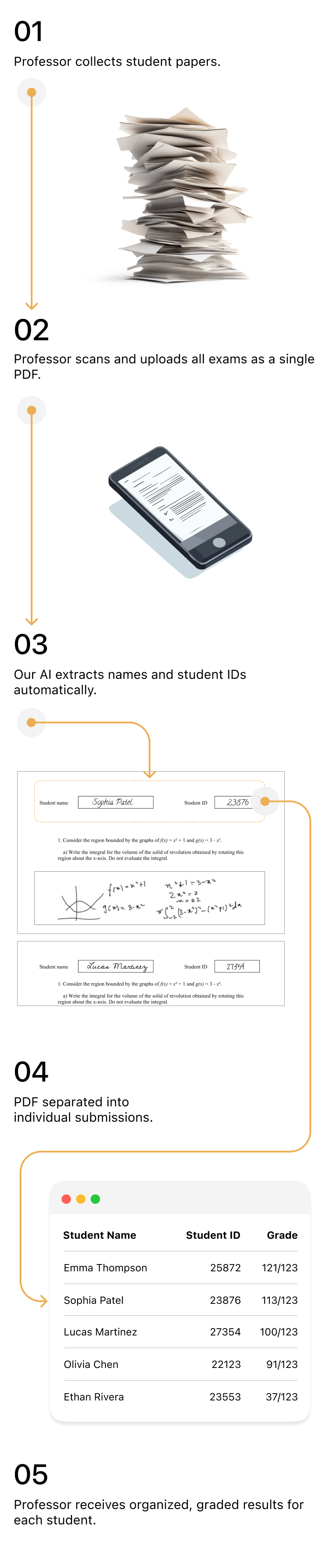
For Exams
A week of grading done in minutes
Features
Powerful AI tools to supercharge your assessment

Rubric generation
Create detailed rubrics for your entire assignment with one click

Learning
Give GradeWiz instructions and it will learn to grade just like you - just like a
real teaching assistant.

Advanced Vision
GradeWiz achieves 99% grading accuracy using our proprietary vision
technology.

Analytics
Get a big picture understanding of common student mistakes to help tailor
your
teaching.
Benefits
We help your students learn by helping you teach
01
Less time spent grading
Instead of going through and grading every single question by yourself,
tell
our model
how to grade it instead. Then review the grades and instruct the model on any changes to
grading.
02
Detailed, actionable feedback
GradeWiz generates an entire paragraph of tailored feedback for each
student,
helping
them learn from their mistakes with minimal frustration.
03
Fair, consistent grading
GradeWiz is completely objective in its grading - it doesn't get tired from
late night
sessions and it doesn't rush to make it for dinner. Give your students access to the hardest
working
grader ever.
04
Data-driven teaching
Transform grading data into actionable insights. GradeWiz analyzes student
responses to identify common misconceptions and knowledge gaps across your class to adapt your
teaching strategy in real-time.
What people think
Feedback from Students and Educators

GradeWiz offers a level of grading automation, rubric generation,
and substantive feedback that I have not seen in other teaching tools, AI-based or otherwise.
Every teacher wants to give their students detailed feedback on their work but is usually
pressed for time to do so. GradeWiz enables you to spend more of your time focused on improving
student learning outcomes, rather than manual grading.

Keith Sollers,
Cal Poly Humboldt

I appreciate that GradeWiz gives students detailed feedback that I don't
have time to give myself.
Chemistry Professor,
Occidental College

It has been a great value add for me. It's giving my students feedback where
they wouldn't get it in the past, all while cutting my time by 70%.
Physics Professor,
Ithaca College

Getting my grades back same day has been amazing! The feedback was very
specific and helpful. It told me exactly what I did wrong and helped me learn more effectively.
Student,
Cornell University

GradeWiz takes so much load off my plate. Impressive technology. Max and
Aman have been extremely responsive to my requests and suggestions.
Chemistry Professor,
Hunter College
GradeWiz made grading an instant task for me. As a part-time professor,
getting grades back to my students on time has always been challenging. GradeWiz solved this problem!
Business Professor,
Cornell University
It's amazing. You just tell the AI how you want work graded and it does
exactly that. It's like having a blazing fast TA 24/7
Calculus Professor,
Cal Poly Humboldt
I found the feedback at the end very beneficial. It was very detailed and it
helped me figure out exactly where I was deficient. I also liked that it gave me details on where I went
right too so I can keep doing that.
Student,
Ithaca College
I really loved the detailed feedback that includes what I can do better. It
was tailored to my exact wording and phrasing and will absolutely help in the future with what to
include and what to leave out.
Student,
Cornell University
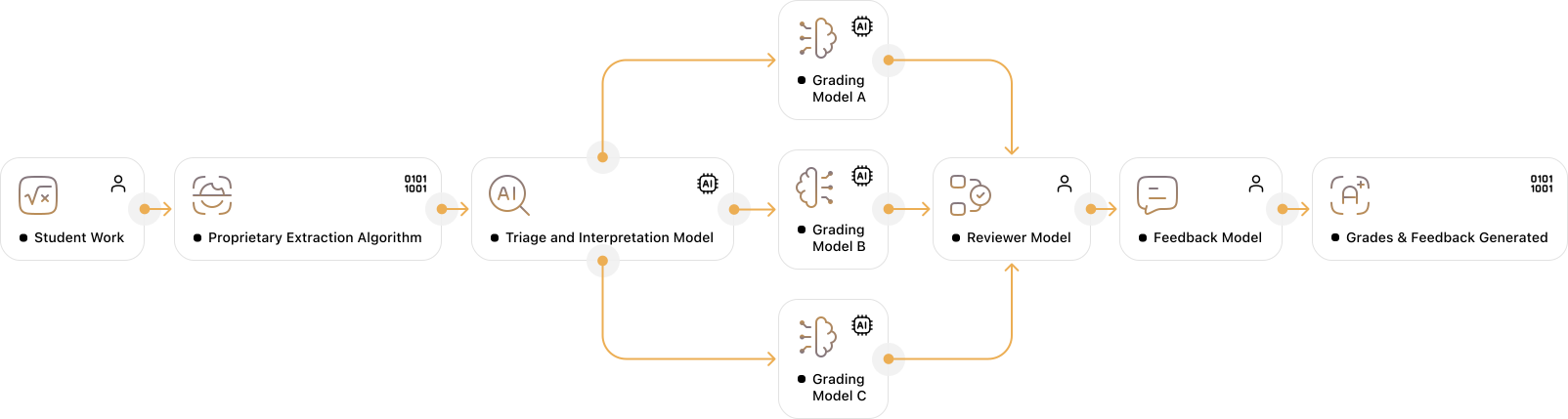
Grading that is trusted by the Ivy League
Proprietary Grading Model
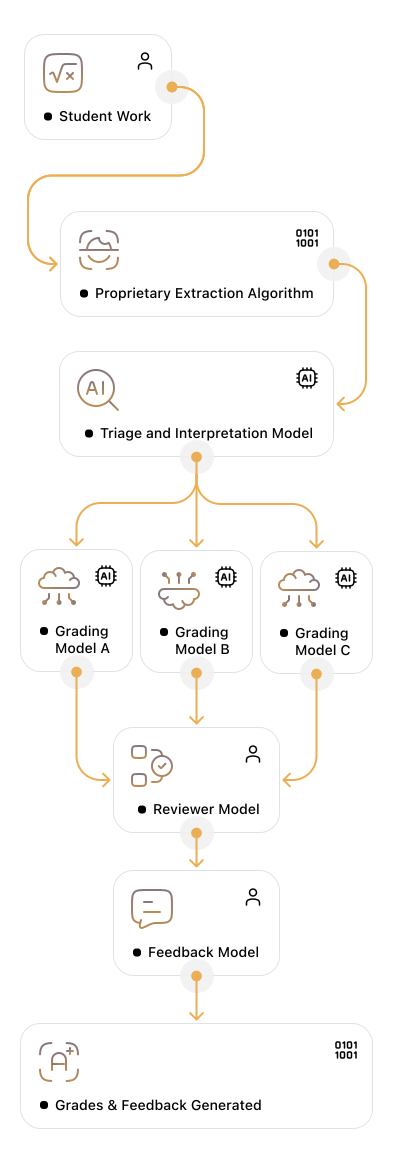
Built for Institutions, Designed for Impact
Institution-ready
VPAT
We provide a VPAT report that details our adherence to accessibility standards. We are
committed to inclusive education.

WCAG 2.2 Compliant
GradeWiz fully meets WCAG 2.2 AA standards. We make sure our platform is accessible to
everyone.

HECVAT (Secure)
Our HECVAT Full and Lite forms are available upon request. Security and reliability are
central to what we do.
FERPA Compliant
GradeWiz fully complies with FERPA standards. We value students' privacy and data and
protect it at all times.
Reach out with any questions, usage inquiries or business proposals
Contact Us
Title
First name
Last name
Email Address
Phone number
Message
Thank you! Your submission has been received!
Oops! Something went wrong while submitting the form.
Can't find what you're looking for?
Chat with our\
founding team!
Frequently asked questions
Getting Started
Using GradeWiz
Feedback and Grading
Account and Privacy
General
To create an account, visit the login page and follow the prompts
to enter your
information. You will receive a confirmation email to activate your account.
Go to the login page and enter your email and password. If you
forgot your
password, use the "Forgot Password" link to reset it.
What information do I need to create an account?\

For a teacher account, you'll need your First Name, Last Name,
School Name,
email address, and an access code. If you're interested in a free trial and
need an access
code, email support@gradewiz.ai.
How do I confirm my email address after signing up?\
You will receive a verification email with a link to confirm your
email address.
What should I do if I don't receive the confirmation email?\
Check out How\
Do I Sign Up? documentation.
How do I change my account password?\
Click "Forgot Password" on the login page and enter your
email to reset
your password.
Can I create multiple accounts with the same email?\
No, each email address can only be associated with one account.
How do I update my profile information?\
Currently, you cannot modify your account information after signing
up, so please
be careful when entering your details.
Is there a mobile app for GradeWiz?\
No, we do not have a mobile app at the moment. If you think there's
a need,
please reach out to support@gradewiz.ai with your suggestions.
What file formats are supported for assignment submissions?\
Standard GradeWiz assignments only support PDF files for assignment
submissions. Flex Assignments allow for textual input, images, and multiple-choice
questions.
How do I create an assignment?\
Navigate to the "Assignments" tab and click "Create
New
Assignment." Upload the assignment PDF you'd like to use as a starting point,
and GradeWiz will automatically input all the fields for you.
How do teacher submissions work?\
For teacher submissions, used for in-class assignments or exams,
the teacher
collects, scans, and submits the assignment. Automatic handwriting recognition
detects the
student's name and ID on the top of the page to assign the work to them.
How do student submissions work?\
For student submissions (i.e., take-home assignments), students are
responsible
for scanning and submitting their assignments as PDFs on the assignment page.
Can I edit an assignment after it has been created?\
Yes, you can edit the assignment until it is published. Once
published, the
assignment cannot be edited. If you made a mistake, you would need to delete it and
create a new
one. This prevents discrepancies between the distributed assignment PDFs and the
updated versions.
How do I delete an assignment?\
Click the trash can icon on the assignment list to delete an
assignment.
How do I view all submissions for an assignment?\
After clicking on the assignment, scroll down to review submissions
either by
student or by question. Reviewing by student allows you to see each student's
entire
submission, while reviewing by question lets you compare responses to the same
question across
different students.
Can students submit assignments late?\
Yes, late submissions are accepted until grades are published.
How do I set deadlines for assignments?\
You will be prompted to set a deadline when creating an assignment.
You can also
edit the deadline later by clicking on the top bar in the assignment page.
How do I provide detailed feedback?\
GradeWiz uses AI to generate initial feedback on student
assignments. This
feedback includes comments on key areas such as content accuracy, writing quality,
and overall
presentation. You can review and edit the feedback to ensure it meets your standards
and addresses
specific points you want to emphasize. To edit the feedback, open the student's
submission, and
you will see the AI-generated comments. Click on any comment to modify it or add
additional notes.
You can also add new comments to the submission for more personalized feedback.
Can I use my rubrics for grading?\
Yes, you can create custom rubrics in the "Rubrics"
section and apply
them to assignments for consistent and detailed grading. Additionally, you can use
GradeWiz AI to generate detailed, specific rubrics for your assignment by clicking
on the Magic Wand icon next to your question.
How accurate is the AI-generated feedback?\
GradeWiz has a 99% accuracy rate when benchmarked against teaching
assistants for
introductory to medium-level classes.
How do I share graded assignments with students?\
Click "Publish Grades" on the assignment page to share
graded
assignments with students.
Can students see the grading rubrics?\
Yes, students can view the grading rubrics used for their
assignments.
How do I provide an answer key for an assignment?\
After creating the assignment, professors should download the PDF,
fill it out,
and submit it for extraction. This is optional but highly encouraged as it increases
grading
accuracy and allows for less detailed rubrics.
Go to your profile, select "Delete Account," and confirm.
This will
permanently delete all associated data, including classes, grades, and submission
history.
What data does GradeWiz collect from users?\
GradeWiz only collects necessary cookies to keep you logged in. We
do not use
marketing, targeting, or personalization cookies and will never sell your data.
Your data is protected using SSL protocol encryption and does not
leave the
platform without being anonymized. To learn more, reach out to
legal@gradewiz.ai
Can I export my data from GradeWiz?\
Yes, you can export your grades as a CSV file from the assignment
page by
clicking "Export Grades."
What should I do if I suspect a security breach?\
Contact support@gradewiz.ai immediately and provide a detailed
description of
the issue.
How do I report a problem with my account?\
Reach out to support@gradewiz.ai for assistance with any account
issues.
How can I contact GradeWiz support?\
You can contact us at support@gradewiz.ai or schedule a meeting
here (preferred).
Are there any training sessions or webinars available for new users?\
Yes, please schedule a training session here.
How do I provide feedback about GradeWiz?\
We value your feedback. Please reach out to
support@gradewiz.ai
with your
comments and suggestions.