

详细内容






Learn English, Spanish and Other Languages Effortlessly with Interactive Dual Subtitles


By using this website you agree to use cookies as stated in our Terms of Use and Privacy Policy .
Accept
Close


InterSub . AI-powered interactive dual subtitles and instant word translations make learning fun and effective.
InterSub . AI-powered interactive dual subtitles and instant word translations make learning fun and effective.
Boost your language skills while enjoying your favorite shows on YouTube, Netflix, Prime Video, HBO Max, Crunchyroll, TED and courses on Coursera, Udemy and LinkedIn Learning. We support English, Spanish and 30 other languages.
Boost your language skills while enjoying your favorite shows on YouTube, Netflix, Prime Video, HBO Max, Crunchyroll, TED and courses on Coursera, Udemy and LinkedIn Learning. We support English, Spanish and 30 other languages.
Install Chrome extension (it's free!)
How it works
How it works
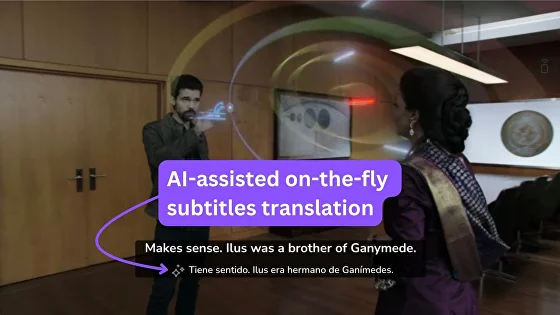
AI-assisted Dual Subtitles
Watch videos with subtitles in your target language and your native language side-by-side.
If a video doesn't have subs in your language, we will translate them on the fly.
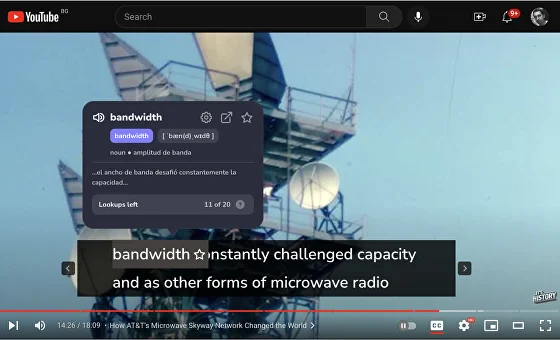
Instant Translations
Hover over any word in the subtitles to get an AI-generated instant definition and a context translation.
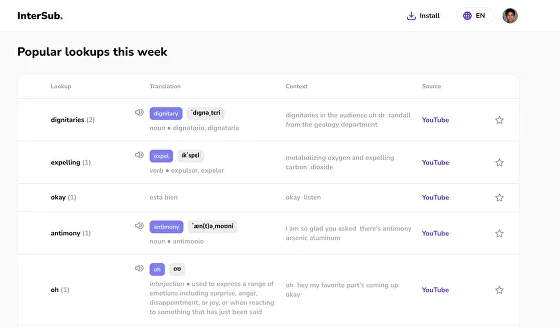
Personal Wordbook
All translated words are automatically saved to your personal vocabulary list (or "wordbook") for easy review.
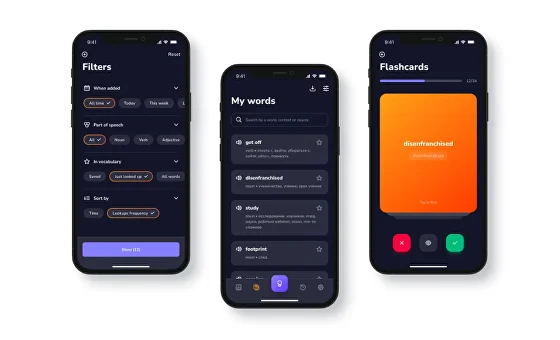
Mobile Integration
Sync your wordbook to Anki and other mobile apps or Telegram bots for on-the-go learning.
AI-assisted Dual Subtitles
Watch videos with subtitles in your target language and your native language side-by-side.
If a video doesn't have subs in your language, we will translate them on the fly.
Instant Translations
Hover over any word in the subtitles to get an AI-generated instant definition and a context translation.
Personal Wordbook
All translated words are automatically saved to your personal vocabulary list (or "wordbook") for easy review.
Mobile Integration
Sync your wordbook to Anki and other mobile apps or Telegram bots for on-the-go learning.
Key Features
Key Features
Multi-Platform Support
InterSub works on YouTube, Netflix, Prime Video, HBO, Crunchyroll, TED, Coursera, Udemy, LinkedIn Learning, Learn.Cantrill, Domestika, DW Learn German, and Shahid. And more to come.
We also allow looking up words on almost any website.
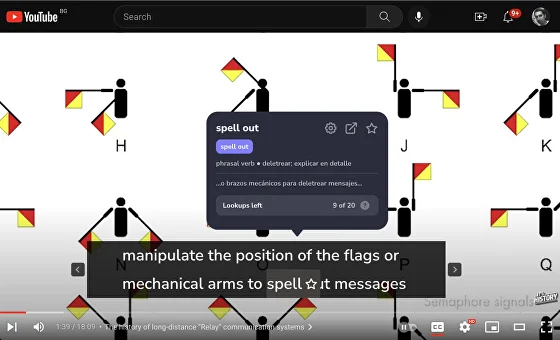
Collocation Detection
InterSub's advanced AI recognizes English phrasal verbs, idioms, and compound nouns.
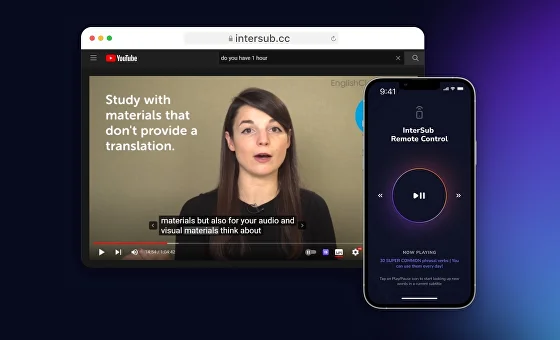
Remote Control
Use your phone to look up words while watching on a big screen.
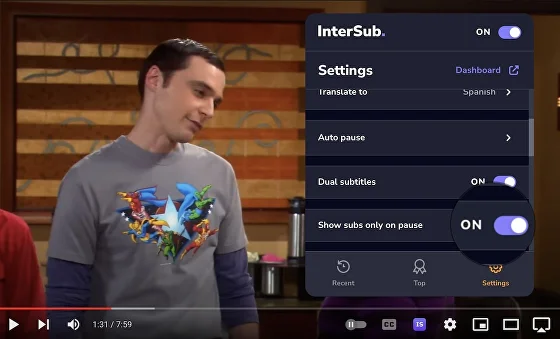
"Show Subtitles on Pause"
Focus on the video, with subtitles only appearing when you need them.
Multi-Platform Support
InterSub works on YouTube, Netflix, Prime Video, HBO, Crunchyroll, TED, Coursera, Udemy, LinkedIn Learning, Learn.Cantrill, Domestika, DW Learn German, and Shahid. And more to come.
We also allow looking up words on almost any website.
Collocation Detection
InterSub's advanced AI recognizes English phrasal verbs, idioms, and compound nouns.
Remote Control
Use your phone to look up words while watching on a big screen.
"Show Subtitles on Pause"
Focus on the video, with subtitles only appearing when you need them.
See InterSub . in action
See InterSub . in action
IS full demo nov23 - YouTube
InterSub
6 subscribers
InterSub
Search
Watch later
Share
Copy link
Info
Shopping
Tap to unmute
If playback doesn't begin shortly, try restarting your device.
More videos
More videos
Share
Include playlist
An error occurred while retrieving sharing information. Please try again later.
0:00
0:00 / 1:21
•Live
•
Grow your language skills with no extra time spent
Grow your language skills with no extra time spent

Our 18,000+ customers are fond of InterSub .
Our 18,000+ customers are fond of InterSub .
- Elena
Love the feature! My English is pretty good, but I'm not native, so, sometimes a little help could be handy. The fact that now I can check the translation without distraction is awesome! And it is completely worth the few bucks of a subscription.
- Nick
I was invited to the beta-test, and was quite impressed! Thank you, guys, and can't wait for the Dictionary function.
- Alex
This function is really helpful! Translation to French seems pretty accurate. It’s great that there is no need to interrupt watching if you didn't understand a new word.
This function is really helpful! Translation to French seems pretty accurate. It’s great that there is no need to interrupt watching if you didn't understand a new word.
Alex
Love the feature! My English is pretty good, but I'm not native, so, sometimes a little help could be handy. The fact that now I can check the translation without distraction is awesome! And it is completely worth the few bucks of a subscription.
Elena
I was invited to the beta-test, and was quite impressed! Thank you, guys, and can't wait for the Dictionary function.
Nick
This function is really helpful! Translation to French seems pretty accurate. It’s great that there is no need to interrupt watching if you didn't understand a new word.
Alex
Love the feature! My English is pretty good, but I'm not native, so, sometimes a little help could be handy. The fact that now I can check the translation without distraction is awesome! And it is completely worth the few bucks of a subscription.
Elena
Join thousands of InterSub . happy users and start watching videos smarter than ever!
Frequently asked questions
What is InterSub?
InterSub is a browser extension for Google Chrome, Microsoft Edge and Firefox designed for language learning and skill acquisition. It offers interactive dual subtitles and instant word translations on popular streaming and educational platforms like YouTube, Netflix, Prime Video, Udemy, Coursera, LinkedIn Learning, and TED.
How does InterSub work?
InterSub integrates with your browser and provides real-time dual subtitles (in your native and target languages) while you watch videos. It also offers instant translations when you hover over unfamiliar words, enhancing your learning experience. InterSub saves all the words you looked up while watching videos in your InterSub Dashboard. To have access to InterSub Dashboard – click “Dashboard” in the plugin settings.
Which platforms does InterSub support?
InterSub currently supports YouTube, Netflix, Udemy, Coursera, LinkedIn Learning, TED, and Prime Video. We're continuously working to add more platforms to our list.
Is InterSub suitable for beginners?
Yes, InterSub is designed for learners at all levels, including beginners. The dual subtitle feature and instant translations make it easier for newcomers to understand content in their target language.
Can I use InterSub for multiple languages?
Absolutely! InterSub supports a wide range of languages. You can switch between different target languages depending on what you're learning. To set “Translate from” and “Translate to” options go to InterSub plugin settings in your browser.
Is there a mobile version of InterSub?
Currently, InterSub is a browser extension for desktop use on Google Chrome, Microsoft Edge, and Firefox. However, we offer a Remote Control feature for looking up words from your mobile device during playback, as well as mobile apps and Telegram bots for memorization and practice as part of our full-cycle learning approach.
Scan QR code in a pop-up on the video to start using the Remote Control feature. Or install one of the apps or bots following the instructions on this page to start memorizing words from your vocabulary
How much does InterSub cost?
We offer flexible pricing options, including a Pay-as-you-go plan for casual learners. Please visit our pricing page for detailed information on our current plans and offers.
Can I use InterSub offline?
InterSub requires an internet connection to function properly, as it provides real-time translations and subtitle synchronization.
How does InterSub's AI-powered phrase translation work?
Our AI-powered phrase detection and translations recognize English phrasal verbs, idioms, and compound nouns in the subtitles of videos you watch.
Is my learning data saved and accessible?
Yes, InterSub saves your learning progress and encountered vocabulary. You can review this data to reinforce your learning. InterSub saves all the words you looked up while watching videos in the InterSub Dashboard (your wordbook). To have access to InterSub Dashboard – click “Dashboard” in the plugin settings, then click "Words" in the side menu.
How do I install InterSub?
InterSub can be easily installed as a browser extension. Simply visit our website and follow the installation instructions for your specific browser.
If you are on the InterSub page in your browser's app or extensions marketplace, click the "Install" button, usually located in the top-right corner.
Which browsers are compatible with InterSub?
InterSub is compatible with major browsers including Google Chrome, Microsoft Edge, and Firefox. Check our compatibility page for the most up-to-date information.
Can I customize the appearance of the subtitles?
Yes, InterSub offers various customization options. You can adjust the size, position, and even toggle shadowing (pause after each subtitle) for the subtitles using our hotkeys. You can also choose your subtitle background to be “wide” or “narrow”.
How does InterSub differ from other language learning tools?
InterSub stands out with its simplicity, multi-platform integration, and full-cycle learning approach. It's designed to seamlessly integrate into your existing entertainment and learning habits.
Is there a trial period for InterSub?
Yes, we offer a free trial period so you can experience the benefits of InterSub before committing to a subscription. Check our website for current trial offers.
How often is InterSub updated?
We regularly update InterSub to improve performance, add new features, and expand platform compatibility. You can find our latest updates on our blog or changelog.
Can I use InterSub for content in my native language?
While InterSub is primarily designed for language learning, you can use it to add subtitles in other languages to content in your native language, which can be useful for learning new vocabulary or improving reading skills in other languages.
How to use hotkeys with InterSub?
- Rewind / Fast forward with ← and →, and pause with Space key
- Resize main subtitles with = / - and secondary subtitles with Shift + = / -.
- Adjust subtitle position with the ↑ and ↓ keys.
- Toggle shadowing with the S key.
- Turn InterSub on/off using the I key.
What is a Remote Control mobile app?
Remote control – the ability to control video playback and look up words in subtitles using any smartphone, without needing a computer. When paused, the subtitle and the translation of the selected unfamiliar word will be displayed. After closing the translation window, playback will automatically resume.
Scan the QR code over the video to launch Remote Control for the video you are watching!
How do I update the InterSub plugin to the latest version?
To update the plugin, quit your browser application and restart it. We support Google Chrome, Microsoft Edge, and Firefox.
Get Started with InterSub .
Get Started with InterSub .
InterSub is available as a free browser extension for Chrome, Edge, and Firefox. Download it today and transform your screen time into language learning time!
InterSub is available as a free browser extension for Chrome, Edge, and Firefox. Download it today and transform your screen time into language learning time!


InterSub Inc.
☂︎ 220 East 23rd Street, Suite 400. New York, NY 10010
© 2025 All rights reserved
PRODUCT
CASES
- Learn on Udemy with InterSub
- Learn on Coursera with InterSub
- Learn on LinkedIn Learning with InterSub
- Feel confident watching anime on Crunchyroll
- Anki + InterSub integration
- Anki: how to set up your saved words sync
COMPANY
 \