

详细内容
Black Friday! Less than 50
couponsBF20 Copywith 20% OFF!
KerligTMAI Writing App for Mac
Save hours on written communication at work
Write emails, Slack replies, Jira tickets, proofread, chat with documents...
Download macOS App Apple Silicon & Intel · macOS 12+
Trusted by 5000+ employees and teams
4.9 Rating 5.0 Rating 5.0 Rating
AI-enabled workflows
Proofread
Before you click "Send"
Write Slack replies
That sound like you
Chat with documents
Webpages, ebooks and images


Reply to client emails in  like a pro, fix your "duck" that should've been something else in
 , learn new skills from
 videos, make sense of your scattered
 thoughts, and weigh job opportunities in
 — because juggling 47 browser tabs is basically a workplace superpower now.
Personalization
Tailor your writing
For every situation
Customize actions
To fit the way you work


Integrate AI into your macOS workflow, instantly.
Ask "ReplytoMikethat2pmisfine"
Fix spelling and grammar
Improve writing
Summarize
Make shorter
Convert to TypeScript interface
YouTube Script Creator
Career coach
Simplify
Built-in & custom actions
Use built-in actions and create your own to supercharge your daily workflows.
Apple Foundation ModelsOpenAIAnthropicGoogle GeminiGroq CloudOllamaOpenRouterx AIPerplexityLM StudioMistralAmazon Bedrock
Integrations
Connect with your preferred AI providers using API keys.
350+
AI models
AI models
All models in one app. Switch between models with one click.
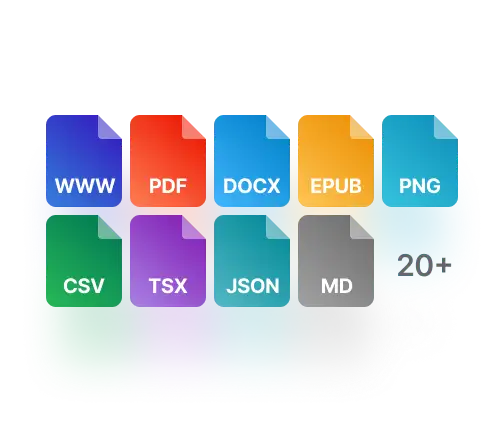
Attachments
Analyze, summarize, and chat with the most popular document types.
Privacy
Your messages are sent directly to AI providers, then stored and encrypted on your Mac.
Deep Research
Use reasoning models for multi-step research leveraging online data.
⌥ option + space
Shortcuts
Run every action faster using shortcuts and global hotkeys.
Team deployment
Remote team deployment via CLI
Chat interface
Chat like you would in ChatGPT
Edit messages
Edit your prompt to improve response
Headless mode
Run actions in the background
Local models
Apple Foundation Models, Ollama, LM Studio
Regenerate responses
See how different models respond
Chat history
Go back to your past chats easily
Citations
Open links with cited sources in your browser
Reasoning models
See models' chain of thought
What are users saying about Kerlig?
Testimonials
“It's a beautifully designed time saver!”

Angelika
Product Designer @ UNUM
“ I love this app. It allows me to run prompts against various models, and it just works really well. It might be my favorite AI app on my Mac.”

Noah
Podcaster
“Since using Kerlig, switching between my operating system and browser has become much more efficient”

Adam
Director of Product Design
“No context switch is what you want in an AI assistant”

Jonathan
Business owner
“ Kerlig helps me fix my grammar mistakes and improve my writing when communicating with clients and colleagues on Slack & Email.”

Mateusz
Senior Product Designer
“Smart academic assistant, learn, and write more efficiently using AI.”

Abdelghani
PhD Student
“I really like the native experience and how accuracy feels like an integrated part of MacOS.”

Michał
Senior Product Designer
“Before I used Kerlig, I had to switch to my browser, open ChatGPT and paste my question.”

Lukas
Business owner
“Sometimes you get a mental block whilst writing, Kerlig fixes that by putting AI features at your fingertips.”

Andreas
Business owner
“You can tell it's built with shortcuts and speed in mind – feels super seamless to use”

Nirmal
Software Engineer
“Beautiful AI writing assistant”

Juraj
Web Developer
“The ability to create your own presets is a big plus.”

Mik
Designer / Owner
Use your favorite LLMs, with over 350 supported models
Pricing
No subscription. Pay once, then only fortokensyou use.
Basic License
November Deal: Lifetime Updates
$49
$247
/once
Buy Basic License
Best for users with one Mac
- 1 Mac (1 seat)
- Lifetime1 year app updates
- Vision, Attachments, Presets
- Use yourtone of voice
- 350+ models: OpenAI, Anthropic, Google, Groq, OpenRouter with your ownAPI key
- Apple Foundation Models, Ollama, LM Studio
- 48h email support
Pro License
November Deal: Lifetime Updates
$79
$467
/once
Buy Pro License
Best for Pro users with two Macs
- 2 Macs (2 seats)
- Lifetime1 year app updates
- Vision, Attachments, Presets
- Use yourtone of voice
- 350+ models: OpenAI, Anthropic, Google, Groq, OpenRouter with your ownAPI key
- Apple Foundation Models, Ollama, LM Studio
- 24h email support
Team License
$297
/once
Buy Team License
Need more seats? Contact us
- 10 Macs (10 seats)
- Vision, Attachments, Presets
- Use yourtone of voice
- 350+ models with your ownAPI key, plus Apple Foundation Models, Ollama, LM Studio local models
- Remote teamdeploymentusing CLI commands
- One year of appupdates
- Priority Zoom & email support
14-day money back guarantee. Prices in USD. VAT may apply.
Trusted by 5000+ employees and teams
4.9 Rating 5.0 Rating 5.0 Rating
FAQ
How does it work?
- Download Kerlig™ app
- Install: define a hotkey, add AI provider API key
- Select text in any app and press the hotkey
- Choose action e.g. Fix spelling
- Paste corrected text into the original app
To make Kerlig app work, you will need to provide an API key from at least one AI provider or use on-device Apple Foundation Model, or other local models via Ollama or LM Studio.
See guides for getting API keys from: OpenAI, Anthropic Claude, Google Gemini, Perplexity, Groq, and OpenRouter. Or see how to run local models.