

详细内容
Luminar Brush: Revolutionize Your Image Enhancement
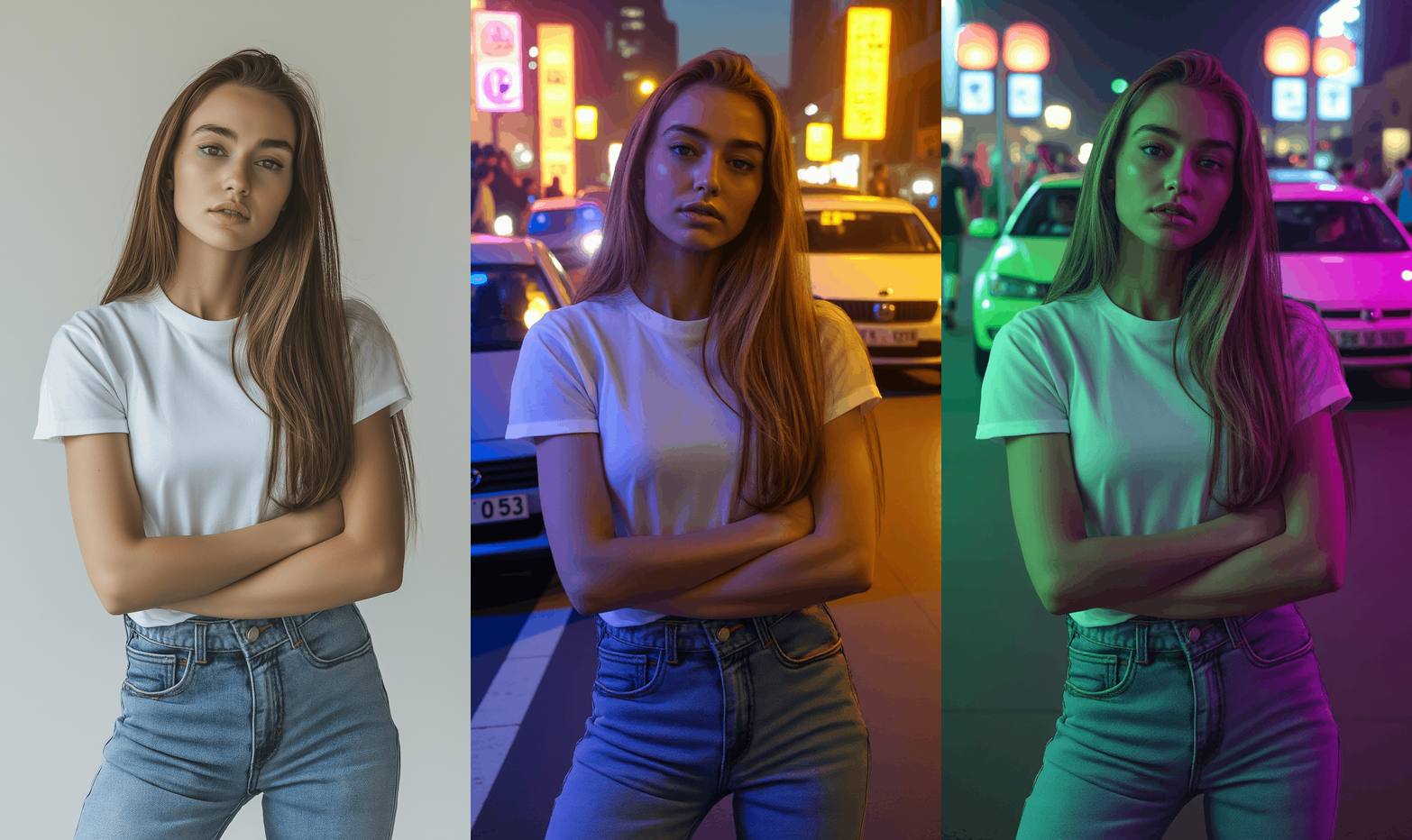
Lumina Brush is an innovative AI-powered image editing tool designed specifically for enhancing lighting effects in photographs. Developed by lllyasviel, the creator of ControlNet, Lumina Brush utilizes a two-stage processing framework that allows users to transform images with uniform lighting and apply interactive lighting effects based on user inputs. This tool is particularly beneficial for artists, photographers, and anyone involved in visual content creation, providing a seamless way to manipulate lighting conditions in images.
Start free trial now, experience Luminar Brush's advanced lighting technology, and create stunning photos with perfect illumination!
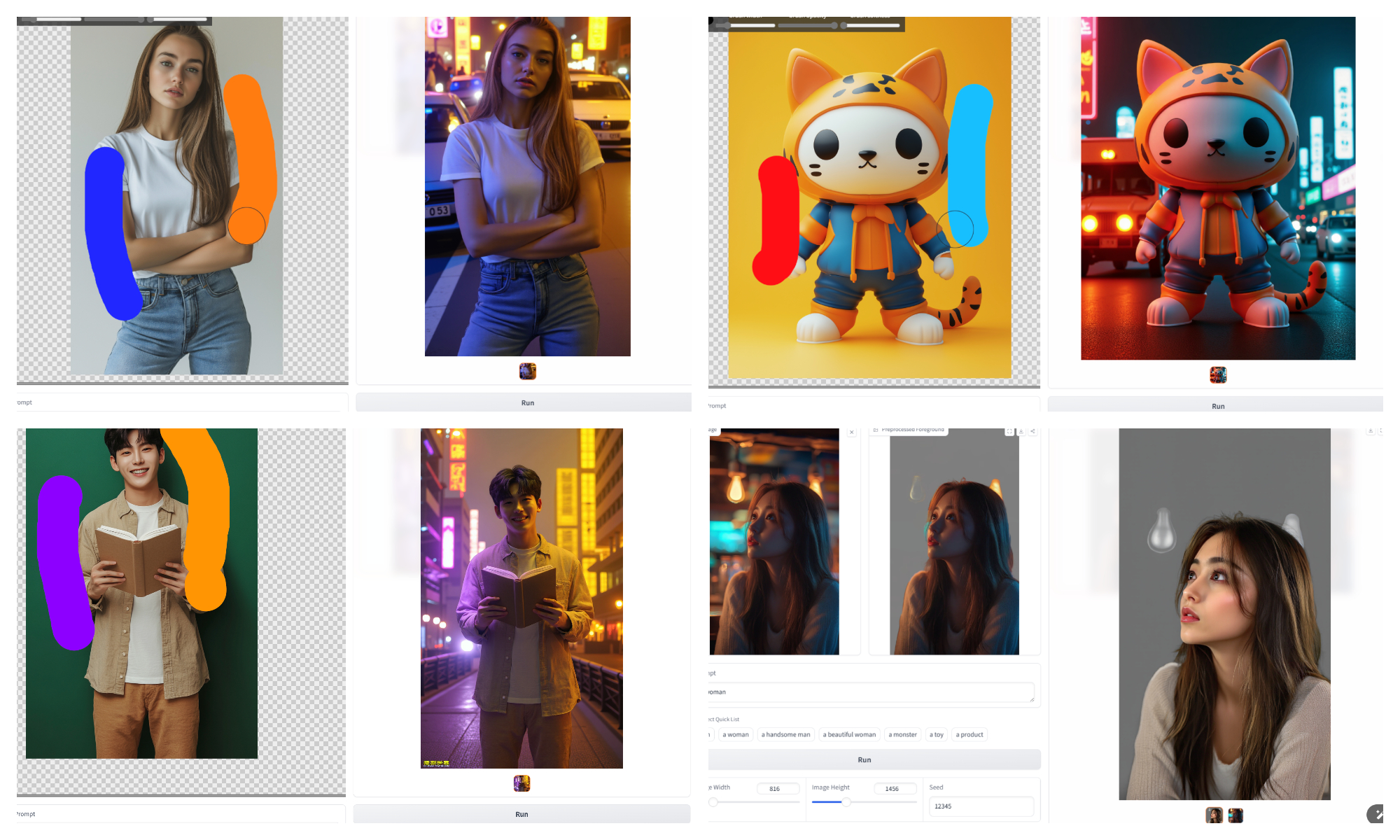
Try Luminar Brush free online
Experience the power of Luminar Brush with our free online tool. Upload your images, select lighting options, and see the magic happen in real-time.
Hugging Face – The AI community building the future.
404
Sorry, we can’t find the page you are looking for.

What is Luminar Brush
Lumina Brush is an advanced image editing tool designed to enhance lighting effects in photographs. Here are the key points that outline its features and functionalities:
Two-Stage Framework
Lumina Brush utilizes a two-stage framework: the first stage converts images to uniformly-lit appearances, while the second stage generates illumination effects based on user inputs.
Simplified Learning Process
Decomposing the illumination drawing problem into two stages simplifies the learning process, avoiding the need for complex external constraints.
Intermediate Representation Benefits
Using uniformly-lit images as an intermediate representation helps avoid issues like overly sharp mesh boundaries and flat surfaces.
Detail Preservation
The framework effectively handles intricate details such as skin textures, hair, and fur, ensuring high-quality results.
Training with Diverse Data
The model is trained using millions of high-quality images to extract uniformly-lit appearances, building a robust dataset for the final interactive illumination drawing model.
Why Choose Luminar Brush
Choose Luminar Brush to revolutionize your image enhancement experience with advanced AI-powered lighting technology.
AI-Powered Technology
Leverages cutting-edge AI algorithms to produce realistic and dynamic lighting effects.
User-Friendly Interface
Designed for both beginners and professionals, making it easy to navigate and use effectively.
Real-Time Editing
Users can see changes instantly as they apply lighting adjustments, facilitating a more intuitive editing process.
Versatility
Suitable for a wide range of applications, from portrait retouching to product photography and digital art.
How to Use Luminar Brush
Using Luminar Brush tool is very simple, follow these steps to enhance your images with AI-powered lighting:
1.Upload Image
Start by uploading the image you want to edit onto the Lumina Brush platform.
2. Initial Processing
The tool automatically processes the image to create a uniform lighting base, removing complex lighting variations.
3. Interactive Editing
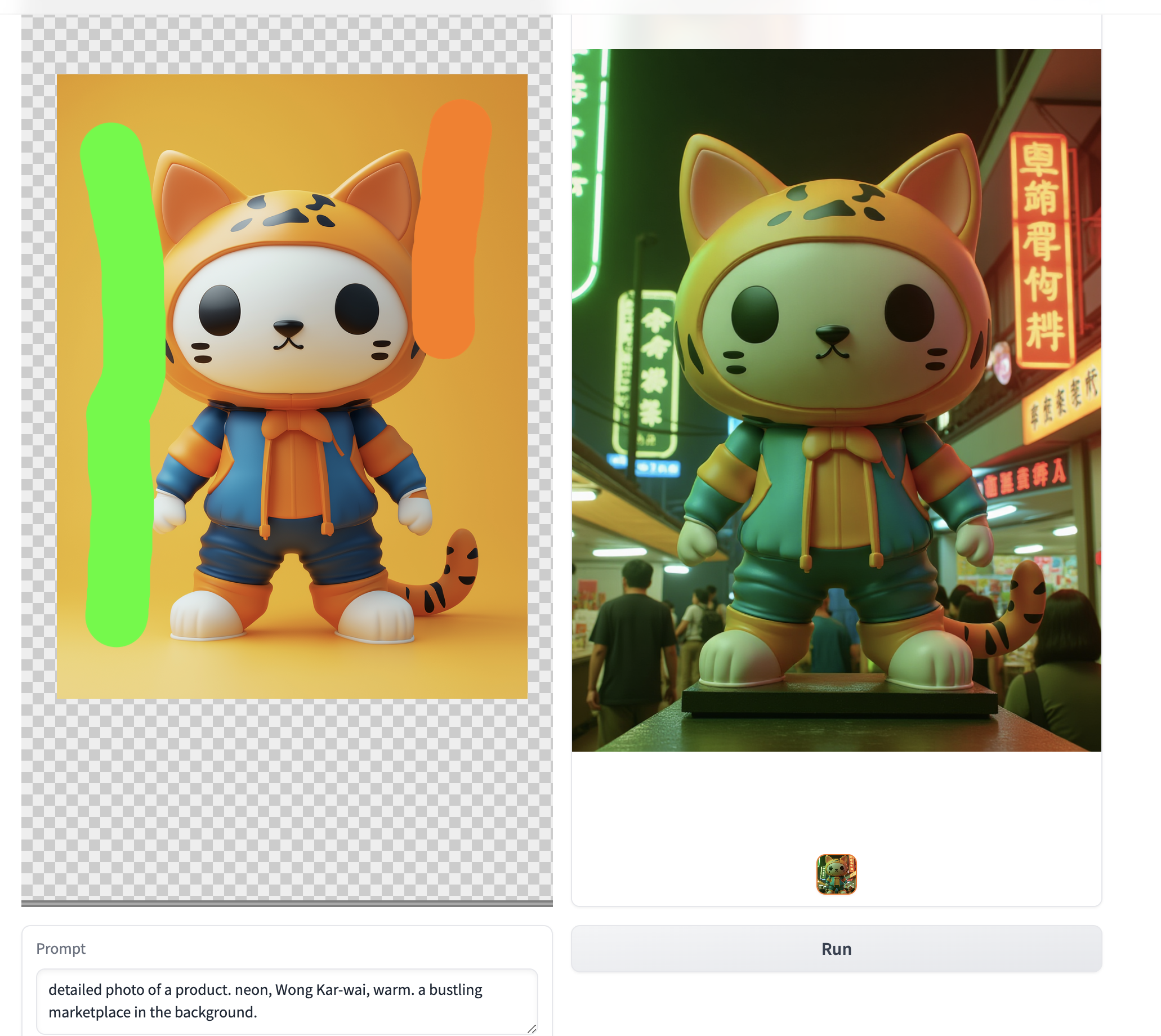
Use the brush tool to apply directional lighting effects by simply doodling over the areas of the image where you want to enhance or change the light./n Adjust settings such as light intensity, color, and direction according to your preferences.
4. Preview Changes
View real-time updates as you make adjustments to ensure the desired outcome.
5. Save and Export
Once satisfied with the edits, save your work and export the final image in your preferred format.
Core Features of Luminar Brush
Experience the perfect blend of advanced AI technology and user-friendly design.

Two-Stage Processing Framework
Uniform Lighting Conversion: Standardizes lighting across images.Interactive Lighting Editing: Users can apply specific light adjustments interactively.

Delighting Technology
Preserves intricate details while removing unwanted lighting effects.

Intelligent Light Synthesis
Produces realistic lighting based on extensive training data from high-quality images.

Real-Time Preview
Instant feedback on edits allows for precise adjustments.
User Reviews of Luminar Brush
Users have shared positive experiences regarding Lumina Brush
"Luminar Brush significantly improves their ability to control lighting in their work, resulting in more visually appealing images."

Alice Zhang
Lighting Specialist
"Luminar Brush highlighted the effectiveness of real-time previews in achieving desired outcomes quickly."

David Li
Visual Effects Designer
"Luminar Brush ease of correcting undesirable lighting conditions in post-production."

Emily Wang
Product Photography Expert
"Luminar Brush praised for reducing editing time when working with large sets of images."

James Smith
Photography Studio Manager
"Luminar Brush significantly enhances their ability to control lighting in digital artwork."

Sophia Chen
Digital Media Artist
Frequently Asked Questions About Luminar Brush
Answers to common questions you might encounter while using Luminar Brush.
What image formats does Luminar Brush support?
Is Luminar Brush suitable for professional use?
What if I make a mistake while editing?
Is there a limit on image size?
Is Luminar Brush free to use?
What types of photos can Luminar Brush enhance?
Can I use Lumina Brush offline?
How do I start using Lumina Brush?
What types of images can Lumina Brush be used on?
Ready to Transform Your Photos with Luminar Brush?
Begin your journey with Luminar Brush and transform your images with stunning lighting effects. This powerful, AI-driven tool is designed for everyone, making it simple and free to enhance your photos effortlessly!