

详细内容
Google Maps Scraper
Get local leads with the power of AI
AI-driven strategies such as generating local b2b leads from Google maps can be beneficial for businesses that want to target specific geographic regions.
Maps
CSV File
Why Use Google Maps Scraper?
Scraping Google Maps data has many benefits, including lead generation, research and data science, monitoring competition, and obtaining business contact details. It can help businesses understand customer needs, research competitors, and develop new strategies
16M+
Places
16M+
Phone Numbers
1.3M+
Email Leads
2.5M+
Social Medias
650K+
Reviews
Google Maps Scraper Features
Empower your sales and marketing teams

Extract email and social media.Unique ability to extract email addresses associated with listed companies, which are not typically displayed on Google Maps.

Ease of Use.Allows data extraction from Google Maps without writing any code (Python or JavaScript).

Batch Lookup.Batch search capability to search for multiple keywords simultaneously, streamlining the process.

Lightning-Fast Results.Lightning-fast results and time savings by providing instant, accurate insights without the need to build and test a custom web scraping tool.

Works like a real user.Mimics real user behavior using Chrome, reducing the risk of being blocked by Google Maps.

Well Maintained Software.Well-maintained software, ensuring timely updates to accommodate any changes on the Google Maps website, enabling seamless and uninterrupted operation.
What type of data can you extract into an excel file?
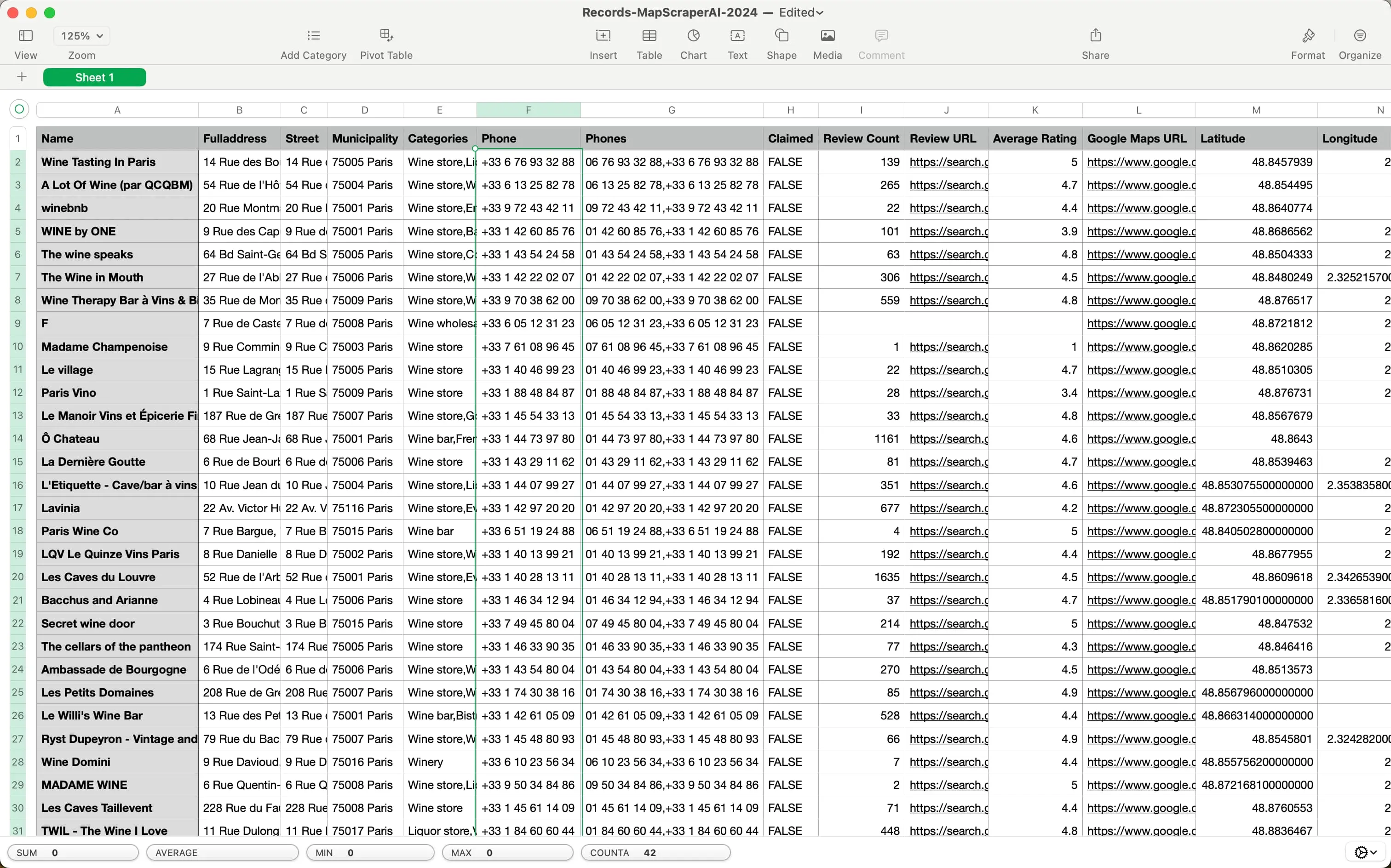
The following table shows all the data fields we support.
Data Fields
NameName of the place on Google Maps, this is usually the canonicalized business name.
PhoneThe place's phone number in its local format.
Email addressThe place's email scraped from the internet.
Social MediasThe social media profile URLs found from the internet (Facebook, Instagram, LinkedIn, Youtube, Yelp, Twitter, and so on).
WebsiteThe authoritative website for this place, such as a business' homepage.
DomainThe web domain associated with the place.
FulladdressThe complete, readable address of the place.
StreetThe specific street where the place is located.
MunicipalityThe governing municipality where the place is situated.
CategoriesThe categories associated with the place on My Business.
ClaimedIndicates if the My Business profile has been claimed, allowing verification and editing of business information on.
PriceThe price range of the place, rated from $ (lowest) to $$$$ (highest).
Plus codePlus codes serve as alternative addressing in areas lacking traditional addresses, such as unnumbered buildings or unnamed streets.
Review CountThe cumulative count of reviews for the place.
ReviewsUser-written reviews about the place.
Review URLThe dedicated URL where customers can leave reviews for the place.
PhotosUser-uploaded photos related to the place.
Average RatingThe overall rating of the place, ranging from 1.0 to 5.0, determined by user reviews.
LatitudeThe geographic latitude of the place, expressed in decimal degrees.
LongitudeThe geographic longitude of the place, expressed in decimal degrees.
Opening hoursThe specified hours during which the place is open to the public.
Featured imageA highlighted photo representing the place or business.
CidA unique identifier assigned by to a specific business entity.
Place IdA unique textual identifier that distinguishes a specific place.
KgmidAn identifier used specifically for the Knowledge Graph API.
Load More
Extract contacts from Google maps using Maps Scraper AI
-
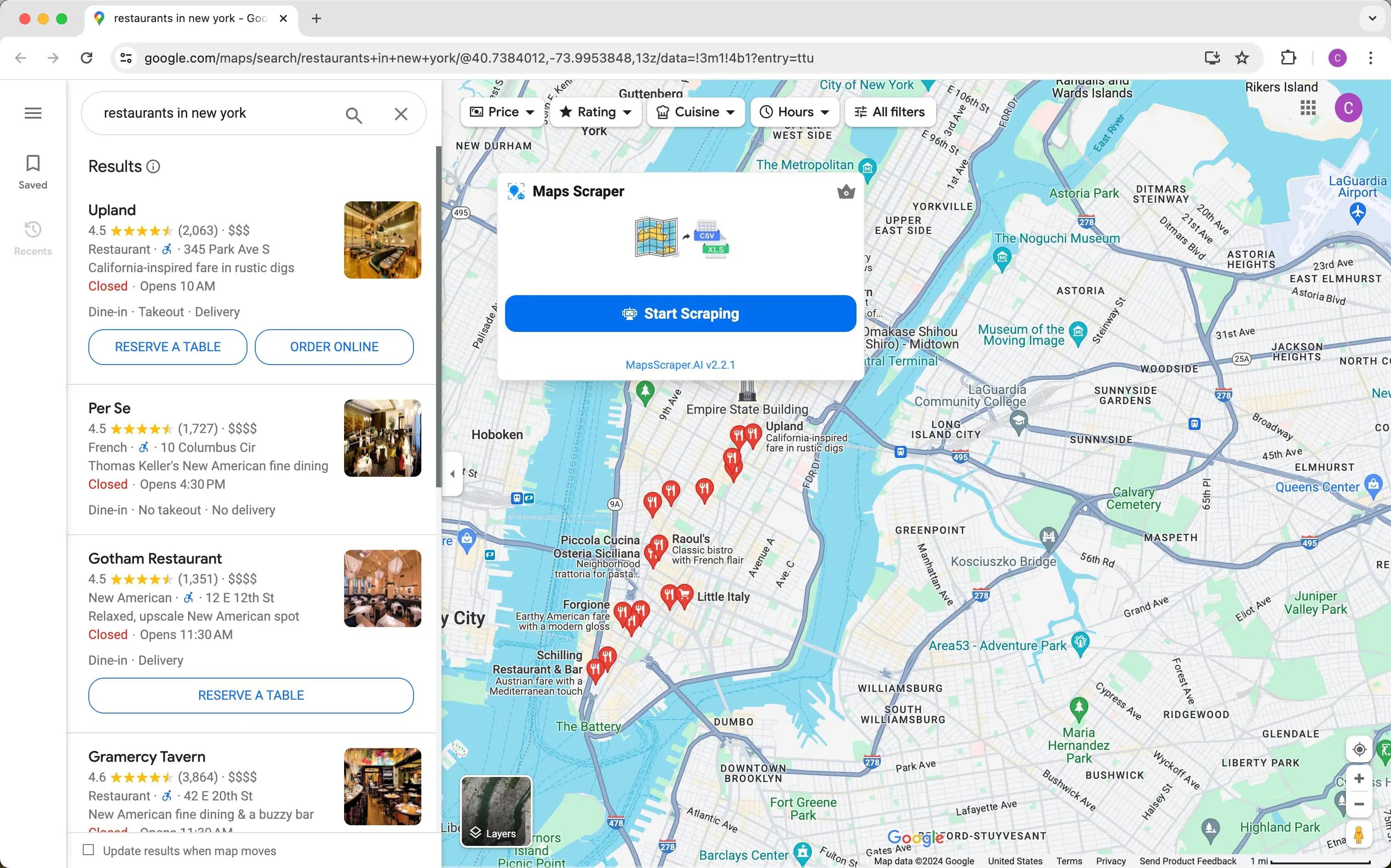
Step 1Search On Google Maps
One way to find nearby businesses is by simply entering your query into Google Maps, which will then use your location to identify local businesses, helping you find services that are quick and nearby.
-
Step 2Open the Chrome Extension
Open the Chrome extension with a simple mouse click. It's so easy to get started with your crawl, you'll be up and running in just a few seconds.
-
Step 3Export Contacts Results
You can export results in CSV or XLS file, with no limits on the amount of data you can export. In addition, the software supports exporting emails and phone numbers, among other features.
How does it work?
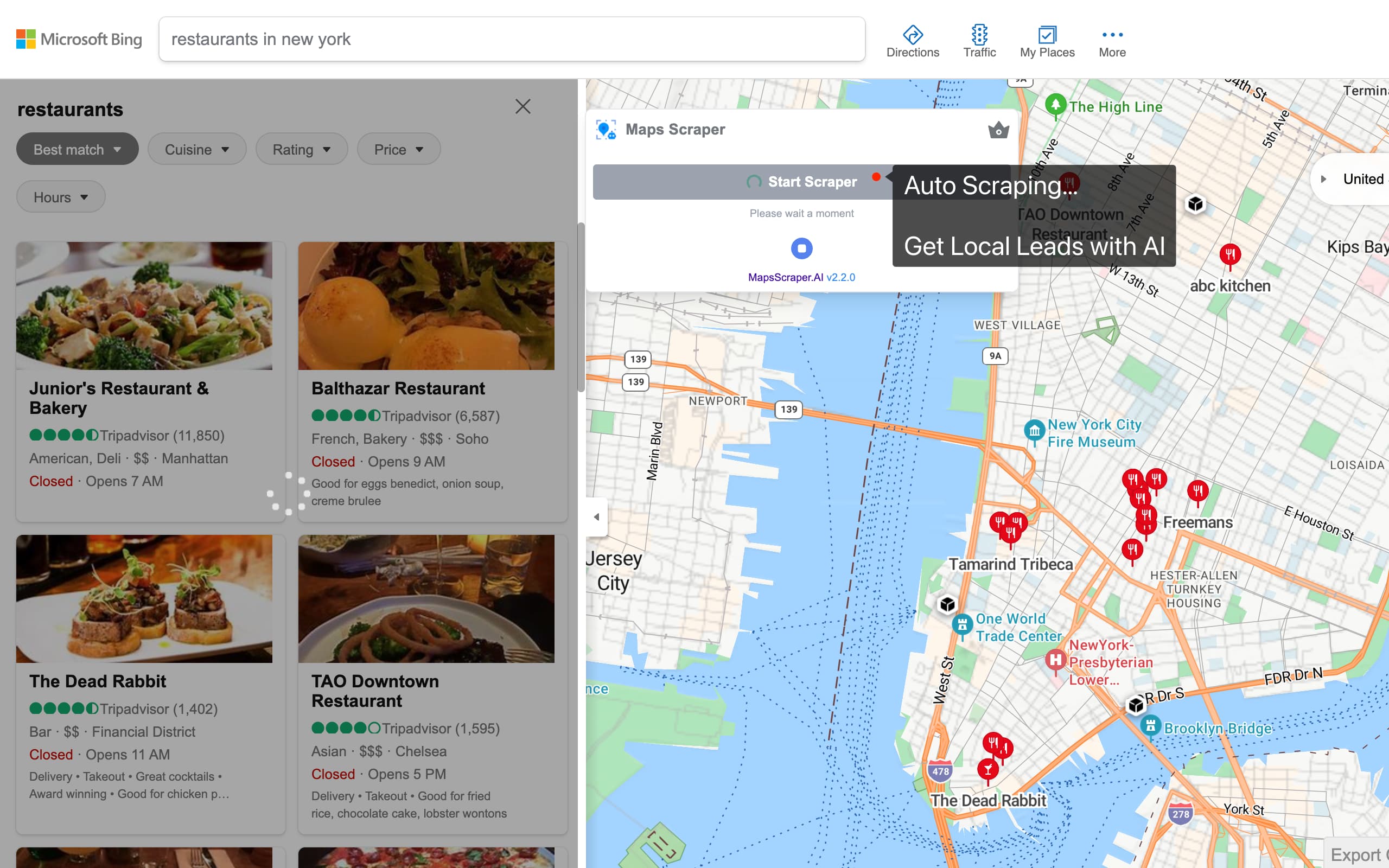
Google Maps Scraper AI works by searching for customer information on Google Maps and then doing a bunch of work to find all the information on every page, copy and paste it, and then do some more work to get to the actual website and get the email address, city, country, etc.
It goes to the Google Maps website, types in your search query, scrolls down until it gets to the last page, and copies all the information it can see, like the customer's location and their email address, and puts it all into a xls file.
Pricing Plans
Get started for free. Go pro when you're ready, cancel anytime.
Free
Monthly leads export 1,000
Export 15 records at a time
0/month
- Custom export settings
- Extract basic information
- Extract phone numbers
- Extract Website、Cid and Place Id
Pro(Yearly)
Most popular
Monthly leads export 100,000
Export Unlimited records at a time
$9.9/month
Everything in Free plus:
- Extract emails
- Extract social medias
- Extract Kgmid, Plus code, etc
- Automatic bulk extract
Pro(Monthly)
Monthly leads export 100,000
Export Unlimited records at a time
$19.9/month
Everything in Free plus:
- Extract emails
- Extract social medias
- Extract Kgmid, Plus code, etc
- Automatic bulk extract
What Clients Say?
"MapsScraperAI interface is simple and intuitive. Saves time collecting and organizing leads."
"Google Maps Scraper is reliable and provides gold leads, greatly helping our marketing. Highly recommend!"
"Google Maps Scraper is a game changer that simplifies lead generation with a user-friendly interface and one-click operation. It's extremely convenient."
"Great tool! Saves me hours of data collection. Kudos to the developers for this effective tool."
"I wish I'd found it sooner. The first search produced more usable data in 20 minutes than my 15 months of doing it all."
"Google Maps Scraper is vital for B2B cold emails. It's a high-performance tool for scraping Google Maps data and daily routine. I can't live without it."
Frequently Asked Questions
What is Google Maps Scraper?
Google Maps Scraper refers to tools that extract data from Google Maps, allowing users to gather information like business listings, addresses, phone numbers, reviews, and more associated with places and locations on Maps.
Legal Considerations for Scraping Google Maps
The provided information suggests that scraping public data from websites like Google Maps is legally protected under the First Amendment of the U.S. Constitution, as large search engines also collect data through scraping.
Why don't I get all the results when searching for a large region?
For large regions like the whole state, search for smaller areas like cities or ZIP codes instead. Search 'Los Angeles restaurants' rather than 'California restaurants' for example.
How do I cancel my subscription?
There you can cancel your current subscription. From within the app, go to the settings menu and click 'Manage Subscription'. Or contact customer support via email and request to cancel your subscription.
Can’t find the answer you’re looking for? Reach out to our customer support team.
Customer support team business@mapsscraper.ai
 \
A great tool for generating leads to collecting information from Google Maps for potential customers automatically.
EMAIL US
SOLUTION
Marketing Analytics Commerce Insights
SUPPORT
Features FAQs Facebook Group Extractor IG Follower Export Tool
COMPANY
About Blog Jobs Press Partners

Change language
🇺🇸 English🇯🇵 日本語🇪🇸 Español🇰🇷 Korean🇫🇷 Français🇩🇪 Deutsch🇨🇳 繁體中文🇵🇹 Português🇹🇷 Türkçe🇷🇴 Română🇷🇺 русский🇳🇱 Nederlands🇳🇴 Norsk🇮🇹 italiano🇸🇪 Swedish🇮🇩 Indonesian🇵🇱 polski🇩🇰 Danish🇧🇩 Bangladesh
© Copyright 2024. All rights reserved.
1.3K