

详细内容
PricingGeneratorLog inSign up
Pine Script Wizard AI
#1 TradingView AI Pine Script Coding Assistant
AI Powered ChatGPT Pine Script Strategy Code Generator - Fine-tuned for Pine Script Coding
TEST THE NEW VERSION (Requires Separate Subscription)
https://app.pinescriptwizard.com/
PLEASE NOTE: The homepage version is not as good as the paid account.
Get higher quality pine script code output by registering for a paid account, it is only $9 USD to get started.
Sign Up
STEP 1: Write in Text Format What Kind of Pine Script Code You Need? STEP 2: Click and Let Pine script AI Generate optimized, accurate pine script code for the Tradingview platform.
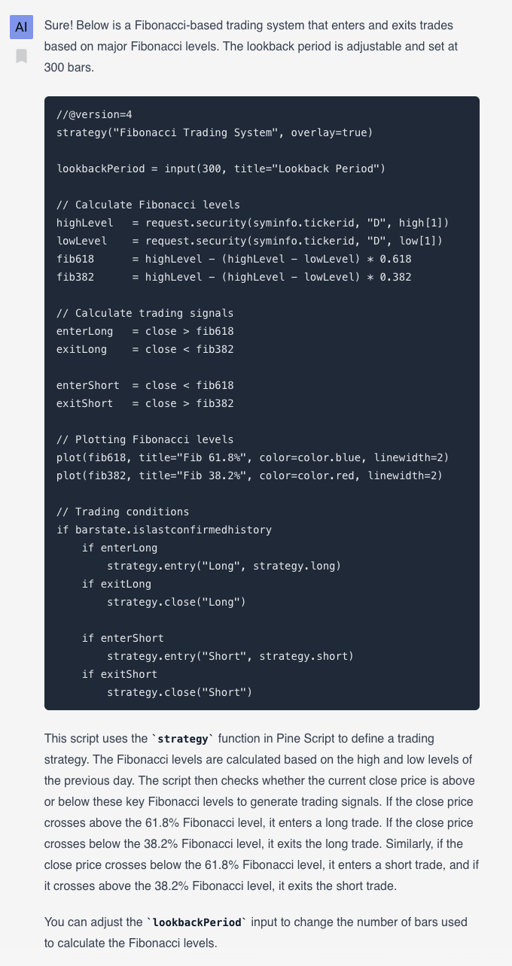
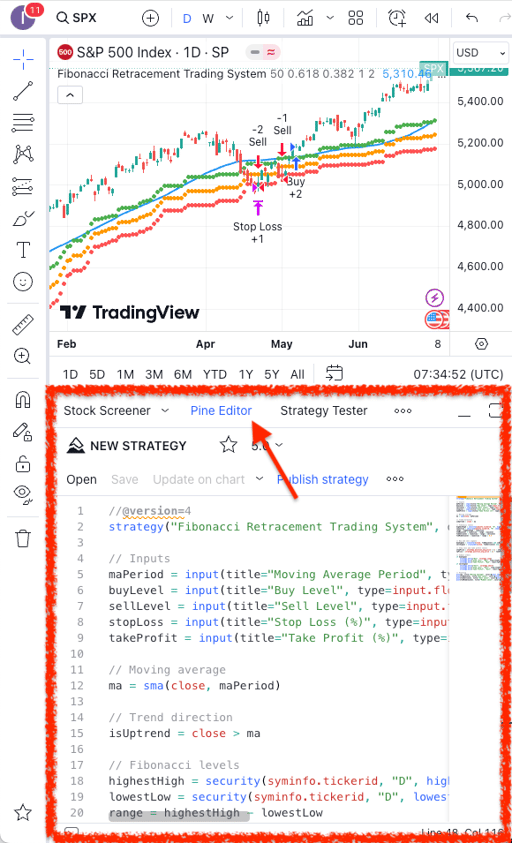
STEP 3: Copy and Paste Code into TradingView Pine Editor, if there are errors when saving and compiling the code, paste the error back into the chat so that AI can fix it for you
Sign Up
STEP 1: Write in Text Format What Kind of Pine Script Code You Need? STEP 2: Click and Let Pine script AI Generate optimized, accurate pine script code for the Tradingview platform. STEP 3: Copy and Paste Code into TradingView Pine Editor, if there are errors when saving and compiling the code, paste the error back into the chat so that AI can fix it for you
More detailed instructions How to add a custom strategy using Pine Script in TradingView, you can follow these steps: Open the Pine Script Editor in TradingView: On the TradingView platform, locate and click on the "Pine Editor" tab at the bottom of the screen. This will open the Pine Script editor where you can write or paste your custom script. Write or Paste Your Strategy Code: You can either write your Pine Script strategy code from scratch or paste a pre-written code into this editor. Ensure that your code starts with //@version=4 or //@version=5 (depending on the Pine Script version you're using). Save the Script: After you've entered your code, click on the “Save” icon in the Pine Editor to save your script. You can give it a name that helps you remember its function. Add the Strategy to a Chart: To see your strategy in action, click the “Add to Chart” button in the Pine Editor. This will apply your strategy to the currently open chart. If the script has any errors, TradingView will display these in the Pine Editor, allowing you to correct them. Adjust Strategy Settings (Optional): Once your strategy is on the chart, you can adjust its settings. Click on the gear icon next to the strategy name in the chart legend to open the settings panel. Here are some questions you may want to consider to help AI formulate a clear coding objective according to you needs: 1. What kind of trading system are you looking for? Is it a trend-following, mean-reversion, or breakout system? or Do you just want an indicator? 2. Which indicators would you like to use in your system? Are there any specific settings you prefer? 3. Do you have any specific trading rules for entering and exiting trades? 4. Do you want to trade both long and short signals, or just one side of the market? 5. What kind of Take Profit and Stop Loss levels would you like?
TradingView Implementation Guide TradingView Backtesting Guide
AI Powered ChatGPT Pine Script Strategy Code Generator - Fine-tuned for Pine Script Coding
© 2024 Pine Script™ Wizard AI
Powered by ChatGPT OpenAI
Contact: support@pinescriptwizard.com or pinescriptwizard@gmail.com
This site is not part of or endorsed by OpenAI, TradingView or Pine Script™ in any way (TradingView’s programming language).All product names, logos, and brands are the property of their respective owners. All company, product, and service names used in this website are for identification purposes only. Use of these names, logos, and brands does not imply endorsement. Disclaimer: The code that is generated and provided by AI is for educational purposes only and should not be used for actual trading without proper testing and analysis. Trading involves risk and it is important to carefully consider your objectives and level of experience before making any decisions. The author and publisher of this code are not responsible for any losses or damages that may occur as a result of using it.
MQL4 Coding Wizard EasyLanguage Tradestation Wizard Pine Script Wizard
Affiliates Manage Your Subscription TradingView Backtesting Guide