

详细内容
Transform your ideas into professional presentations in minutes,
saving 95% of creation time.


Text
Upload
Url
YouTube
Image
0/20000
Model:
 Basic Model

Basic Model
Scene:
General Scene
General Scene
Teaching Materials
Work Summary
Work Plan
Project Report
Solution
Research Report
Meeting Materials
Product Introduction
Company Introduction
Business Plan
Science Popularization
Public Speaking
Audience:
Public
Public
Students
Teachers
Superiors
Subordinates
Interviewer
Colleagues
Tone:
Professional
Professional
Friendly
Technical
Persuasive
Academic
Inspirational
Educational
Humorous
Concise
Pages:
Medium
Medium
Short
Long
Submit

Drag and drop a file to create a PPT
Supports DOC, DOCX, PDF, PPT, PPTX, TXT, MD, XLS, XLSX, CSV, HTML, EPUB, MOBI, XMIND, and MM files under 10MB
Choose a File
Model:
Basic Model
Basic Model
Scene:
General Scene
General Scene
Teaching Materials
Work Summary
Work Plan
Project Report
Solution
Research Report
Meeting Materials
Product Introduction
Company Introduction
Business Plan
Science Popularization
Public Speaking
Audience:
Public
Public
Students
Teachers
Superiors
Subordinates
Interviewer
Colleagues
Tone:
Professional
Professional
Friendly
Technical
Persuasive
Academic
Inspirational
Educational
Humorous
Concise
Pages:
Medium
Medium
Short
Long
Model:
Basic Model
Basic Model
Scene:
General Scene
General Scene
Teaching Materials
Work Summary
Work Plan
Project Report
Solution
Research Report
Meeting Materials
Product Introduction
Company Introduction
Business Plan
Science Popularization
Public Speaking
Audience:
Public
Public
Students
Teachers
Superiors
Subordinates
Interviewer
Colleagues
Tone:
Professional
Professional
Friendly
Technical
Persuasive
Academic
Inspirational
Educational
Humorous
Concise
Pages:
Medium
Medium
Short
Long
Submit
Model:
Basic Model
Basic Model
Scene:
General Scene
General Scene
Teaching Materials
Work Summary
Work Plan
Project Report
Solution
Research Report
Meeting Materials
Product Introduction
Company Introduction
Business Plan
Science Popularization
Public Speaking
Audience:
Public
Public
Students
Teachers
Superiors
Subordinates
Interviewer
Colleagues
Tone:
Professional
Professional
Friendly
Technical
Persuasive
Academic
Inspirational
Educational
Humorous
Concise
Pages:
Medium
Medium
Short
Long
Submit

Drag and drop a file to create a PPT
Supports PNG, JPG, JPEG, and BMP files under 5MB
Choose a IMAGE
Model:
Basic Model
Basic Model
Scene:
General Scene
General Scene
Teaching Materials
Work Summary
Work Plan
Project Report
Solution
Research Report
Meeting Materials
Product Introduction
Company Introduction
Business Plan
Science Popularization
Public Speaking
Audience:
Public
Public
Students
Teachers
Superiors
Subordinates
Interviewer
Colleagues
Tone:
Professional
Professional
Friendly
Technical
Persuasive
Academic
Inspirational
Educational
Humorous
Concise
Pages:
Medium
Medium
Short
Long
Revolutionizing Presentation Creation with PPT AI
PPT AI uses cutting-edge technology to convert text, documents, PDFs, websites, and videos into professional presentations.
Trusted by Users from Top Companies


Key Features of PPT AI
AI-Powered Presentation Creation That Works

Instant Conversion with PPT AI
Transform documents, spreadsheets, audio, or video into 20+ professional slides in seconds.

Multi-Model Intelligence Engine
Powered by DeepSeek, GPT-4o, Claude 3.5, and Gemini 2.0 for intelligent content analysis and slide creation.

Free Professional Templates
Access PPT AI collection of expertly designed templates at no cost, with smart design recommendations.

Smart Design Optimization
PPT AI layout and visual refinement ensure perfectly structured and professionally styled slides.

Multilingual Support
Create presentations in multiple languages with PPT AI intelligent translation capabilities.

Effortless Editing & Sharing
Modify text, colors, and images with PPT AI intuitive tools. Export presentations in multiple formats.
Why Choose PPT AI?
Transform Your Presentation Process
Save 95% of Creation Time
Create complete 20+ slide presentations in under 60 seconds with PPT AI industry-leading technology.
No Learning Curve Required
PPT AI needs no training—just add your content and get AI-generated presentations instantly.
Free Premium Templates
While competitors charge $15-30 per template, PPT AI offers its entire collection at no cost, even for free users.
Complete PowerPoint Compatibility
Export directly from PPT AI to PowerPoint format with 100% preservation of all design elements.
How to Use PPT AI
Create Professional Presentations in Three Simple Steps
Step 1
Step 2
Step 3
Input Your Content
Enter your topic or upload content (text, Word, PDF or video). PPT AI will analyze your input and structure a professional presentation outline.
Smart Generation
Watch as PPT AI designs your slides with AI-powered automation. Choose from various templates, and let the system optimize your presentation.
Customize and Download
Refine your slides with PPT AI editing tools. Adjust layouts, styles, and text, then download or present directly from our platform.
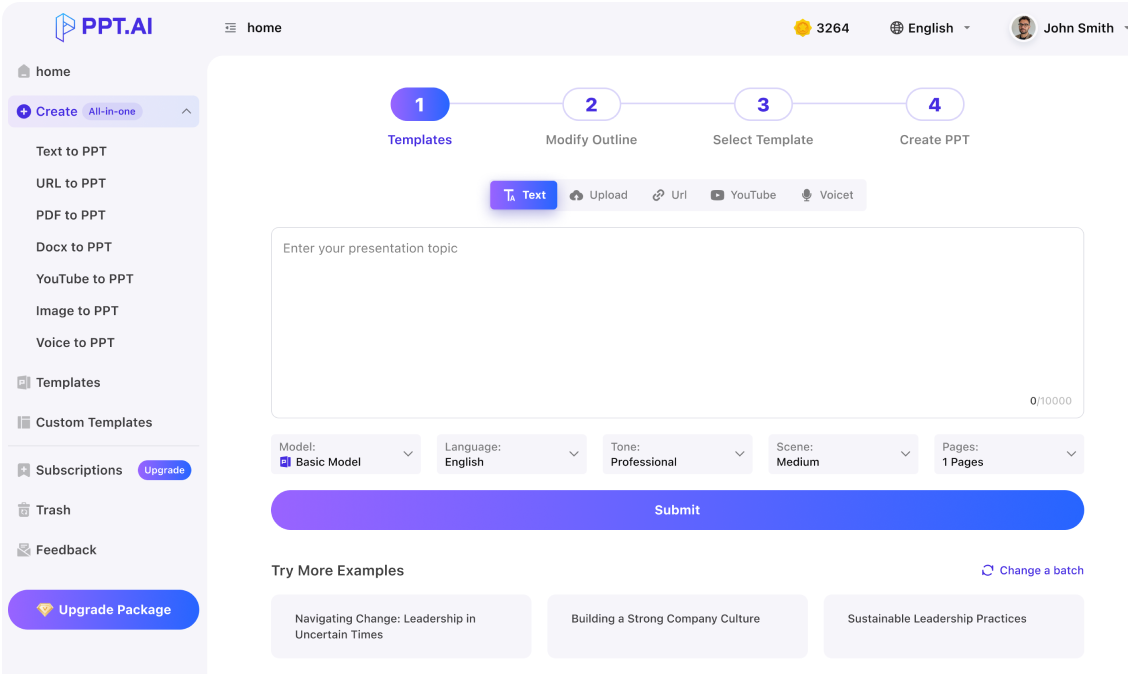
PPT AI Templates
Choose from business, education, healthcare, marketing, company profiles and more. With PPT AI, creating professional slides is fast and easy!


What Users Are Saying
Real Experiences from PPT AI Users
John Smith
CEO, InnovateTech Solutions
PPT AI has completely transformed how we create presentations. It's quick, efficient, and always delivers high-quality slides.
Emily Chen
Senior Marketing Manager, Global Enterprises
With PPT AI, our team creates presentations in minutes. It's a game-changer for anyone who needs to save time and boost productivity.
Michael Tan
Head of Sales, Bright Future Corp.
PPT AI intelligent design system has made our presentations look more professional and cohesive than ever before.
David Zhang
Project Manager, Global Solutions Inc.
As a project manager, PPT AI has streamlined my workflow and improved team collaboration. I can't imagine working without it.

Lisa Wang
Marketing Director, AlphaTech Labs
We've cut our presentation creation time by 80% with PPT AI. It helps us stay ahead with its fast, automated process.

Jack Liu
Business Development Manager, NextGen Tech
PPT AI customization options and professional templates make it easy to create high-impact presentations that impress clients.
Frequently Asked Questions
Have another question? Contact us by email
What is PPT AI and how does it work?
PPT AI transforms your content into professional presentations in minutes using advanced AI technology to analyze your input and create well-structured, visually appealing slides.
How do I get started with PPT AI?
Sign up, upload your content or input your topic, choose a template style, let PPT AI generate your presentation, then review and customize.
What benefits do PPT AI free users receive?
Free users can generate 3 presentations per month, access 50+ templates, create up to 15 slides, use essential editing features, and download presentations with a watermark.
What file formats does PPT AI support?
PPT AI supports Word, PDF, TXT, and Markdown for input, and offers PPT, PPTX, and PDF for output. All presentations can be edited directly in our online platform.
How does PPT AI ensure presentation quality?
PPT AI uses advanced algorithms trained on millions of professional presentations, analyzing content structure and design principles to ensure high-quality outputs with 96% user satisfaction.
What makes PPT AI different from traditional presentation tools?
PPT AI offers intelligent content analysis, automatic design suggestions, time-saving automation (95% faster), professional templates with smart matching, and intelligent content organization.
Is my data secure with PPT AI?
Yes, PPT AI prioritizes security with bank-level encryption, secure cloud storage, regular security audits, GDPR compliance, and options to delete data anytime.
What languages does PPT AI support?
PPT AI currently supports 15 major languages including Chinese, Japanese, Korean, French, German, and Portuguese.
Can I customize presentations created with PPT AI?
Yes, all PPT AI presentations can be customized using built-in editing tools for colors, fonts, images, layouts, and content.
How does PPT AI pricing work?
PPT AI offers three plans:
- Free: 3 presentations/month
- Plus: $9.9/month or $7.9/month annually (save 20%), up to 50 presentations/month
- Pro: $19.9/month or $13.9/month annually (save 30%), up to 200 presentations/month
Discover More PPT AI Products
Unlock even more with PPT AI suite of intelligent solutions
 \
Text to PPT \
\
Transform your text into sleek, professional slides.  \
URL to PPT \
\
Convert any webpage into a clean, engaging presentation instantly.  \
PDF to PPT \
\
Turn PDFs into clear, editable slides easily.  \
Word to PPT \
\
Convert Word documents into eye-catching presentations seamlessly.  \
YouTube to PPT \
\
Extract key insights from videos and create dynamic slides. \
Image to PPT \
\
Convert images into stylish, ready-to-use slides automatically.
PPT AI Blog
Explore premium articles to learn how to maximize your use of PPT AI for better presentations.
 \
Top 3 AI Generators for Google Slides  \
Top 3 Napkin AI Alternatives in 2025: Best AI Visual Generators  \
Google Slides AI: Top 4 AI Generators for Creating Stunning Presentations
Try PPT.AI Today
Start here, better presentations instantly.
Start for free

Help us understand?
What was the reason you didn't complete your payment?
Payment method not supported
Price too high
Concern about payment security
Uncertain if the product will work
Just browsing / Changed my mind
Other:
Continue payment
Submit feedback
Chatway App
Hide Chatway Widget
👋 Our team is here for you

Janice
Online
Hi, how can we help?
Start a new chat
Open https://chatway.app/ in new tab
ChatFAQ
Show Chatway MessengerHide Chatway Messenger