

详细内容


Automatically add Subtitles to Video
Use AI to add Subtitles to video and create professional quality content.


Sorry, your browser doesn't support videos.



Automatically add captions to videos.
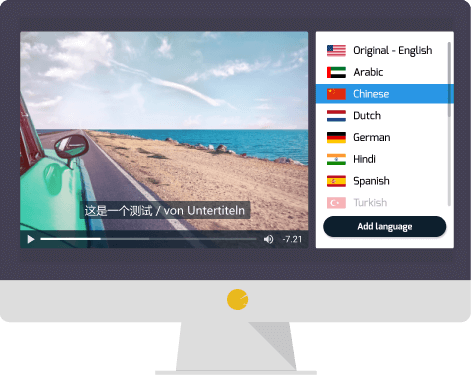
Easily add captions to a video in different languages.
Generate captions and download them to use in your video editors.
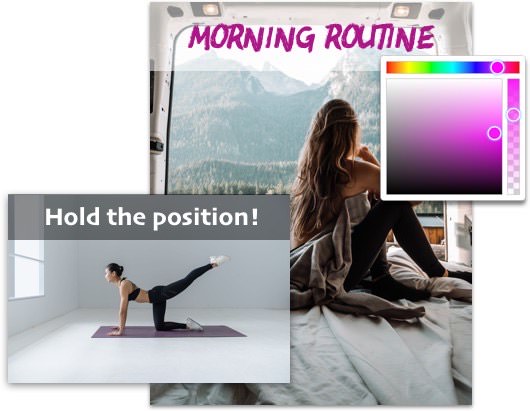
Be creative with the subtitle font.
Maximize user experience by adding head titles at various points.
Unleash your creative potential by customizing the caption font color, style, size, and opacity.
Resize and Export your video with subtitles in various formats.
Effortlessly export your video and, with a single click, share it on social media - that's the power of friendly export.
How to add Subtitles to Video
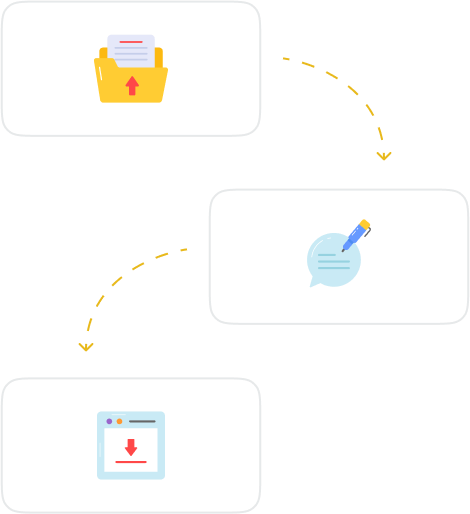
1. Upload the video or Paste a link
SubtitleBee accepts 1GB for free, regardless of the aspect ratio and resolution. We support several different formats (MP4, MOV, WMV, AVI, Webm, etc.) for your convenience.
2. Edit autogenerated Subtitles
Style and adapt the subtitles to your needs and make any corrections as required. Add text to video, resize, add your logo and export in various formats and languages.
3. Download the subtitled video
Download the video with subtitles embedded, or if needed, you can download the subtitle files separately in .srt, .ass, .vtt, or .txt formats.
SubtitleBee Features
Subtitle Generator
Use AI Subtitle Generator to automatically generate and sync subtitles for your videos effortlessly. Customize fonts, colors, and styles to suit your brand or creative needs and easily add subtitles to video online for free.
Subtitle Translator
Automatically translate subtitles in multiple languages to your videos, increasing accessibility for a global audience. Our platform supports subtitle translation in over 120 languages, making content inclusive for diverse viewers worldwide.
Audio Transcription
Use AI to convert audio files into accurate, readable text effortlessly. Perfect for generating transcripts, captions, or notes from spoken content. Save time by downloading subtitle files instantly, even before the media export is fully completed.
Add Text to Video
Overlaying text makes content visually appealing. Easily add text to video online using supertitles to enhance your subtitled video with personalized messages, titles, or captions. Additionally, customize supertitles’ fonts, colors, styles, and positioning.
More to SubtitleBee...
Video Caption Generator
Progress bar generator
YouTube Caption Generator
YouTube Caption Generator
Video Cropper
Video Compressor
Audio to Text
Video to Text
Add Watermark to Video
Transcribe your audio files automatically
Automated conversion from audio to text using Artificial Intelligence


Translate your videos into multiple languages with more than 120 languages
SubtitleBee recognizes more than 120 languages around the world to add auto subtitles.
Get your video subtitles translated into any language you need with great accuracy in just a few minutes. Once the subtitle has been generated for the original language, click on the "Translate Subtitles" button to start the translation process.
With a high degree of accuracy, the algorithm can detect your voice and add automated subtitles for most languages.
Further, you have the option to add captions and subtitles with their translations for a truly global reach.
More about mutiple language translation
Customize with your logo
Customize your video by adding your own logo to your subtitled videos! Easily add your custom logo to any video you process. Forget about having to re-edit videos if you export for different brands.


Enhance your videos with a customizable progress bar
12345
Select the color of your choice to match your video aesthetic
Increases viewer engagement and retention
Does not interfere with your video
Optimized for all video resolutions
Perfect for videos shared on social media
Supertitles catch viewers attention
Overlay text to engage viewers, promote your content, and boost viewership. Our simple drag-and-drop editor makes it easy to add text to video in minutes. Add colors, animation, and other effects to make your titles really stand out.
Plus, you can create multiple versions of your Supertitles to fit any device or platform.
Adding text to video is great for marketing videos, promotional content, and more.
Supertitles are also highly customizable, so you can tailor the look and feel of your Supertitles to fit any brand or style.
Sorry, your browser doesn't support videos.
Advanced video cropping
Easily crop your videos for different social media platforms. Easily create Instagram Stories, TikTok, Snapchat, Instagram Portrait, etc.
Do multiple crops at different times so no content is left outside for your viewers.
Keep the subtitles always visible thanks to our easily cropping interface.

Privacy Focused
Your videos are yours. We never share, sell, or use your content, and you keep your content rights.
You have full control of your content, and you are free to delete it from our servers at any time.
Why add Subtitles to Video
Add Captions to Your Videos and Boost Engagement
Captions keep viewers watching longer, increasing video watch time and CTR. Adding subtitles to your videos grabs attention, improves retention, and keeps your audience engaged across all platforms. Simply upload video or audio, and download the auto-captioned video.
Make Your Videos Discoverable with Subtitles
You can make your videos more discoverable on search engines by adding a full text transcription of your content. Subtitles improve discoverability, making it easier for people to find you through platforms and search engines. More visibility, more views, more impact.
Increase your reach with Subtitles
Expand your audience globally! Captions and subtitles break language barriers, helping your videos connect with viewers worldwide – wherever they are, whatever they speak. Make multi-language subtitles for your movies and videos.
Add captions for the deaf and hard of hearing
Make your content inclusive! Captions ensure your videos are accessible to deaf and hard-of-hearing audiences, so no one misses out on your message. Captions ensure all viewers can fully experience your content, including important audio cues like tone or sound effects.
Choose the package that better fits your needs.
MonthlyYearly
Limited BFCM Deal: Save up to 32% Apply code BEE20 at checkout.
*Valid till 4th December, 2025
Popular Premium
- Free Trial
Starter20% OFF32% OFF
Premium20% OFF32% OFF
🤩 Most Popular
Business20% OFF32% OFF
20% OFF32% OFF**$19****$15**/mo**$13**/mo$159 billed yearly
20% OFF32% OFF**$49****$39**/mo**$34**/mo$415 billed yearly
20% OFF32% OFF**$129****$103**/mo**$90**/mo$1087 billed yearly
- Video Features
- Auto-subtitles/translations
10 minutes
240 minutes / mo
1050 minutes / mo
3600 minutes / mo
- Video exports per Month
1 video
12 video
35 video
60 video
- Video Length per video
More information here.
10 minutes / video
20 minutes / video
30 minutes / video
60 minutes / video
- Max Video Upload Duration
10 minutes
240 minutes /mo
1050 minutes / mo
3600 minutes / mo
-
Lifetime uploads
-
Subtitling & Transcription
-
Subtitles Translation per video
3 translations / video
10 translations / video
15 translations / video
- Languages
120 languages available
- Overlay Captions
5
20
50
-
Audio Transcription
-
Audio to Video
-
Branding & Customization
-
Remove Watermark
-
Custom Logo
-
Font Styles
Customize fonts, colors, and tweak opacity for the perfect subtitle style.
5
15
30
All
-
AI Features
-
Advanced Cropping
-
Video Resize
-
Progress Bar
-
Video Translation
-
Video Converter
-
Video Compressor
-
File Download Options
-
Download
-
Cloud Storage
-
Video Export Formats
MP4, AVI, MOV
MP4, AVI, MOV
MP4, AVI, MOV
MP4, AVI, MOV
-
Additional Features
-
Top-Up Credits
-
Support
Basic
Priority
Premium
-
Privacy Control
-
Social Media Shares
-
Price
Free
$19**$15**/mo**$13**/mo$159 billed yearly
$49**$39**/mo**$34**/mo$415 billed yearly
$129**$103**/mo**$90**/mo$1087 billed yearly
Need more videos or longer duration? Contact us for a custom plan.
SubtitleBee’s worldwide usage at a glance
Join us to find out why thousands of users from around the world trust in our service to add captions and subtitles to millions of videos. Now is your chance to discover why we stand as the best subtitle generator. Don't miss it!
1.8Mmedia uploaded
26Bsubtitles created
23Mtranslations created


Top #1 Video to Text Converter for influencers
Adored by influencers and vloggers everywhere, this Video-to-text converter is used on a daily basis to add subtitles to their videos - enhancing engagement with viewers.
According to the research conducted by "Bu Socialy," SubtitleBee has earned the distinction of being deemed as 2024's preferred automatic captioning and subtitling tool!

What our users think of SubtitleBee

Jimmy H.Udemy Instructor
I love this product. It is very easy to use, quick, and extremely helpful for those who wish to watch videos at a low volume at night!

Aldemir AnuddinUAB Professor
As a college professor, I find SubtitleBee very useful when creating content for our students. It offers everything we need in a subtitling service, including the ability to insert our school logo into the video.

Mark LopezSales Executive
What an awesome app! It helps me a lot for school purposes. The customizable fonts really make my video presentations stand out. Thank you, dear developers, for making this easy to use and affordable. Keep it up!

Gaelt GantMarketer Lead
I love the options you can use with the editor. I can move the subtitle position on the video, change the font, and even adjust the background of the text. It makes my videos look professional.

Ramon BorovskyBlogger
I am very glad that SubtitleBee allows me to upload audio files from my podcast and quickly transcribe them for me. Thanks!

Z. ChanDigital marketer
The translation from one language to another is amazingly accurate. I have suggested your service to quite a few colleagues, as it is a pleasure to use.

Grant GavinSaaS owner
SubtitleBee is one of the best tools we have for our marketing videos. The process of uploading, captioning, and exporting is very straightforward; it saves us a lot of time.

Tyler HollandAdvertising Creator
Video cropping in SubtitleBee is just spot on! I can easily crop my videos depending on which social media platform I am uploading them to.

Hilda J. VegaSocial Media Influencer
The progress bar is superb for my Instagram videos. I love it!
You are in good company



















FAQs
How to add captions to a video?
To add captions to a video, upload your video, let the AI auto-generate captions, then edit and style them before downloading the caption-embedded video.
Can we generate English Subtitles for free?
Yes, you can generate English subtitles for free using the free plan. Simply upload your video to AI caption generator, and the platform will automatically generate subtitles through AI.
How do I embed subtitles into my video permanently (burned-in)?
SubtitleBee automatically generates burned-in subtitles, permanently embedding them into your video. Simply upload your video, generate or upload subtitles, customize their appearance, and export the final version with subtitles seamlessly integrated.
How do I sync subtitles with my video?
Use SubtitleBee’s subtitle editor to adjust and sync subtitles with the correct dialogue. Preview the video, make timing adjustments if needed, and export when everything is aligned.

This website uses cookies...
We use cookies to make your experience better and show you content you’ll like. You’re in control - choose which cookies you want to allow here.
You can modify your preference later by clicking on the “Cookie Preferences” link at the bottom of the page.
Customize
DeclineAccept All
Customize Cookies
Analytics Storage
Enables storage of information used to analyze website traffic and usage patterns.
Ad Personalization
Allows for the personalization of ads you see based on your interests and browsing behavior.
Ad User Data
Allows the sharing of your advertising-related data with Google.
Ad Storage
Enabled storage of information used for advertising purposes.
DeclineAccept All
Save & accept