

详细内容
Major update Instant Generation | Smartest Models | UI Improvements
Tech Screen AI
Your Invisible Interview Assistant
Don’t Let a Tough Question Cost You Your Dream Job. Try For Free Today
Download For WindowsDownload For MacOS
Preview
InvisibilityInvisible on any interview
SpeedFast responses
AccuracyAccurate responses
Features
Screen Sharing Invisibility
Tech Screen is completely invisible to screen-sharing software on platforms like Zoom, Google Meet, CoderPad, Discord and more. Get real-time AI assistance without leaving pricing trace.
Useful & Intuitive Shortcuts
Tech Screen offers seamless, easy-to-use shortcuts that let you access AI assistance instantly—without breaking focus. Navigate coding challenges, get hints, and optimize responses effortlessly, all while keeping your workflow smooth and natural.
Active Tab – Always There
Tech Screen works seamlessly on top of your active applications, eliminating the need to Alt+Tab or switch windows. It’s always ready to assist without requiring any extra clicks or interaction—just focus on your interview, and let the AI support you effortlessly in the background.
Fast & Accurate Responses
Tech Screen delivers instant, precise answers to any technical question, ensuring you never waste time waiting. Get the support you need in real-time, so you can stay focused and confidently tackle every challenge.
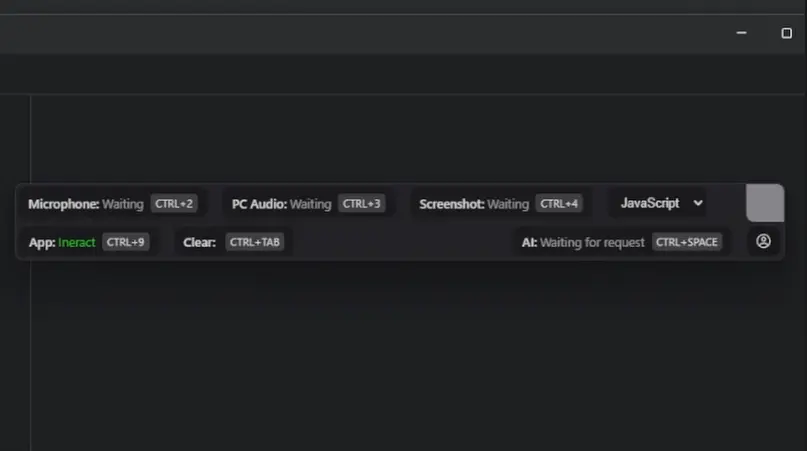
Multi-Input Support
Tech Screen intelligently processes various input types, including computer audio, microphone input, and on-screen content. Whether it’s spoken question, system audio, or screenshot, our AI adapts to provide seamless, real-time assistance.
Multi-Language Support
Tech Screen understands and assists with multiple programming languages, ensuring you're covered no matter the tech stack. Whether it's Python, Java, C++, JavaScript, or any other language, get accurate, real-time help tailored to your needs.
System audio recording works unstable on some devices. THIS IS NOT REFUNDABLE. Check the troubleshoot section if you have any errors.
Usage
How to use Tech Screen App - YouTube
Photo image of Tech Screen App
Tech Screen App
3 subscribers
Tech Screen App
Search
Watch later
Share
Copy link
Info
Shopping
Tap to unmute
If playback doesn't begin shortly, try restarting your device.
More videos
More videos
You're signed out
Videos you watch may be added to the TV's watch history and influence TV recommendations. To avoid this, cancel and sign in to YouTube on your computer.
CancelConfirm
Share
Include playlist
An error occurred while retrieving sharing information. Please try again later.
0:00
0:00 / 1:21
•Live
•
Frequently Asked Questions
How do I get started?
Simply sign up, install Tech Screen, and start using it instantly—no complex setup required!
What is Tech Screen?
Tech Screen is an AI-powered tool that helps you navigate technical interviews by providing real-time assistance. It works seamlessly in the background, ensuring you stay confident and perform at your best.
Is Tech Screen visible during screen sharing or recordings?
No. Tech Screen is completely invisible to screen-sharing software, screenshots, and recordings on platforms like Zoom, Google Meet, HackerRank, and CoderPad.
How fast are the responses?
Tech Screen delivers instant and accurate responses, ensuring you get real-time assistance without delays, so you can focus on solving problems without interruptions.
How much does Tech Screen cost?
We offer flexible pricing plans tailored to different needs. Check our pricing page for details on free trials and premium features
What input types does Tech Screen support?
Tech Screen can process multiple types of input, including:
- Computer audio
- Microphone input
- Screenshots
ACE your next Interview
Get fast and accurate AI responses
when you need them the most

Home Contact Agreement Policies Change Log
© 2025, TechScreen.