

详细内容
Start Your Day with a Plan
Regain control, clarity and focus with Trevor AI - the one AI planner for all your tasks and calendars.

Available on Web for mobile and desktop.
"Really loving Trevor. It's a daily habit for me now and my mind clutter had reduced significantly."
— Denis Cutura, Managing Director at Decocorp
"I wanted to reach out and just comment on how much I LOVE your "software." I have been looking for something that does exactly what yours done and it works amazingly. I love that I can create tasks and then either have "smart scheduling' or I can schedule them myself."
— Kristina Whitteker
“This app is great for helping me with prioritizing my day and scheduling my most important tasks on my calendar, so that I make sure they get done.” — Anthony Gauna
_6.png)
#1 See & Manage Everything Worth Your Time
-
Connect multiple task lists & calendars
-
Schedule tasks with real-time sync
-
Plan with intuitive "drag & drop" and AI
“In a world of complexity and overload, the path to peace of mind is through simplification and integration.”
No more hunting for scattered to-dos or forgotten appointments. Trevor brings all your tasks and calendars together—so you can finally see everything that's competing for your time at a glance. Just drop it in and drag it all around. You are always in control.
#2 Turn To-Dos into Time-Blocks—Instantly
-
Trevor predicts the duration of tasks
-
Trevor analyses your availability
-
Trevor suggests a time-block - just click.
“If you talk about it, it's a dream, if you envision it, it's possible, but if you schedule it, it's real.” – Tony Robbins
Trevor’s AI does what traditional to-do lists can’t: it estimates how long tasks will take, suggests when to do them, and time-blocks everything right into your calendar. While old-school lists add more work and only get 40% completion rates, Trevor’s AI scheduling helps you finish 85% of your tasks. No more unfinished to-dos or rigid calendars—your Trevor is here to help.
#3 Plan Your Optimal Day or Week—Automatically
- Trevor can instantly plan your day or week
- Trevor adapts to you, continuously
- Trevor uses the most advanced AI models
“The most fundamental principle of the organized mind... is to shift the burden of organizing from our brains to the external world.” - Daniel J. Levitin
Use “Plan My Day” to create your optimal schedule. Your Trevor AI adapts to your with each planning session, allowing him to predict the optimal time for each of your tasks. Offload hundreds of scheduling decisions to your AI while retaining the ultimate control. Experience all of that magic, in a single button, and all across the app.
#4 Enter Flow & Do Your Best Work
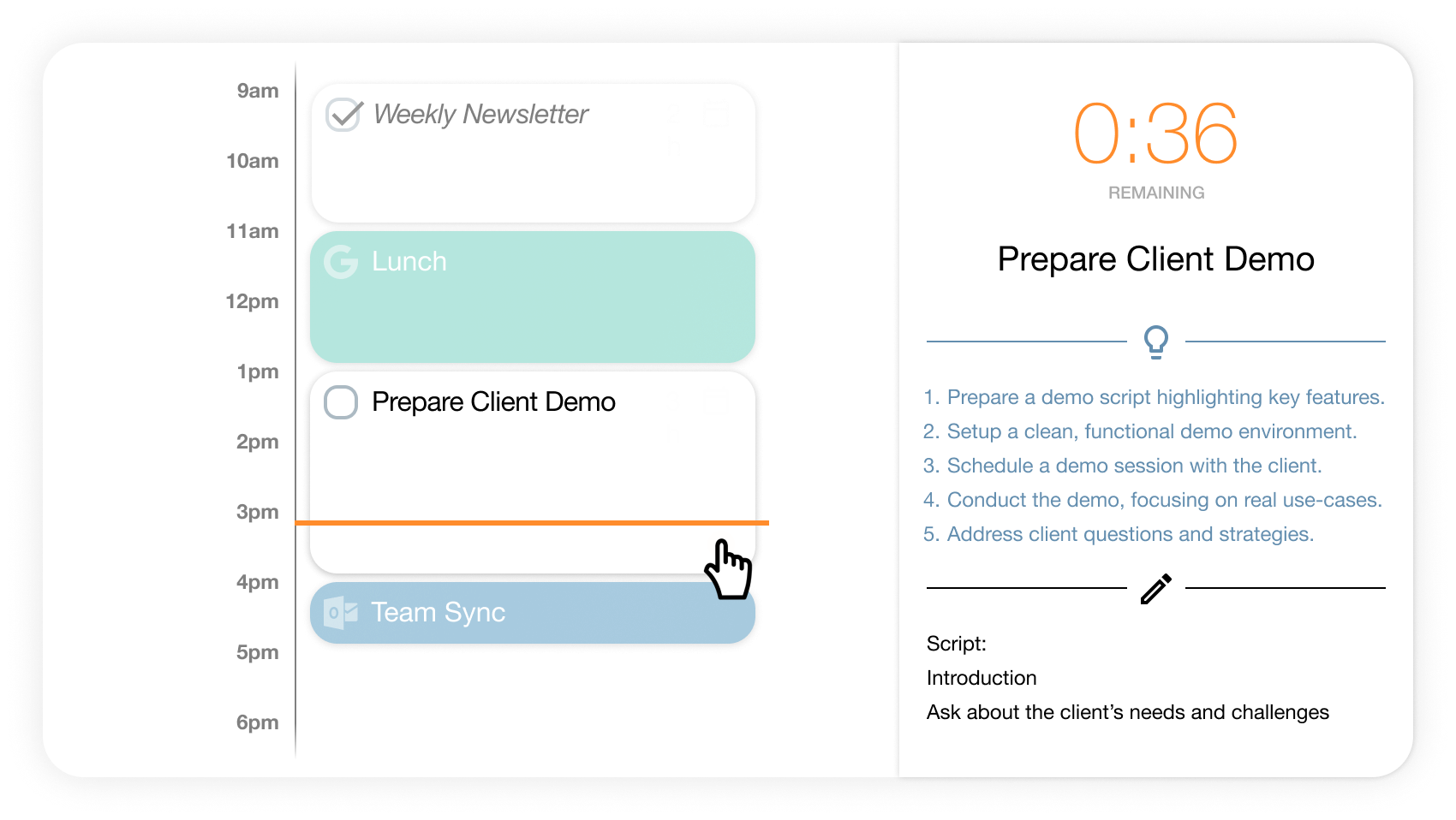
-
Focus on one task at a time
-
Start with a Task Breakdown (AI)
-
Write notes as you progress
"The ability to focus on what is important and ignore the rest is the hallmark of the greatest achievers." - Dean Graziosi.
While time-blocking effectively anchors your attention on the one task at hand, Trevor takes things even further with Focus Mode. Eliminate distractions, multitasking and procrastination with a timer, a note field and an AI-generated task breakdown.
#5 Ask Trevor—Your Capable Planning Assistant

-
Add, schedule and reschedule tasks, even in bulk
-
Find tasks scheduled in your calendar
-
Ask technical and how-to questions
"Ask Trevor is the future of personal productivity and the culmination of ~10 years of our work." - George & Dmitry, co-founders of Trevor AI
A Chat with Trevor AI is much more than a "ChatGPT experience". Trevor AI is capable of executing a variety of complex scheduling tasks, while having all the necessary context - like your tasks, calendar events, scheduling preferences and the optional personal context, making him an unrivalled planning assistant.
#6 Improve Every Day with your AI Coach

-
Gain momentum with daily progress insights
-
Review overdue and recurring tasks
-
Get AI Coaching on your recent schedule
"The key is in not spending time, but in investing it." - Stephen R. Covey
Wake up to a daily progress review, personalized insights, and AI-powered coaching. Trevor doesn’t just help you plan—he helps you get better at planning with every "Start My Day" email.
Trevor AI has a lot more to offer, like Scheduling Blocks, Rescheduling Suggestions, Smart Scheduling Queue, and more... make the most of your day by signing up now.
Available on Web for mobile and desktop.
Free tier for personal use. Pro plans available.
Your data is Private and Secure.
Plan your Day in 30 seconds...
Plan your Day in 30 seconds with Trevor AI - YouTube
Trevor AI
450 subscribers
Plan your Day in 30 seconds with Trevor AI
Trevor AI
Search
Watch later
Share
Copy link
Info
Shopping
Tap to unmute
If playback doesn't begin shortly, try restarting your device.
More videos
More videos
Share
Include playlist
An error occurred while retrieving sharing information. Please try again later.
Watch on
Data Privacy & AI Transparency

Trevor AI pledges to never sell or share any of your private data to 3rd parties.
Trevor AI is based in Europe and hosted on Google’s and Amazon’s robust worldwide infrastructure.
We adhere to GDPR standards, ensuring your data is managed securely and yours to export or delete.
A private AI model is trained on your calendar data and used exclusively to enable Trevor's smart features.
Some features are powered by LLMs, including OpenAI, while payments are securely processed by Paddle.
Connection to our websites should always be encrypted with a valid SSL certificate.
For any questions regarding data privacy, contact us at support@trevorlabs.com
Available on Web for mobile and desktop.
Free tier for personal use. Pro plans available.
Your data is Private and Secure.
Features & Pricing
Free Plan
The most intuitive Task Planner for Personal Use, featuring:


Task Hub
Task Hub
Task Hub
Organize your tasks in list, add colors and notes, invite peers, and integrate with 3rd party task managers like Todoist.
Smart Planner
Smart Planner
Smart Planner
The calendar interface is synced with your connected Google or Microsoft calendar account in real-time and keeps all scheduled tasks in perfect sync across your devices.
Unlimited Task Scheduling
Unlimited Task Scheduling
Unlimited Task Scheduling
Drag and drop, auto-scheduling and In-schedule suggestions provide optimal flexibility when scheduling your daily or weekly tasks.
Focus Mode
Focus Mode
Focus Mode
Dive into deep work with just a timer, a note field and a 5 step action plan to help you get started.
Predicted Task Duration
Predicted Task Duration
Predicted Task Duration
Trevor’s AI will auto-assign a base duration for each of your tasks, which you can easily overwrite.
AI Scheduling Suggestions
AI Scheduling Suggestions
AI Scheduling Suggestions
In-schedule suggestions show optimal scheduling times for your tasks, which you can accept with a single click.
Pro Plan $5/month, paid annually
or $6/month, paid monthly
Price shown may includes a 25% discount, applied on Sign Up.
30 day money-back. Cancel anytime. 7 day trial may be included.
The smartest Task Planner for Professional Use, featuring:
Multiple Calendar Accounts
Multiple Calendar Accounts
Multiple Calendar Accounts
Connect multiple Google and Microsoft calendar accounts for both work and personal life. You can disable irrelevant calendars to declutter your schedule.
Personal AI Model
Personal AI Model
Personal AI Model
Your Trevor’s AI will adapt you with each planning session, dramatically improving prediction accuracy of all AI scheduling features.
Recurring Scheduled Tasks
Recurring Scheduled Tasks
Recurring Scheduled Tasks
Setup both scheduled and unscheduled tasks as recurring to track progress and develop meaningful habits.
Smart Scheduling Queue
Smart Scheduling Queue
Smart Scheduling Queue
A powerful prioritisation mechanism allowing you to add tasks or lists to a queue which Trevor will proactively help you schedule, even in bulk.
Personal Scheduling Insights
Personal Scheduling Insights
Personal Scheduling Insights
Unlock the My Progress analytics dashboard and receive scheduling advise based on your own schedule in your daily email.
Rescheduling Suggestions
Rescheduling Suggestions
Rescheduling Suggestions
Trevor will provide rescheduling suggestions for overdue scheduled tasks and tasks with past due dates, until you mark them as complete.
Ask Trevor
Ask Trevor
Ask Trevor
Chat with Trevor and ask him to add, schedule and reschedule tasks, even in bulk. Ask for guidance, features, and anything related to planning.
Scheduling Blocks
Scheduling Blocks
Scheduling Blocks
Define scheduling times for each of your lists to help you separate work from life and to improve AI scheduling features.
Scheduling Calendar
Scheduling Calendar
Scheduling Calendar
Define a scheduling calendar for each of your task lists, allowing you to automatically schedule work tasks in your work calendars.
See AI Scheduling in Action:
AI Scheduling for your Tasks | Trevor AI - YouTube
Trevor AI
450 subscribers
AI Scheduling for your Tasks | Trevor AI
Trevor AI
Search
Watch later
Share
Copy link
Info
Shopping
Tap to unmute
If playback doesn't begin shortly, try restarting your device.
More videos
More videos
Share
Include playlist
An error occurred while retrieving sharing information. Please try again later.
Watch on
Available on Web for mobile and desktop.
Free tier for personal use. Pro plans available.
Your data is Private and Secure.
Explore your Use Case:
Explore Articles:
 How to Overcome Distraction in the Digital Economy
 Why Schedule your Tasks? Your Calendar as a Central Planning System
 The Superpower of a Daily Plan, in the Digital Economy
 Plan your day with Trevor AI - The Ultimate Guide
 The Minimalist Task Planner App for Clarity, Focus and Deep Work
 A Smart Planner for a Smarter Day
Frequently Asked Questions
What are Trevor AI's capabilities?
Trevor AI is an all-in-one AI planner for your tasks and calendars. Explore all of Trevor AI's capabilities and limitations in our documentation.
Is Trevor AI a Calendar or a To-do List?
Trevor AI is a smart planner that integrates both to-do lists and calendars, giving you the best of both worlds. What makes Trevor AI better than either one is the connection it facilitates between tasks and calendar events, as well as all the AI planning features.
How does Trevor AI plan my daily tasks?
Trevor AI offers an intuitive visual planner for your tasks, meetings and events. You can plan your day with AI in 1 click, you can drag & drop your tasks yourself, or you can simply ask Trevor to do it in the chat. Plan your day, your way.
Is Trevor AI Free?
Yes, a lot of Trevor AI’s features are free for personal use, including some AI planning features. Pro and Executive plans are available for those looking for an extra edge (that pays for itself many times over).
What does the “AI” in Trevor AI do?
Trevor's AI helps with organizing, planning your tasks tasks—From predicting a task's duration, category and even priority, to suggesting it’s optimal time-slot in your busy schedule, to finally breaking it down for you into 5 manageable steps - Trevor AI is with you all the way.
How does Trevor AI compare to Reclaim?
Compared to Trevor AI, Reclaim seems to have an algorithm that uses strict rules for each task. It works great for habits, but if you have over 25 tasks in your list, it can quickly become overwhelming to set rules for each one. While Trevor’s one-click AI scheduling feature is a direct competitor, you can just as easily drag & drop tasks between your task list and your calendar as much as you want, giving you effortless control over your schedule.
How does Trevor AI compare to Motion?
Compared to Trevor AI, Motion seems to be focused on executives and managers willing to pay a premium for advanced project management features. Trevor AI is the assistant for the everyday hero - by eliminating complexity and offsetting it with powerful AI automations, Trevor makes planning your day truly effortless.
How does Trevor AI compare to AkiFlow?
Compared to Trevor AI, AkiFlow’s main advantage seems to be the number of task integrations you can sync with. Trevor AI focuses on quality over quantity of integrations and provider powerful AI planning features on top of that solid foundation.
How does Trevor AI compare to Google Calendar or Microsoft Calendar?
Trevor AI doesn’t compare with popular calendar platforms, it integrates with them in real-time. You schedule a task - It pops up in Google Calendar. You move it in Google Calendar, it updates in Trevor.
Which tools does Trevor AI Integrate with?
Trevor AI integrates with both task managers and calendar platforms like: Google Calendar, Microsoft Calendar (Outlook & Office365), Apple Calendar, Google Tasks, Microsoft To-Do, and Todoist. For a complete integrations list visit our Integrations page.
YOUTUBE Twitter Patreon Facebook Medium F6s
Privacy policy terms of service cookie policy
© Trevor Labs Ltd.
By continuing to browse this site, you consent to our use of cookies for improved navigation and usage analysis. We keep your data private. See our Cookie Policy.