

详细内容
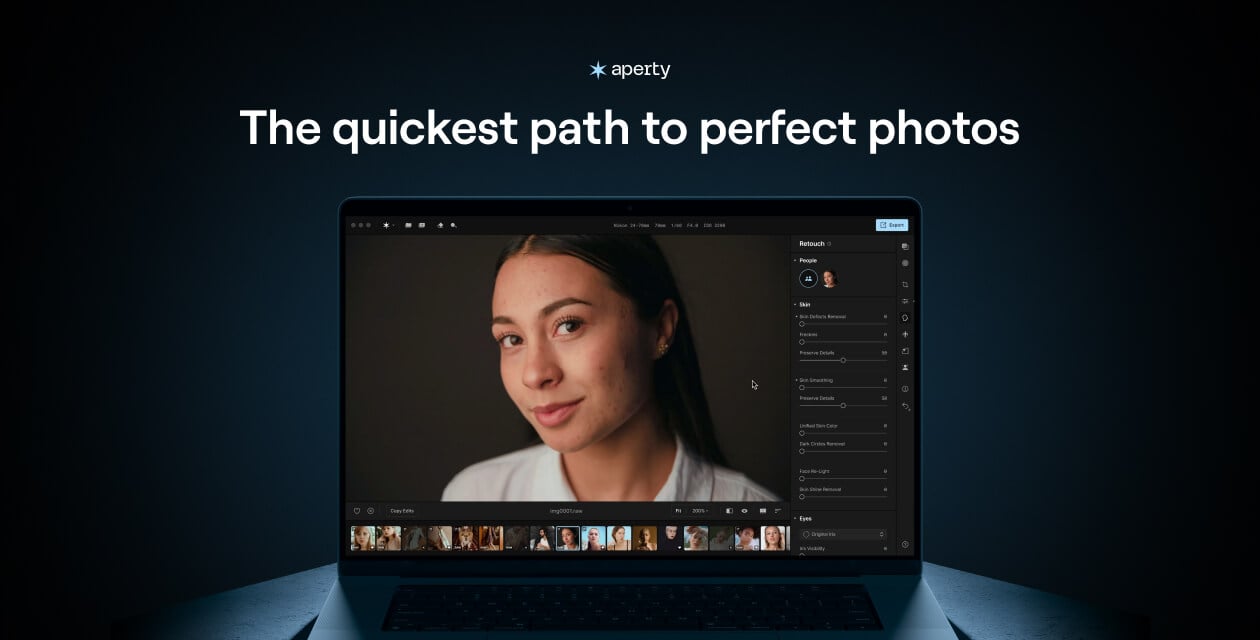

Summer editorial offer – 50% off Aperty!
exclusive gift included

01d:11h:01m:59s
Works as a
MacOS &
Windows app and a plugin for Photoshop & Lightroom
Retouch portraits faster & get natural results
Discover smart AI photo editing and maintain full creative control.
01d:11h:01m:59s
Before
After
events
Capture every event in detail
Smooth and enhance event photos while preserving natural expressions.
Retouch + Color
Noise reduction
Before
After
outdoor
Enhance your travel memories
Quickly bring out the beauty in travel shots, wherever you are.
Preset by Julia Trotti
Before
After
fashion
Flawless & iconic
Enhance details and textures for stunning fashion portraits.
Retouch
Color Correction
Makeup
Before
After
wedding
Perfect romantic moments
Create beautiful, natural-looking edits for every moment of the big day.
Retouch
Color Correction
Body skin smoothing
Before
After
family
Memories made perfect
Quickly retouch family photos while keeping the warmth and emotion intact.
Retouch
High Key
Before
After
studio
Studio quality portraits
Achieve professional studio results with minimal effort and maximum impact.
Retouch
Color Correction
Light Control
Before
After
school
Effortless school portraits
Easily enhance and retouch school photos with natural, quick results.
Retouch + Reshape
Color Correction
Bokeh
fashion
wedding
family
studio
school
events
outdoor
fashion
wedding
family
studio
school
events
outdoor
“Portrait Editor With AI Offering Fast Results”
FSTOPPERS
“Best AI photo retouching options”
slrlounge
“This AI Photo Editor Is So Good I’ll Never Trust a Photo Again”
muo
“Aperty is a great portrait editor – and it could replace Adobe Lightroom”
xda
“Adobe Lightroom Has Real Competition With This Portrait Photo Editing Tool's Release”
muo
“New World of Editing Power to Professional Portrait Photographers”
shutterbug
Why Aperty?
Aperty is a portrait editor that benefits photographers looking to decrease post-processing times without sacrificing quality and client satisfaction.

Retouching automation
Cut editing time, achieve pro results.

Unlimited exports
Retouch photos freely, without limits.

Batch retouching
Easily organize and edit multiple photos at once.

Plug-in support
Aperty works as a plugin with Lightroom and Photoshop.

Works offline
Edit offline with full photo security and privacy.

Prioritize natural beauty
Enhance skin while preserving its natural beauty.
01d:11h:01m:59s
Experience precise,
elegant retouching
Aperty removes the stress of tedious, manual retouching of a traditional portrait photo editor. Easily remove blemishes and deliver flawless, natural results with elegance and precision.
zoom in
Before
After
Skin retouching
Eyes
Makeup
Final result
Skin retouching [001]
Eyes [002]
Makeup [003]
Final result [004]
Remove blemishes and smooth imperfections to effortlessly enhance natural radiance, giving a polished look in every portrait.
Brighten and define eyes with ease. Add a captivating depth that draws attention and highlights unique expressions.
Enhance smiles by refining lip color and definition. Showcase natural beauty and create a soft, inviting look in every portrait.
Achieving a stunning, harmonious portrait that captures your subject’s essence and tells their unique story
01d:11h:01m:59s


Before
After
[ batch editing ]
Maximize efficiency, achieve consistency
Handle large volumes of photos all at once, cutting down processing time and effort.
Automate repetitive tasks for flawless, uniform results every time — whether it’s for one portrait session or multiple.


Before
After
Originalprocessed
Before
After
Originalprocessed
Before
After
Originalprocessed
Before
After
Originalprocessed
Before
After
Originalprocessed
Before
After
Originalprocessed
Before
After
Originalprocessed
Before
After
Originalprocessed
Before
After
Originalprocessed
Originalprocessed
Originalprocessed
Originalprocessed
Originalprocessed
Originalprocessed
Originalprocessed
Originalprocessed
Originalprocessed
Originalprocessed
Originalprocessed
01d:11h:01m:59s
[ new features ]
Turn back time with a touch
[001] Wrinkle Removal
Gently reduce fine lines while preserving
natural skin texture.
[002] Lips Smoothing & Blemish Removal
Refine lip texture and remove imperfections for a polished yet natural look.
watch in action
before
after
[Wrinkle Removal]
Gently soften wrinkles while preserving the skin's natural texture
[Lips Smoothing & Blemish Removal]
Naturally beautiful lips with a soft, refined
look
01d:11h:01m:59s
All-in-one AI Presets for quick retouching
Elevate your photos instantly with AI-powered presets that retouch skin, remove
imperfections, and bring out the best in every portrait.
original
retouch preset
original
retouch preset
original
retouch preset
original
retouch preset
original
retouch preset
what’s inside
Create & apply
all-in-one AI presets
Face Blemish
Face Skin Smoothing
Face Skin Color
Eyes Iris
Eyeball
Teeth
Lips
Contour & Highlights
Blush
Eyeliner & Eyebrows
Lips Makeup
Body Skin
Face Blemish
Face Skin Smoothing
Face Skin Color
Eyes Iris
Eyeball
Teeth
Lips
Contour & Highlights
Blush
Eyeliner & Eyebrows
Lips Makeup
Body Skin
Pack various adjustments like skin retouching, makeup enhancements, and color adjustments into a single powerful preset – apply pro-level edits in one click.
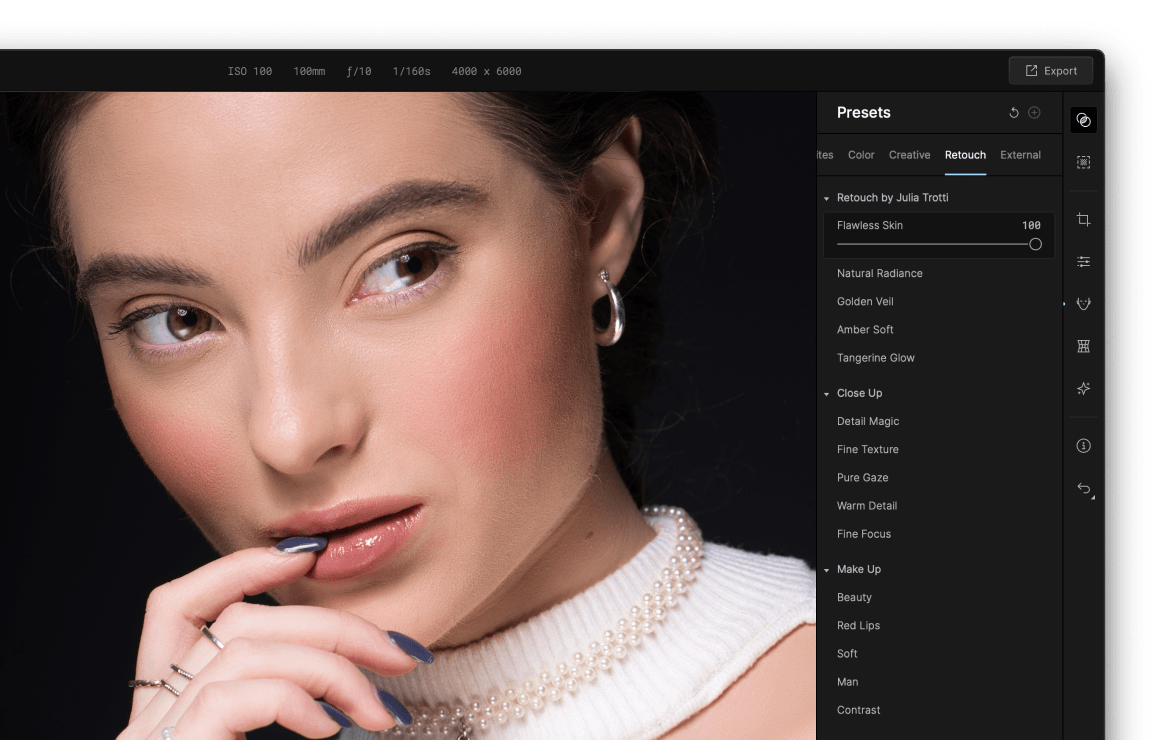
ready to use
Over 50 built-in presets, constantly updated
With custom presets you can choose between effects pre-made by the team or famous photographers like Julia Trotti, applying them in a beat.
01d:11h:01m:59s
Plug into software that you already use
Get better portraits without changing your workflow.
Achieve quick pro-level results, and a consistent look across your photos.
Adobe Photoshop® Plugin
Adobe Lightroom® Classic Plugin
01d:11h:01m:59s
Light Control
Perfect light in a few clicks
Control light sources
Is your portrait overexposed or too dark? Try a new light configuration.
Play with patterns of light
Different light sources can cast unique light patterns on your models.
before
after
01d:11h:01m:59s
[ Make-up ]
Unparalleled make up tools
When makeup doesn’t capture a model's full potential, Aperty allows you to perfect every detail. Subtle adjustments and enhancements in post-production ensure a flawless, picture-perfect finish, elevating the beauty of every shot.


 Apply make up tool BlushApply make up tool Contour and highlightsApply make up tool lipsApply make up tool brows
[001] Blush
Enhance any complexion with natural-looking vitality.
[002] Contour and highlights
Sculpt and illuminate the face for a flawless look.
[003] Lips
Define the lips for a captivating look.
[004] Brows
Shape and enhance brows for a polished finish.
[ Reviews ]
Trusted by professionals
Julia Trotti
Portrait photographer
641K
“Aperty has allowed me to simplify and speed up my photo editing workflow. Instead of having to move from one app to the other, I can now do all my raw processing and skin retouching in Aperty. As photographers and small business owners, we are always looking for ways to speed up our workflow while still maintaining high-quality results. The tools we have created in Aperty will allow us to achieve this.”
Taylor Jackson
wedding Photographer
634K
“All your clients are going to like their images just a little bit more. They’re hopefully not going to notice that your photos have been retouched. Aperty will make them look as if you haven’t done anything, just captured a person in their best element. They’ll be happy with the results, as well as all the rest of the family. And that means you’re going to get referrals. Life’s going to be good.”
Jim Nix
Professional Photographer
48,9K
“If you are a portrait photographer and you’re doing these kinds of edits for weddings, seniors portraits, or other kinds of portrait sessions, this is going to be a tool for you. Aperty is a pro-level-class editor, and it was built in collaboration with Julia Trotti who is a well-known portrait photographer and YouTuber.”
Anthony Turnham
Professional Photographer
72.2K
“Aperty is very speedy and efficient. Especially when you put it into that context of how long would I spend retouching this manually versus waiting 20-30 seconds for it to render that finished result.”
[ Powerful features ]
Discover even more possibilities
Mask and apply essential adjustments
Handle all the basic adjustments and precise masking effortlessly, ensuring every detail is perfectly crafted.
Reshape faces quickly and easily
Easily adjust facial features to achieve flattering results that look authentic. Sculpt cheekbones, refine nose structure, enhance lips, and even reshape body contours to get the exact look you envision
Add flair and style
Retain full control over the mood, lighting, and final look of your images, transforming your portraits into stunning works of art.
Mask and apply essential adjustments
Handle all the basic adjustments and precise masking effortlessly, ensuring every detail is perfectly crafted.
Reshape faces quickly and easily
Easily adjust facial features to achieve flattering results that look authentic. Sculpt cheekbones, refine nose structure, enhance lips, and even reshape body contours to get the exact look you envision
Add flair and style
Retain full control over the mood, lighting, and final look of your images, transforming your portraits into stunning works of art.
Mask and apply essential adjustments
Handle all the basic adjustments and precise masking effortlessly, ensuring every detail is perfectly crafted.
‹›
[ developed with pros in mind ]
Reliable innovation
Advanced human detection
Enjoy precise human detection and segmentation - easily select people in a group, or fine-tune facial features, retaining full control over results.
Advanced AI technology
Aperty's AI-driven approach learns and adapts, providing tailor-made enhancements for each photo.
User-centric design
Built with photographers in mind, Aperty's interface is intuitive and easy to navigate, reducing the complexity of advanced photo editing.
Developed with a professional
We’ve created Aperty together with renowned photographer Julia Trotti, to help you achieve studio-level quality with ease.
Community and support
Join a growing community of photographers and editors who trust Aperty for their work. Access dedicated support and resources to get the most out of your editing experience.
01d:11h:01m:59s
Elevate your portraits
Achieve effortless, professional portraits in no time with Aperty.
01d:11h:01m:59s
Frequently Asked Questions
What are the unique features of the Aperty portrait editor?
The AI portrait editor Aperty has a unique toolkit of features that can help you enhance your portraits with ease. You’ll find features designed for creating fantastic portraits – for reshaping, retouching, blemish removal, adding make-up, and more.
How to edit portrait photography using Aperty?
Use Aperty’s portrait photo editing software to enhance facial features, colors, and remove imperfections, showing your subjects in their best light.
What tools are available in the portrait photography editor?
You’ll find a variety of portrait enhancement tools for retouching skin, eyes, faces, and facial features. Reshaping bodies and faces. As well as additional creative tools to make your portraits stand out.
Can I change the skin complexion in Aperty?
Of course! You can easily adjust skin tone in the Aperty editor.
What features are available for editing eyes?
You’ll find features for iris color enhancement, iris flare, eye whitening, eye enlargement, removing redness, and more.
Will there be an option to remove background?
No, but you can select background area in masking and adjust it.
Can I purchase additional presets for Aperty?
Of course. You’ll be able to add your custom presets, or buy additional presets.
Does Aperty work as a plug-in?
Aperty portrait photo editor works both as a standalone program and as a plug-in for Photoshop, macOS Photos, and Lightroom.
See more F.A.Qs
↓
See less F.A.Qs
↑
Be the first to know
Stay updated on our latest features and improvements
email invalid
subscribe
I agree to my personal data being stored and used to received newsletters and commercial offers from Skylum.
Subscription successful
You’ve subscribed to product updates. Keep an eye on your inbox, we’ll be sending you the latest changes and updates every month.
