

详细内容

Save hours of manually writing code documentation
AI Code documentation tools
Automated AI-powered tools to generate Code & Api documentation from your source code files

Join over +30,100 Members


Scott A. CTO / Co-Founder at Tech
I have been in this business for 20+ years and this is one of the most useful tools I have come across in recent years :)

Mike T. Engineer at NVIDIA
Great tool to write code documentation. It saves me a lot of time and the output is very accurate and professional.

Esteve A. Co-founder & CBO at FwLaps
Great tool to speed up the writing of Code documentation. Time saver and high quality output.

Jose L. Senior Web developer at Tech
DocuWriter saved my deadline. I was able to generate the entire code documentation for my project in a few minutes.
Automatic Code Documentation Tool
API Documentation Tool
Code Comments & DocBlock Generator
UML Diagram Generator
AI-Powered Code Tests Suite Generation
Intelligent Code Refactoring
Code Language ↔ Converter
n8n Workflow Integration
Automatic Code Documentation
Automated Code Documentation Generation
DocuWriter.ai uses AI technology to generate accurate documentation for your code.
-
Save time — with fast AI-generated content.
-
No Outdates— Continuous code documentation refresh.
-
Consistency — Consistent code documentation
API Documentation
Swagger API Documentation
Automatically generates Swagger-compliant JSON documentation directly from your source code files.
-
Swagger-Compliant — Compatibility and ease of use.
-
Postman compatible— Import collection directly to Postman.

TESTS GENERATION
AI-Powered Code Tests Suite Generation
Generate a comprehensive test suite for your codebase with DocuWriter.ai. Our AI-powered test generation tool will help you save time and money by automating the process of writing tests.
-
Time Saver — Rapid test suite generation
-
Quality Assurance— Ensure code reliability
-
Catch Bugs — Identify issues faster
Example - Time Elapsed JSTest Generated - JS
let seconds, minutes, hours = 0;
let timer;

const start = () => {
  timer = setInterval(() => {
    seconds++;
    if (seconds === 60) {
      seconds = 0;
      minutes++;
    }
    if (minutes === 60) {
      minutes = 0;
      hours++;
    }
  }, 1000);
};

const stop = () => {
  clearInterval(timer);
};

const getSeconds = () => seconds;
const getMinutes = () => minutes;
const getHours = () => hours;

module.exports = {
  start, stop, getSeconds, getMinutes, getHours
};
const { expect } = require('chai');
const sinon = require('sinon');
const timeElapsed = require('./time-elapsed.js');

describe('Time Elapsed', () => {
  let clock;

  before(() => {
    timeElapsed.start();
    clock = sinon.useFakeTimers();
  });

  after(() => {
    timeElapsed.stop();
    clock.restore();
  });

  it('should increment seconds', () => {
    clock.tick(1000);
    expect(timeElapsed.getSeconds()).to.equal(1);
  });

  it('should increment minutes and reset seconds', () => {
    clock.tick(59000);
    expect(timeElapsed.getMinutes()).to.equal(1);
    expect(timeElapsed.getSeconds()).to.equal(0);
  });

  it('should increment hours and reset minutes', () => {
    clock.tick(3590000);
    expect(timeElapsed.getHours()).to.equal(1);
    expect(timeElapsed.getMinutes()).to.equal(0);
  });
});
Code Refactoring / Optimization
Intelligent Code Refactoring
DocuWriter.ai's Code Refactoring tool uses AI to clean up and optimize your code, making it easier to read, understand, and maintain.
-
Code Simplification — Refactor for readability
-
Maintainability Boost— Easy code updates
-
Best Practices — Adherence to coding standards
Example - Test PythonRefactored / Optimized Code
# Bad code

def func1(x1,x2):
    a=x1
    b=x2
    c=a+b
    d=c*10
    e=[]
    for i in range(d):
        e.append(i*2)
    return e
# Refactored and optimized code

def sum_and_multiply(x1, x2):
    # Rename variables to be more descriptive
    num1 = x1
    num2 = x2

    # Calculate the sum and multiply it by 10
    total_sum = num1 + num2
    multiplied_sum = total_sum * 10

    # Create an empty list to store the results
    result_list = []

    # Iterate through the range of the multiplied sum
    for i in range(multiplied_sum):
        # Append the double of each value to the list
        result_list.append(i * 2)

    return result_list
CODE CONVERTER
Code Language Converter
Working with multiple programming languages? Let DocuWriter.ai streamline the process. Our Code Language Converter makes translating code from one language to another in a second.
-
Swift Transitions — Convert from Java to Dart, Bootstrap to TailwindCSS, and more in a snap.
-
Time-Saving— Save valuable time for more crucial tasks.
Example - Bootstrap buttonsTailwindCSS converted buttons
<button type="button" class="btn btn-primary">Primary</button>
<button type="button" class="btn btn-secondary">Secondary</button>
<button type="button" class="btn btn-success">Success</button>
<button type="button" class="btn btn-danger">Danger</button>
<button type="button" class="btn btn-warning">Warning</button>
<button type="button" class="btn btn-info">Info</button>
<button type="button" class="btn btn-light">Light</button>
<button type="button" class="btn btn-dark">Dark</button>

<button type="button" class="btn btn-link">Link</button>
<button type="button" class="px-4 py-2 font-bold text-white bg-blue-500 rounded-xs hover:bg-blue-700">Primary</button>
<button type="button" class="px-4 py-2 font-bold text-white bg-gray-500 rounded-xs hover:bg-gray-700">Secondary</button>
<button type="button" class="px-4 py-2 font-bold text-white bg-green-500 rounded-xs hover:bg-green-700">Success</button>
<button type="button" class="px-4 py-2 font-bold text-white bg-red-500 rounded-xs hover:bg-red-700">Danger</button>
<button type="button" class="px-4 py-2 font-bold text-black bg-yellow-500 rounded-xs hover:bg-yellow-700">Warning</button>
<button type="button" class="px-4 py-2 font-bold text-black bg-blue-200 rounded-xs hover:bg-blue-400">Info</button>
<button type="button" class="px-4 py-2 font-bold text-black bg-white rounded-xs hover:bg-gray-200">Light</button>
<button type="button" class="px-4 py-2 font-bold text-white bg-gray-800 rounded-xs hover:bg-gray-900">Dark</button>
<button type="button" class="text-blue-500 underline hover:text-blue-800">Link</button>
Comments & DocBlock
Code Comments & DocBlock Generator
Automatically generate code comments and DocBlocks for your codebase with DocuWriter.ai.


UML Diagram Generator
Generate UML diagrams from your codebase with DocuWriter.ai. Our UML diagram tool will help you save time and money by automating the process of writing UML diagrams.

n8n Workflow Integration
Automate your documentation generation workflows with our native n8n integration. Connect DocuWriter.ai to your existing automation processes and trigger documentation generation automatically when code changes occur.
- Trigger documentation generation on Git push events
- Automate team notifications with generated docs
- Schedule periodic documentation updates
Learn more about n8n integration

Workflow Automation
Seamlessly integrate with your n8n workflows for automated documentation generation and team collaboration.
All in one Codebase Knowledge base management tool Spaces
Centralize all your documentation in one place. Create your own spaces and organize your documentation as you wish.
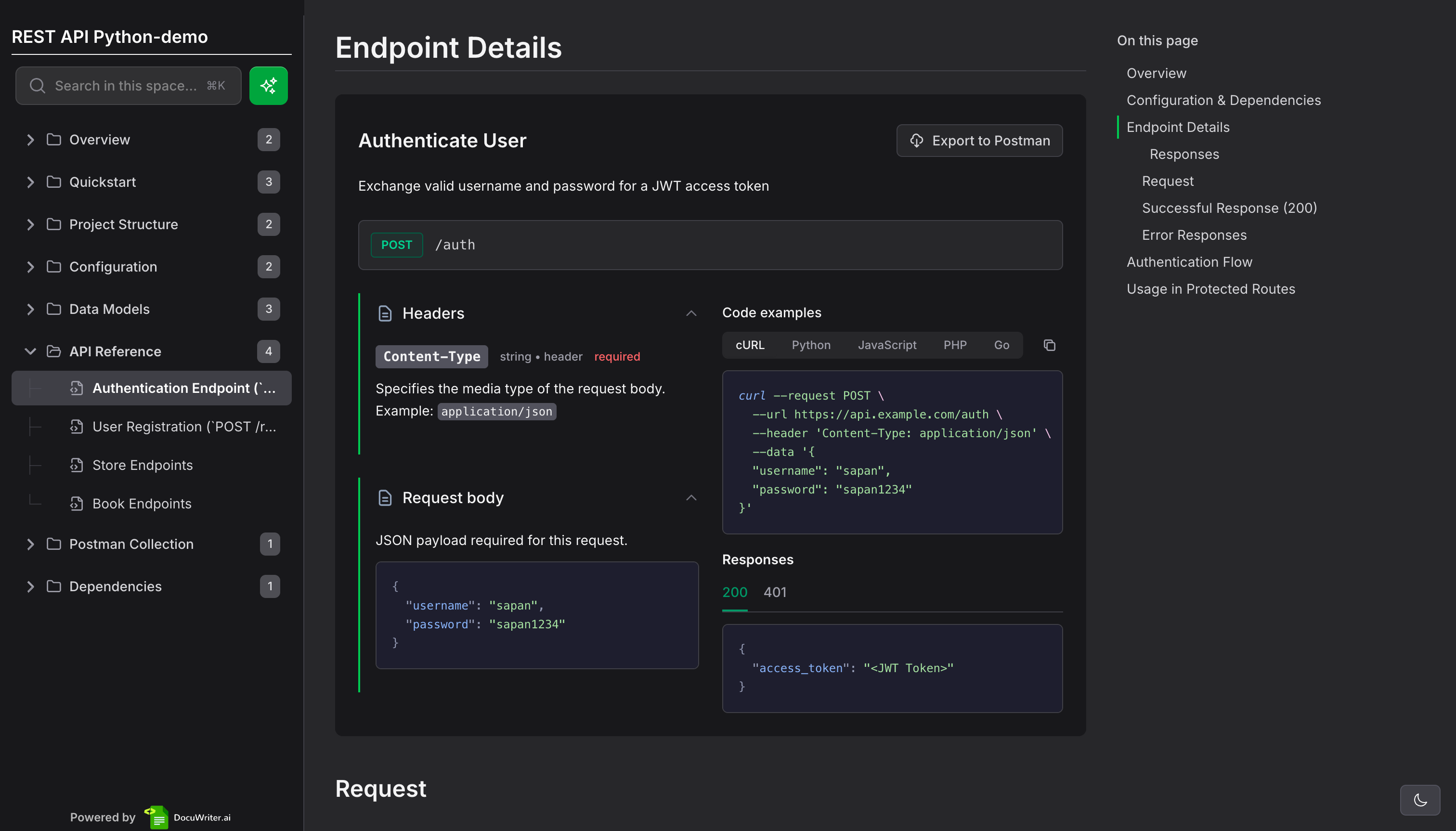
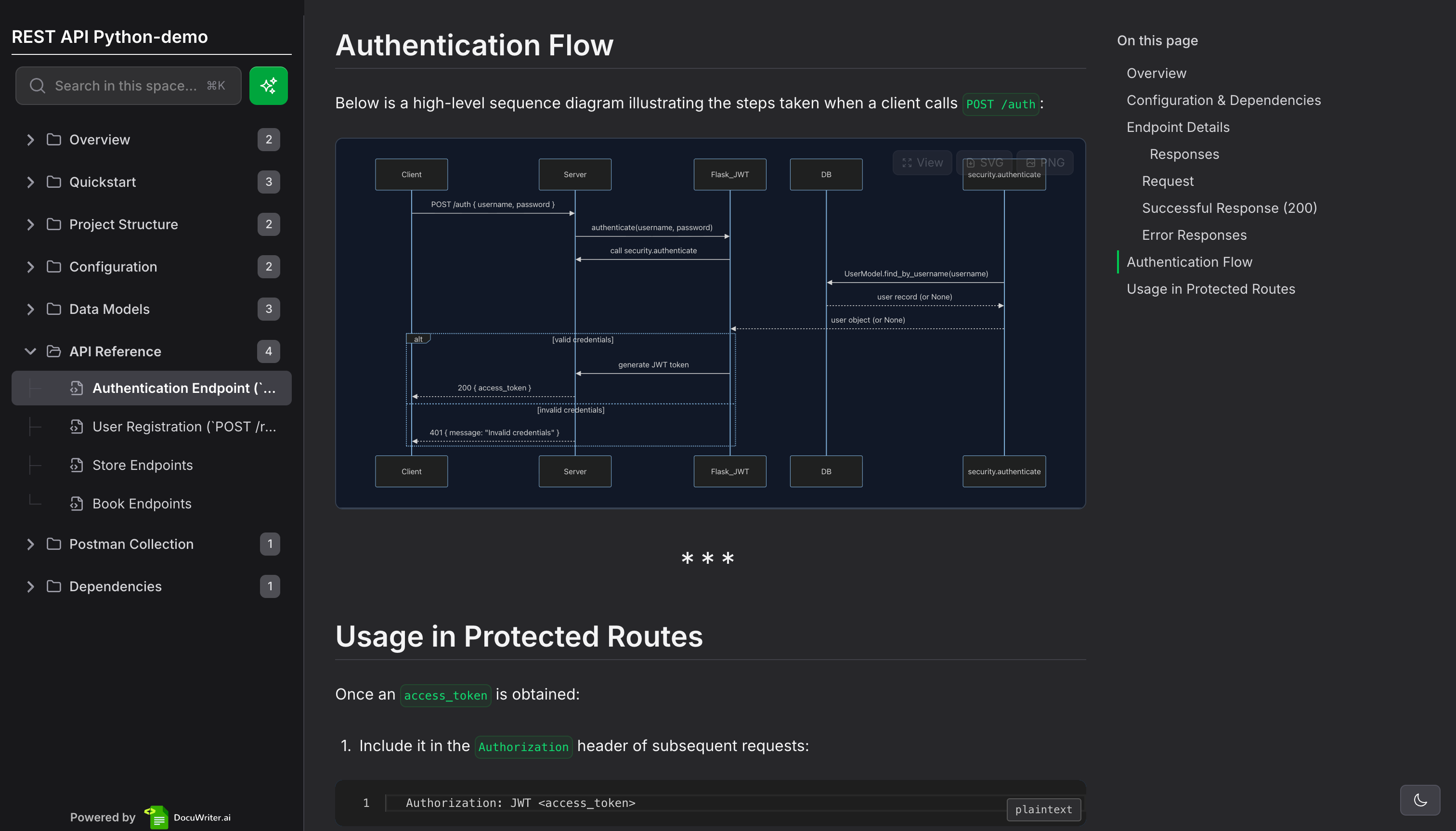
Don't know how to write technical documentation? Read our technical documentation guide.
MCP Ready
Connect DocuWriter.ai with Cursor, Claude & ChatGPT
Use Model Context Protocol (MCP) to integrate DocuWriter.ai directly into your AI coding assistant. Generate documentation, manage spaces, and create content without leaving your editor.

Our numbers speak for themselves
We are proud of the numbers we have achieved so far. Helping developers and teams to save time and improve their code documentation quality.
+30,100
Platform members
173,843 h
Hours saved from manually writing code documentation
+66,863
Code documents generated
NO COMMITMENT. CANCEL ANYTIME.
MonthlyYearly4 Free months
Professional $33Billed Yearly
Advanced for professionals
- 250 AI Generations / month
- 5 Knowledge Spaces
- Unlimited History
- AI Assistants
- Git Repository Sync Hot
- Chat with Codebase New
- Access to Premium Models
- MCP & API Access
Enterprise $86Billed Yearly
Unlock the full potential
- 500 AI Generations / month
- Unlimited Knowledge Spaces
- Full Tree Documentation Hot
- Full API Documentation Hot
- Team Management & Roles
- Priority Support
- Everything in Professional
Unlimited $199Billed Yearly
Unlimited potential for your business
- Unlimited AI Generations
- Unlimited Knowledge Spaces
- Early Access to New Features
- Dedicated Success Manager
- Everything in Enterprise
CustomTailored plan
Need something unique?



FAQS
Frequently Asked Questions
Answers to Common Queries About DocuWriter.ai
If you have any other questions, please reach us at support@docuwriter.ai
General
Do I have to pay for DocuWriter.ai?− +
Yes, DocuWriter.ai offers various pricing plans to accommodate different requirements.
What Programming Languages are Supported by DocuWriter.ai?− +
DocuWriter.ai is designed to be versatile and support all programming languages. Our advanced AI algorithms can generate documentation, test suites, and optimize code regardless of the programming language you are using. Whether you're working with, DocuWriter.ai has got you covered!
Is my code safe with DocuWriter.ai?− +
Absolutely! At DocuWriter.ai, we understand the importance of your code's security. We employ top-notch security measures to ensure that your code is protected. Your code is only used to generate documentation, or other code processes. We respect your intellectual property and prioritize your privacy.
We do not store/save any of your uploaded files/code, we only process it to generate the results, after that, the files are automatically deleted.
Your code will not be used to train or improve any AI models.
What is a Generation / Credit?− +
Each time we process your source files, we call it a generation. It can be a documentation generation, code tests, refactors, etc... Each generation costs one credit.
🎓 Educational Discount Available!− +
If you are a student, teacher or work for any Educational Institution, please reach out to us at support@docuwriter.ai for a special discount.