

详细内容

AI Image Upscaler
Select a Model Family:general
Upscale Factor
1x
2x
3x
4x
4MP
8MP
16MP
use Face Restoration
(try this option if your result has strange looking faces)
Creative hallucination (see help below)
select imagesupload (0)
Daily free quota exhausted. Visit /account to get more quota
High Resolution Upscaled Images:
Ready for download — Click on an image to open it!
enable quick download without preview:
Don’t forget to share our project with your friends and on social media 😊
Images currently being upscaled:
High-quality processing usually takes only a few seconds. For Diffuser, it can take 1 to 5 minutes. Your file will be ready soon! Feel free to check
back shortly!
You can also visit our new discord or take the time to follow me on
twitter.
Images waiting in line for high-quality upscaling:
High-quality upscaling takes time and other images are currently being processed. Check back in about 5
minutes - you do not need to keep this tab open. There are currently a total of requests waiting.
Thank You!
You are a supporter of the service and help keep it running.
You can view your account balance at /account.
This upscaler is free, but running it isn’t.
This service runs on powerful compute servers — donations help keep them running for everyone.

Enhance Your Images with AI Upscaling
Upload an image to have it scaled up to 4x using AI! Images are only visible to you and will be deleted a few
minutes after processing. You can upload images up to a size of 16MPx to be scaled to 16k*16k. Note that in
times of high demand, it may take a few minutes for your images to be processed.
What model to choose?
Diffuser
Pros:
- Very good at restoring poor-quality photos
- Very good at upscaling small images
- Excellent at producing realistic / natural images
- A text prompt can help refine details
Cons:
- limited to 4MP (2K)
- Slow and expensive
- No transparent image support
Additional info:
- Hallucination can increase creativity and enhance image quality, detail and sharpness.
It may deviate more from the target image, and if overused, can appear unnatural or overly “AI-dreamy".
Higher hallucination can help if your images are severely blurry or noisy or full of compression artifacts.
- Try Plus or General models first, often you get good results for cheap and without long wait.
Plus
Pros:
- Very good at upscaling images that are of decent quality
- Supports up to 32MP
- Best for upscaling art / drawings
- Fast and cheap
- Supports transparent images
- Produces sharp outputs
Cons:
- Images can look unnatural or “plastic”, therefore the best use case is upscaling art / drawings
Additional info:
- Face Enhance can improve faces
General
Pros:
- Supports very large outputs up to 256MP (16k)
- Best for upscaling art / drawings
- Fast and cheap
- Supports transparent images
Cons:
- Might not have the best quality compared to Plus or Diffuser
- Images can look unnatural or “plastic”, therefore the best use case is upscaling art/drawings
Additional info:
- Face Enhance can improve faces
Key Features
- Top quality results, including drawings, AI art, anime, photos
- 100% free for small-scale use — no paywall, no sign-up. A daily free quota applies.
- Download as apk for Android: here
- Supports common image formats: PNG, JPG, WebP (animated formats like GIF are not supported)
- Large image support up to 4096*4096
- Scale image 2x / 4x using AI
- Restore low resolution photos
- Improve blurred / pixelated faces
- Supports bulk upscaling
- Supports transparent images
- Fast and user friendly interface
How It Works
Using this website is incredibly simple — and free:
-
Upload Your Image: Select an image from your device. Please note that the image
size is limited
to 16MPx.You can now select a model and choose the required scale.
-
Processing:
The server will start working on your image. This process usually takes only a few seconds.
Your image will be saved and ready for download once it’s done.
This algorithm prioritizes quality over speed, so larger images may take longer to
process. -
Download Your Upscaled Image:
Return to the site after a few minutes, and your high-resolution
image will be waiting for you in the gallery! -
Cleaning Up: Your images will be deleted a few minutes after processing to free up
space for new requests.
Comparison Example:
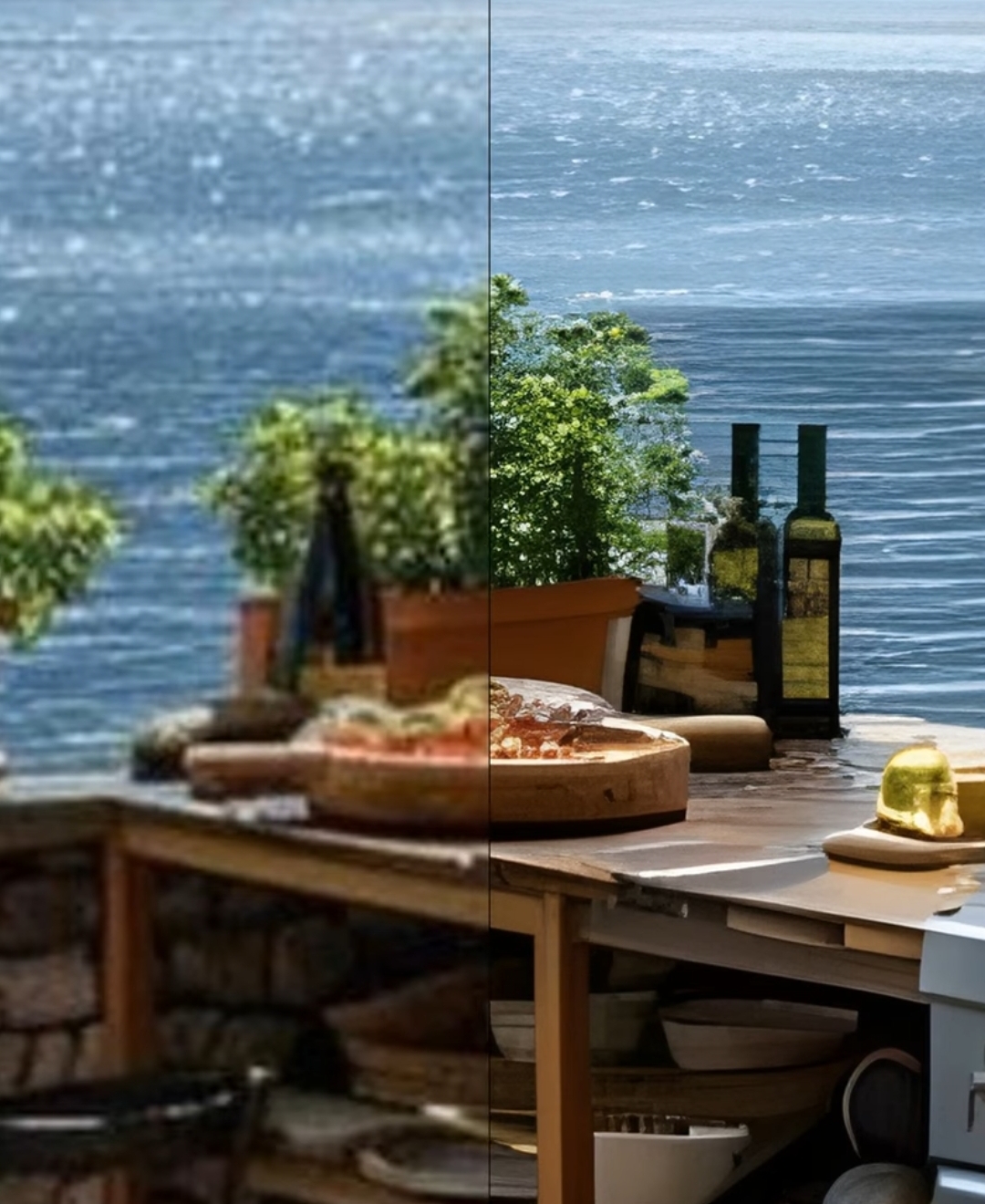
Incredible — isn’t it? You can try this out right now for free here!
AI Upscaling vs. Traditional Scaling
AI Upscaling:
-
Enhanced Detail: AI technology analyzes and reconstructs finer details, resulting
in sharper
and more vibrant images. -
Preserved Quality: Unlike traditional methods, AI upscaling maintains the integrity
of the
original image, avoiding pixelation and blurriness.
Traditional Scaling:
-
Loss of Detail: Standard scaling methods often lead to a loss of detail, making
images appear
blurry and pixelated. -
Limited Enhancement: Traditional techniques can’t add new details, limiting the
quality
improvement.
Data safety and copyright
-
Your images are matched to you using a cookie - a 32-character hexadecimal string randomly
generated when
you first visit the page. Only with this cookie can an image be accessed. -
Your images will be stored until they are processed and a few additional minutes for you to
download them. -
Your images will not be used in any way other than being upscaled and stored for a short time on
this server. -
Using this website gives me (the owner) no rights about your images - you are still full
copyright holder. -
The images are stored on this web server in germany.
© 2024 image-upscaling.net
marvineckhardt04092003@gmail.com
Impressum
Marvin Eckhardt
Hinter dem kleinen Dorfe 170
38822 Aspenstedt
Germany