

详细内容
Easily create stunning photos with AI editor
Edit, enhance, generate images—an all-in-one AI photo toolkit built on Flux.1 × Google Gemini.
Start creating for free Explore All Tools

Photo Enhancer
Upscale and enhance image quality in seconds. Make your photos brand new and in HD resolution
 Extremely easy to use
Fully automated process
Download images in HD quality

AI Image Extender
Expand image without stretching or cropping. Resize for social posts, posters, or web banners
Extend images seamlessly
No image quality loss
Flexible sizes

Nano Banana Pro
Edit photos with simple text prompts — remove objects, replace items, change colors, or adjust backgrounds
No editing skills needed
Greater creative freedom
4K output supported

Magic Eraser
Easily remove objects from your photos. Easily remove anything and draw the missing part of the photo
Perfectly erases any object
Extremely easy to use
Automated process

AI Clothes Changer
Virtual try on clothes in seconds with AI. See how any outfit looks on you — instantly
Try on clothes instantly
Natural and realistic results
No editing skills needed

AI Image Generator
Turn words into art with text to image, or transform photos via image to image editing
Instant results
Multiple styles available
Download images in HD quality

Photo Enhancer
Upscale and enhance image quality in seconds. Make your photos brand new and in HD resolution
Extremely easy to use
Fully automated process
Download images in HD quality
AI Image Extender
Expand image without stretching or cropping. Resize for social posts, posters, or web banners
Extend images seamlessly
No image quality loss
Flexible sizes
Nano Banana Pro
Edit photos with simple text prompts — remove objects, replace items, change colors, or adjust backgrounds
No editing skills needed
Greater creative freedom
4K output supported
Magic Eraser
Easily remove objects from your photos. Easily remove anything and draw the missing part of the photo
Perfectly erases any object
Extremely easy to use
Automated process
AI Clothes Changer
Virtual try on clothes in seconds with AI. See how any outfit looks on you — instantly
Try on clothes instantly
Natural and realistic results
No editing skills needed
AI Image Generator
Turn words into art with text to image, or transform photos via image to image editing
Instant results
Multiple styles available
Download images in HD quality
More useful tools from Picsman

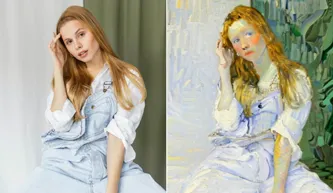
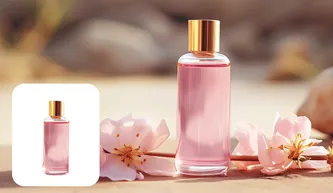
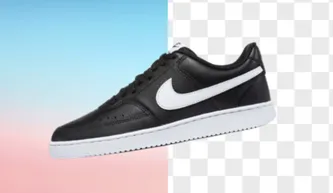


Thousands of templates for your store, e-commerce, social media and stories
See All


More customization to perfect the design
Add style and personality to your images with tons of backgrounds, illustrations and text effects
Start creating for free


Text Art
Create artistic text with over 200 font effects to make your work shine

5000+ Photos
Explore our libraries of free stock images to find the perfect photo for your project

2000+ Stickers
Tons of free graphics, icons and PNG stickers to add more creativity to your works
Start creating for free
More customization to perfect the design
Add style and personality to your images with tons of backgrounds, illustrations and text effects
Text Art
Create artistic text with over 200 font effects to make your work shine
5000+ Photos
Explore our libraries of free stock images to find the perfect photo for your project
2000+ Stickers
Tons of free graphics, icons and PNG stickers to add more creativity to your works
Start creating for free
More functions to make your images stand out
Resize image, crop image, 3D shadow, image reflection and more for you to create professional photo
Start creating for free


Resize & Crop
Transforms your images into the perfect size with image resizer and image cropper

3D Shadow
Add shadow effects to your product to make it more realistic and attractive

Image Reflection
Add reflection effects on objects to make your images even more amazing
Start creating for free
More functions to make your images stand out
Resize image, crop image, 3D shadow, image reflection and more for you to create professional photo
Resize & Crop
Transforms your images into the perfect size with image resizer and image cropper
3D Shadow
Add shadow effects to your product to make it more realistic and attractive
Image Reflection
Add reflection effects on objects to make your images even more amazing
Start creating for free



Get Picsman APP
now
Download our mobile app and enjoy editing photos on the go — anytime, anywhere.


They love editing photos with Picsman

Ethan Turner

Simple yet incredibly potent
Picsman is a lifesaver! Its simple and user-friendly interface makes photo editing a breeze, saving us both time and money. We love how effortlessly we can enhance our images without any steep learning curve. Picsman has truly simplified our workflow, making it an essential tool for any business.

Caleb Mitchell
Efficient and powerful
Removing and replacing backgrounds with Picsman is a breeze! Whether it's a quick touch-up or a complete transformation, Picsman gets the job done flawlessly. Perfect for e-commerce, it has become our secret weapon for stunning product images.

Emma Reynolds
Perfect for e-commerce
Picsman excels in e-commerce image perfection! Tailored for product images, the app's suitability for e-commerce needs, coupled with its simplicity, has elevated our online store's visuals. Picsman is our go-to for creating professional, eye-catching product images effortlessly.


1.What is Picsman.ai Photo Editor?


Picsman.ai is a visual online photo editing website powered by AI technology.
With Picsman photo editing software, you can easily enhance the appearance of your digital photos. With just a few clicks, you can remove the background of your photos, improve image quality, add photo effects, remove unwanted items from photos, modify image size, and more.
2.What AI tools does Picsman have?
The main AI features of Picsman Photo Editor Web App include Remove Object, Remove Background, Change Image Background, Enhance Photo, Remove People, Remove Watermark, AI Image Generator, Batch Editor, etc.
Our team is always working on improving old features and developing new ones for our users.
3.How to edit photos in Picsman?
To edit photo online, all you need to do is open the Picsman website, choose an AI tool, and upload the photo. For each tool, we have a specific guideline on how to use it on the webpage.
4.What image formats are Picsman supported?
We support the most popular image formats today: JPG, PNG, JPEG, WebP, BMP, TIFF, HEIC, etc., and allow users to download high-definition images in JPG or PNG format.
5.How do I edit a picture into a picture?
To overlay two images, please click the 'Start Creating' button on the homepage of the website, upload the base image and open the editor. Then, you can click the 'Add Image' tool on the left to upload a secondary image or choose from our free stock library. Selected images can be adjusted and edited.
6.Is Picsman’s online photo editor free to use?
Yes, Picsman's online photo editor offers a free plan, which allows you to use most features and export edited photos for free. Users who want more advanced features can upgrade to Picsman PRO.
7.What's the difference between Picsman and Photoshop?
Picsman is a user-friendly online photo editor similar to Photoshop. Picsman has a variety of photo editing features to help you quickly improve and edit photos. You can use Picsman to remove backgrounds, remove unnecessary objects on photos, improve image quality, beautify portraits, modify image size, crop images, add text and overlays, and more.
Picsman's photo editor is easier to use than Photoshop. With a user-friendly interface and powerful editing functions, it simplifies the photo editing process and helps you achieve stunning results with minimal effort. It is an ideal choice for amateurs and professionals.
8.How to cancel my subscription to Picsman?
To cancel your subscription, please refer to our Billing Policy.
9.Can I edit photos on a mobile phone with Picsman.ai?
Yes, our photo editor is available on Windows, Mac, iOS, and Android devices. You can edit and enhance your photos from anywhere and anytime with just one account.

We use cookies to provide you with better experience. By continuing, you acknowledge that you have read,understood and agreed our Cookie Policy.
Accept
