

详细内容




#1
AI AGENT FOR WEB BROWSING
APP DASHBOARDADD TO BROWSERADD TO BROWSER
Summarize YouTube videos, blogs, PDFs in seconds, answer emails, proofread, generate articles, extract data and automate your work with contextual & practical AI.
 4.7
Trusted by 500.000 professionals

EVERY AI IN ONE APP
Press Alt + A to access OpenAI GPT-4o, Claude 3.7, DeepSeek, Gemini 2.0, Llama, Perplexity on any web page.


BEST-IN-CLASS PRIVACY IN AI
HARPA supports local models like Meta Llama, does not log your conversations and actions, is GDPR compliant, and can be paired with any LLM model of your choice.

HARPA has a hybrid Browser Automation/AI engine and is compatible with OpenAI GPT, Anthropic Claude, Google Gemini, DeepSeek, Perplexity and Meta Llama.


YOUTUBE SUMMARIZER
Save time on YouTube. Extract key takeaways from hours-long videos, seek information and jump to timestamps, talk to videos.


ANSWER ENGINE
Get hallucination-free AI responses alongside Google Search along with source citations. HARPA scans websites, compiling informed answers and follow-ups.

GMAIL ASSISTANT
Zero your inbox in no time: categorize incoming emails with AI, summarize long threads, and draft contextual replies in your tone of voice.

WRITER THAT MIMICS YOUR STYLE
HARPA mimics your writing style while crafting emails, tweet replies, LinkedIn cover letters, and SEO-optimised articles of unlimited length.
DM
TWEET
SOCIAL POST
ARTICLE
STORY
CV
COVER LETTER
POEM
TODO LIST
MEETING AGENDA

TRACK PAGE UPDATES
Set up a web page monitor and HARPA will periodically check websites for changes, and notify you whenever they update.

READY-TO-USE PROMPTS
Access over 100 carefully crafted practical page-aware automations to refine your LinkedIn resume, practice a language, generate SMM content, fix code and more.
MARKETING & SEO
CHARTING
E-COMMERCE
COPYWRITING
LEARNING
RECRUITING
PRODUCTIVITY

WRITE ARTICLES
Generate 25.000+ word articles in 25 writing frameworks, from outline to chapters, refining or adding keywords at each step.

QUICK SHORTCUTS
HARPA is always at hand with // shortcut. Press F to finish a draft, G to check grammar, P to rephrase, T to translate, S to search, E to explain and much more.

BOOST YOUR SEO
Perform AI-driven SEO audit, extract long-tail keywords, segment your audience, create content calendars, compile keyword reports, outrank articles.

TRACK PRICE DROPS
Get price drop and back-in-stock alerts for products on virtually every e-commerce website: Amazon, AliExpress, Walmart, Ebay…

APIFY ANY WEBSITE
Scrape data, automate web search and monitoring and trigger IFTTT chains with Make.com, Zapier, n8n. Extract prospects, listings and data from any website.

USE AGENTS IN BROWSER
Bring your custom GPTs to your Browser. Create an AI agent for your team, giving it access to page content, search and automation functions.


MIDJOURNEY WIZARD
Effortlessly generate highly detailed Midjourney, DALL-E, Leonardo AI prompts in various styles. HARPA comes with over 30+ professional templates and presets.
/imagine prompt: A stunning AI cyborg girl stands tall amidst a bustling cityscape, her metallic skin reflecting the warm glow of the setting sun… Camera: Canon EOS R5. Lens: Canon RF 50mm f/1.2L USM. Settings: Shutter speed 1/250, Aperture f/4, ISO 400. —ar 16:9
LANGUAGE WIZARD
The most practical language learning AI assistant. HARPA corrects mistakes, explains grammar, and builds learning plan for any proficiency level and language.
DIALOGUE
GRAMMAR CHECK
LEARNING PLAN
EXPLAIN GRAMMAR
FIND RESOURCES
TEST

AUTOMATE YOUR WORK
Build AI-powered web automations that can navigate websites, extract data, click buttons and fill forms. Control your browser remotely from Zapier, Make.com, n8n.
USE CASES
No matter what you do, HARPA is there to help you work smarter, not harder.


 \
Productivity\
\
Get information instantly with AI on Google Search, summarize web pages, rewrite text, extract data.  \
Marketing & SEO\
\
Segment your audience, research SEO keywords, create marketing strategies, generate blog outlines and articles.  \
Learning\
\
Fill in tests and pass exams, explain any concept, learn foreign language, create quizes and study plans.  \
Copywriting\
\
Generate any type of text content, from Twitter tweets to YouTube video scripts and Amazon descriptions.  \
HR & Recruiting\
\
Improve your resume, write LinkedIn replies, generate Upwork cover letters and Fiverr Gigs.  \
Product Development\
\
Write and inspect code, get answers to Stackoverflow questions with AI. Rewrite code between languages and stacks.
PRIVACY BY DESIGN
HARPA AI runs locally, does not store your data, and is trusted by 500.000+ professionals and teams of all sizes, with an average review score of 4.7

Carlton Duncans
Wow, this is really an amazing extension to have. It saves me so much time!

Evan Teitelbaum
Scary good at summarizing my search into steps for support.

Lyondhur Picciarelli
Nothing but love for this project/team. It has been incredibly useful and seamless.

Thiago Brito
Wow! Just Wow! This is the best think I ever seen in my live! Thank you!!!!

Alfonso Rodríguez
Que pena que no haya 10 estrellas, les pondría 12!!!

Mariana Pereira
Simply the beast. The beast of all AI tools. The new update changes EVERYTHING.

William B OK
Brilliant. Incredible. Clever. Creative. Thoughtful. Life Changing. Thank you!

Suhas BR
Absolutely phenomenal and very helpful this works smoothly on your browser every time

Akash Jangid
Feels like you have chat gpt as your personal assistant by side of your work , feels really great

Damien Casoni
Life changing. One of the best AI app I've ever used and intend to keep using with ChatGPT and Perplexity.

Simon Matthews
So far, the most useful and comprehensive AI I have used. Makes my work so much easier to accomplish. thank you.

Marcelo Bradaschia
Incrível... não para de evoluir... cheio de funcionalidades úteis. Cada vez que eu fuço, acho mais coisa

Just Sturgis
Love the simplicity of HARPA. I've tried many ChatGPT/AI extensions and HARPA is the cleanest.

MJ Abogados
IM-PRE-ZIO-NAN-TE como diría aquel torero. La MEJOR (si con mayúsculas) implementación de ChatGPT con Chrome.

Wilfried Monkam
This is just perfect!!! I never wrote a review for an extension but man this extension is so good. Keep up man!

Atila Alacan
The HARPA AI Chrome extension has been an absolute boon for our small digital marketing team.

Paul Hughes
Exceptionally well thought out and superb implementation. Excellent tool for research, fact finding and to get quick insights.

Joaquin Alexander Calles Hernandez
Es una herramienta que ahora es parte de mi dia a dia y estoy muy complacido con el apoyo a la sociedad por parte de HARPA AI

Peter Ashworth
Most amazing advancement in content creation in human history. And only going to get more advanced.

Kevin Baum
Is the most useful OpenAi extension I have used so far. Keep up the great work. Can't believe its free.

Periklis Papanikolaou
Excellent piece of software. Well, I can only imagine what features paid version would pack.

Adrian Obleton
As a user of the Harpa plugin, I can't help but be impressed by its functionality and seamless integration with my browser.

Miguel Alvarez, Copywriting.com
This is a brilliant chrome extension... VERY useful for using ChatGPT on any website without all the copy/pasting. =)

Quentin Smiths
Amazing tool. Very versatile and easy to use. Great work to the developers. Looking forward to further updates.

Vangelis Moraitis
The Best ChatGTP assistant app from all I have tested (and I have tested most of them). Congrats!!!

Francisco Suarez Peredo
Increible realmente ponen la ai al acceso de todo mundo Felicidades son grandes y estan cambiando al mundo GRACIAS

Lic Guillermo Williams
Es una excelente muestra de la aplicación de la Inteligencia Artificial en beneficio de la humanidad

Casey Roberts
Bing < Harpa

Amelina Yaroslavovna
It is game-changer for me! Awesome amazing product has saved me so much time and effort that I can't imagine a world now where such tools weren't available to us.

Mohannad Mahmoud
The platform's ease of use is incredible. The user interface is intuitive and straightforward, making it easy to navigate and use all of the tools and features offered by the platform.

Ricky Stevenson
I assumed there would be a significant cost associated with it, like other tools in this space, but for my use case, it's free. Harpa is in my top 5 favorite tools of 2023. It's easy to use, feature rich, and free.

Jennifer M
Absolutely love this! Every now and again ChatGPT plugins but out and won't do the requested task - this extension has improved my productivity by so much - love it a lot!

AceBreakz
The devs couldn't have created a more useful extension and use for ChatGPT for all things productivity related. I just started using HARPA AI and already it hasbecome a go-to, daily use tool when browsing the web.

Veronika Khabarova
Hands down the best plugin I have ever used. I use it for all my marketing purposes, especially summarizing articles, and doing it in one click with a custom prompt has been a game changer.

Emma Karkar, Boss Agency
EPIC EXTENSION. Just when i think i have got to know all its features and capabilities, it never fails to to impress with me with something I didn't know. Without question the best AI tool out there.

Anoir Ben Tanfous
The fact that the devs are from Finland made me confident that I can install it, I love how everything is so well designed and integrated and I didn't use it more than 1 minute before writing this review.

Josh H
So I continue to be amazed with the upgrades. Best extension I've ever used! I'm still trying to figure out how to use a lot of the functions in a real world, digital marketing environment

Rusty Moore
Within 30 minutes of using this I am simply blown away. I'm a fitness writer and speed it key. One time killer was watching Youtube videos an pulling key points out of the videos.

Harsh Shah
What an ai its very helpful during the hard equations with detailed solutions and it fulfils every satisfaction so i have reduce the usage of google and youtube because of this AI is lifesaver.

Adam Lasnik
I've tested out many ChatGPT extensions and this is by far my favorite: most powerful and reliable by far! It can be a little overwhelming at first, but take the time to get to know it and you'll be rewarded.

Matthias “MH” Huber
Very well made extension. UI is very well thought out and the preconfigured commands are also very useful. I like the options to extend answers once you get a result.

Gavin Jackson
How on Earth is this FREE? This has helped me so much!! This is by far the best extension I have ever used. If it becomes a paid extension, I would support them 100%

Sukumar Gudalore
Absolutely fantastic! Harpa AI has undoubtedly enhanced my Google experience, making it more intuitive, personalized, and efficient.

Abd Karim Alias
This is a real five-star extension. Extremely useful. Factastic. Kudos to the team for making such a useful and functional tool. Love it!!

Trey Lumley
This fits flawlessly into my day-to-day workflow and I can use it for anything without downloading another app. Perfectly executed

Anmol Saraf
Very useful and convenient. Appreciate the team and the work of Harpa AI thoroughly. Thanks a lot for this beautiful and powerful tool...

Tara Berry
I'm very amazed with this AI. I can't believe what all it can do and it does it very well. I don't know what i'd do without it at this point. Just AMAZING

Anshul Jain
I've tried many ChatGPT extensions and this one of the best. Really works well. And part of the Discord, many more features seem to be coming.

Jeremy P
This is a great tool to use! So much data and accurate results for competitor analysis and content writing. Thank you for making this tool!

Piero Gonzalez
HARPA AI is seriously a game-changer for me! I love how easy it is to use and access, just a few clicks. Really user-friendly! Very awesome!

Terri McLaughlin
It makes content creation a hundred times easier and faster. Just discovered the YouTube summaries too, can't wait to explore everything else it can do :)

A. M.
Incredible. I'm blown away by the number of features, the speed of development, and the smooth integration with OpenAI's technologies. Kudos to the team behind this!

Super Mario
I highly recommend HARPA AI to anyone who wants to level up their web browsing experience with a powerful and versatile AI tool.

Patric Melander
I absolutely love this extension! I haven‘t even begun to explore everything that is possible, but it keeps amazing me every single day! Harpa has done an amazing job!!

Eric Ryan
There are only 538 reviews are you kidding me?!? This is hands down the most amazing GPT AI tool that I've used so far. Like game changing. Life changing even.

Nirmala Gangwar
HARPA AI's sleek design integrates perfectly into the Chrome browser, making it easy to use. Much care and effort developed a tool both useful and aesthetically pleasing.

Maninder Rao
This tool is very specific, up to the mark, far better than chatgpt. Its capabilities are insane. Saved me a lot of time and efforts. Must have tool for your browser.

Yakshit Joshi
I recently downloaded and started using the Harpa AI app, and I am thoroughly impressed! This app is a game-changer in the world of artificial intelligence.

Keven Johnson
This is a pretty amazing little find. I am seeing that the possibilities are endless. I've only scratched the surface with everything this plugin does. WOW!


WORKS EVERYWHERE
HARPA comes with prebuild GPT prompts and Automations for your favorite web services.


APP DASHBOARDADD TO BROWSERADD TO BROWSER

F.A.Q.

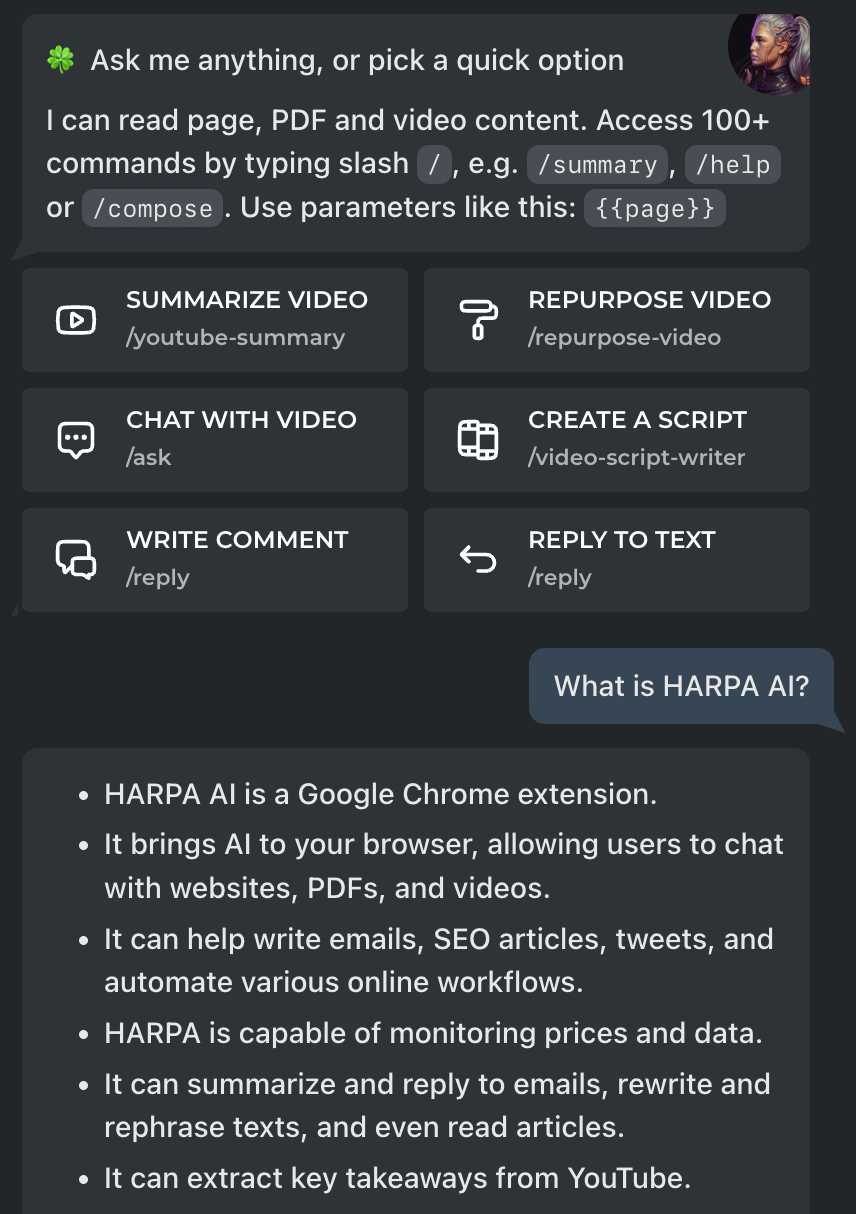
What is HARPA AI?
HARPA AI is a browser extension, powered by hybrid AI-engine that combines ChatGPT, Gemini, ClaudeAI, Perplexity, DeepSeek with Web Automation. Read the Get Started Guide to find out more.
What is it used for?
HARPA automates your copywriting, email management, web search, online data extraction and web monitoring tasks.
It is used to quickly write and reply to emails, post comments and DMs, summarise and “talk to” web pages, YouTube videos, PDF documents, extract and research SEO keywords, create SMM content plans and Midjourney prompts, automate form filling, write blog articles, review CVs, job offers and legal documents, plan trips, track competitors, prices and SERP pages, create learning plans, search for information and more.

What makes HARPA different?
HARPA can read, understand and act upon web page content.
It can navigate, click and extract data from web pages, run it through Large Language Models, paste back to websites or trigger IFTTT chains such as Zapier and Integromat.
Ultimate copilot and AI Agent for your web browsing, search and automation tasks. It provides access to AI on any website, and you can use HARPA with almost every web service or online app.

Is HARPA free?
HARPA has a basic free tier and a demo period for it's premium features. You can try the app before making an informed purchase.
Basic S plan starts with $12 per month paid annually, includes CloudGPT connection, cloud command storage, chat history and more.

Is HARPA CPU-intensive?
HARPA is optimized for speed and performance and does not use CPU when it has no tasks to run. You can also limit the number of automations that are run simultaneously in the HARPA app settings.

What HARPA stands for?
HARPA stands for High Availability Robotic Process Automation. HARPA is designed to bridge the gap between AI and Automation and serve as your virtual assistant and a digital workforce for your business.

Do I need to have an OpenAI account?
Generative AI features require connection to AI service providers. You can use HARPA with ChatGPT account, OpenAI API key, ClaudeAI, Google Gemini, OpenRouter and API keys.
You can also connect to our CloudGPT on S plan.
How to create ChatGPT account?
Step 1: Navigate to the ChatGPT login page. Click Sign Up button. ChatGPT offers three options for new user registration:
- With email address.
- With your Google account. Click the Continue with Google account option, and enter your Google account password to complete the process.
- With your Microsoft account. Click the Continue with Microsoft account button, enter your password, and complete the sign-up process.
Choose the appropriate option and create the account. ChatGPT will send a verification email to the registered email address.
Step 2: Open your email account and verify your email address by clicking the Verify Email Address button and enter your full name.
Step 3: Enter your phone number. ChatGPT will send a verification code to your phone number. Verify it by typing the code in the space provided. Finally, your ChatGPT account is ready to use!
How to get access to GPT-4?
HARPA CloudGPT supports GPT-4 model. Please upgrade to S plan to get access to GPT-4.
Alternatively, GPT-4 comes with ChatGPT Plus. It is limited by OpenAI to 50 requests per 3 hours. GPT-4 is also available for OpenAI API accounts.
To upgrade to ChatGPT Plus:
- Log in to your OpenAI account.
- Click "Upgrade to Plus" in the left menu.
- Select the ChatGPT Plus upgrade plan.
- Enter your bank details and set up a recurring payment of $20/month.
- Click "Continue to ChatGPT Plus."
To create OpenAI account and generate a key, navigate to openai.com
How to switch the GPT version and model?
Locate GPT connection button below the Chat window. You might need to expand the control panel by clicking the "triangle" button. Select a GPT connection and model in the screen that appears.
Alternatively, type -3 in chat and press Enter to switch model to GPT-3, -4 to switch to GPT-4, -c to switch to ClaudeAI, etc.

How does HARPA ensure privacy and data security?
HARPA is privacy-centered. It runs on your computer, does not send or store website data on remote servers, only performs the tasks you have asked it to. We do not show ads or sell your data.
GPT prompts you enter to HARPA are transparently sent to OpenAI, Google or ClaudeAI servers for processing and not stored on our servers.

Why HARPA does not open on a web page?
HARPA does not work with Google Sheets yet. Some domains e.g. Discord may require you to disable fingerprint protection on Brave and Edge. Click HARPA icon in the browser toolbar, instead of pressing Alt+A. If the HARPA popup does not appear:
- Right click HARPA icon in the browser toolbar. Make sure "This Can Read and Change Site Data" option is set to "On all sites".
- uBlock may prevent HARPA from loading on some websites. Try turning it off for the web page.
- If you are on Chrome:
- Navigate to chrome://settings/content/popups
- Add your domain to Allow list.
- If you are on Brave:
- Navigate to brave://settings/shields
- Either deactivate “Prevent sites from fingerprinting me based on my language preferences” option, or deactivate Brave Shields for your domain, e.g. Discord.
- If you are on Edge:
- Navigate to edge://settings/content/ads
- Either deactivate "Intrusive Ads" block or add your domain to Allow list.
If nothing helps, navigate to chrome://extensions, disable HARPA, quit and restart your browser, and turn HARPA back in.
Why do I get CRX_FILE_NOT_READABLE error?
This error may occur if:
- You downloaded a CRX file and installing it manually. CRX files downloaded online may be broken or insecure. We recommend installing HARPA from the official Chrome Web Store.
- You are using NordVPN with the "THREAT PROTECT" is ON. Turn it OFF while installing HARPA extension.
Why HARPA chats are not showing up in ChatGPT?
You can see 🧬 chats in chatgpt.com if you're on a Browser Session connection. If you don’t want your dialogues to be cleared automatically whenever a tab is closed, you can change this in the App Settings.
Why HARPA says there is no video transcript?
If a YouTube video is fresh or has a low number of views, it may not have a transcript available. If you are using uBlock Origin, turn it off while running HARPA or add a rule to allow XHR requests on YouTube.
Can HARPA generate blog outlines and articles?
Yes, HARPA has an extensive library of copywriting prompts, can generate and refine short and long articles in 18 writing styles and can mimic yours.

How to turn off the bar that pops up when I select text?
Please click the settings (”gear”) button in the app and uncheck the box next to “Show floating quick-access bar”.
Which API connection is better than Browser Session?
HARPA S plan comes with CloudGPT, which is the most reliable, fastest and non country restricted GPT connection. You can also use CloudGPT or OpenAI keys with HARPA with an additional setup.
There are Pros and Cons to using OpenAI API keys over Browser Session:
- Browser Session connection is free, Browser Session Plus is $20 / month and OpenAI API Key connection is paid per use based on the number of tokens (request volume).
- GPT-4 access is unlimited on OpenAI API key connection. Browser Session is limited to 25 requests per 3 hours. OpenAI API accounts may have access to GPT models with larger context windows, e.g. gpt-8k and gpt-32k.
- The OpenAI API key connection is reliable, never disconnects or logs you out.
What search engine supported?
HARPA provides AI search assistance for Google, Google Scholar, Baidu, Bing, DuckDuckGo, Brave, Yahoo, Naver, Yandex, Kagi, Searx.
Can I reuse one AI dialogue across multiple browser tabs?
Yes, this feature is available on HARPA S plan. Please note the dialogue content is not stored on our servers and is not synched between your devices.
What is a Prompt and AI Command?
A prompt is a message (instruction) your send to Large Language Model (LLM) such as OpenAI GPT-3.5. AI Command is an automation recipe which may or may not include steps that prompt LLMs.
Think of AI Commands as a sequence of steps, e.g. “Navigate to web page”, “Click Messages button”, “Extract messages”, “Run through GPT to find important messages”, “Send as Email”.
HARPA comes with over 100+ preconfigured commands and you can create yourself to automate your workflow.
What are Prompt Parameters?
HARPA makes it possible to customise your prompts with predefined parameters, such as:
- {{page}} to reference page content.
- {{transcript}} to extract YouTube video transcript.
- {{selection}} to get text selected on page.
- {{gpt}} to reference the last GPT answer and chain your requests.
You can also create custom parameters in your commands to store data or options. Custom parameters are usually named {{p1}}, {{p2}}… You can also set up global parameters such as {{g.tone}} and reuse them in your prompts e.g. to write customised emails.
How chunking works?
Large Language Models have a limited token window, e.g. 8192 tokens on ChatGPT 3.5. It is often impractical or impossible to fit large documents, web pages, and video transcripts into a single GPT request.
Chunking is a technique that divides content into smaller parts, also called chunks, to ensure that each part, including the prompt, fits within the GPT token limit. These chunks are then injected into prompts as {{chunk}} parameters and processed by GPT one by one.
Chunking does not possess inherent memory. Therefore, if you require context to be maintained across chunks, it must be incorporated within the prompt.

How to change AI response language?
Most HARPA AI commands send a {{language}} parameter with prompt. You can set the language for commands output in the app settings. You can also send {{language}} parameter in chat along with your prompts to instruct AI to reply in a given language.
How do I change UI language?
HARPA UI is currently available in English only. We will internationalize and translate the user interface to Spanish, French, German and other languages once all the major features are implemented.

Does HARPA have a CloudAI API?
Yes. HARPA S plan comes with CloudAI API, and provides reliable access to OpenAI and ClaudeAI models.
Does HARPA have a Server API?
This is a planned feature. You can follow product updates in our Discord and also vote for the features you’d like to see implemented first.
Do you offer Firefox version?
Not at the moment. The Firefox version as well as UI translation are planned after all the major features are implemented.

Can’t find the answer you’re looking for?
Please check out the User Guides and Videos, send us Email or ask your question in the Discord community
APP DASHBOARDADD TO BROWSERADD TO BROWSER
Contact us
Name *
Email *
Message *
SEND MESSAGE
All rights reserved © HARPA AI TECHNOLOGIES LLC, 2021 — 2025
Designed and engineered in Finland 🇫🇮
Home Use Cases Guides Privacy Policy Terms of Service

5.9k
CAN WE STORE COOKIES?
Our website uses cookies for the purposes of accessibility and security. They also allow us to gather statistics in order to improve the website for you. More info: Privacy Policy
ACCEPT ALL
ONLY NECESSARY COOKIES